Introduction
The production of the Federal Register is undergoing a modernization process to help streamline the current processes. Each federal agency provides input into the Federal Register in Microsoft Word file. A SGML Document Type Definition (DTD) was originally developed in 1993. The original SGML DTD, with updates is still in use today in production of the Federal Register.
As part of an overall legislative modernization effort the United States Legislature has developed and is continuing to develop a standard XML markup language designed to handle all legislative material, Bill, Resolutions, Amendments, U.S. Code, Congressional Record, Federal Register, etc. Ultimately in the future all legislative documents will be available in United States Legislative Markup (USLM) format. [bharvey-uslm1]
USLM has a publically available schema and sample documents in USLM. [bharvey-uslm2] The Federal Register is currently being modelled in USLM but these documents aren't publically available at the time of this paper.
This paper will describe some of the efforts for modernization of data and processes related to the Federal Register.
Federal Register and Microsoft® Word
Federal agencies send the Office of the Federal Register (OFR) their articles to be included in the Federal Register in Word format. The Federal Register is published daily. Agencies use in-line SGML tags in the Word file to identify pieces of information. Appoximately 20% of the data contains SGML tags. In the example below the agency, sub-agency, department document number (<DEPDOC>), and subject have been identified as tags. These correspond to specific information in the document.
The Federal Register has 2 major hierarchy, PREAMB (heading and metadata information) and SUPPLEMENTARY INFORMATION. The PREAMB always has an opening tag. The SUPPLEMENTARY INFORMATION almost never has a tag. When a tag is not available the conversion has to rely on heading and regular expressions to identify the structure.
The average size of the a Federal Register article is probably 10 pages or less. However, there are some articles that are 500 or more pages.
The paragraphs with bolded headings without elements are also components in the DTD that require tagging.
Figure 1: Example Word File
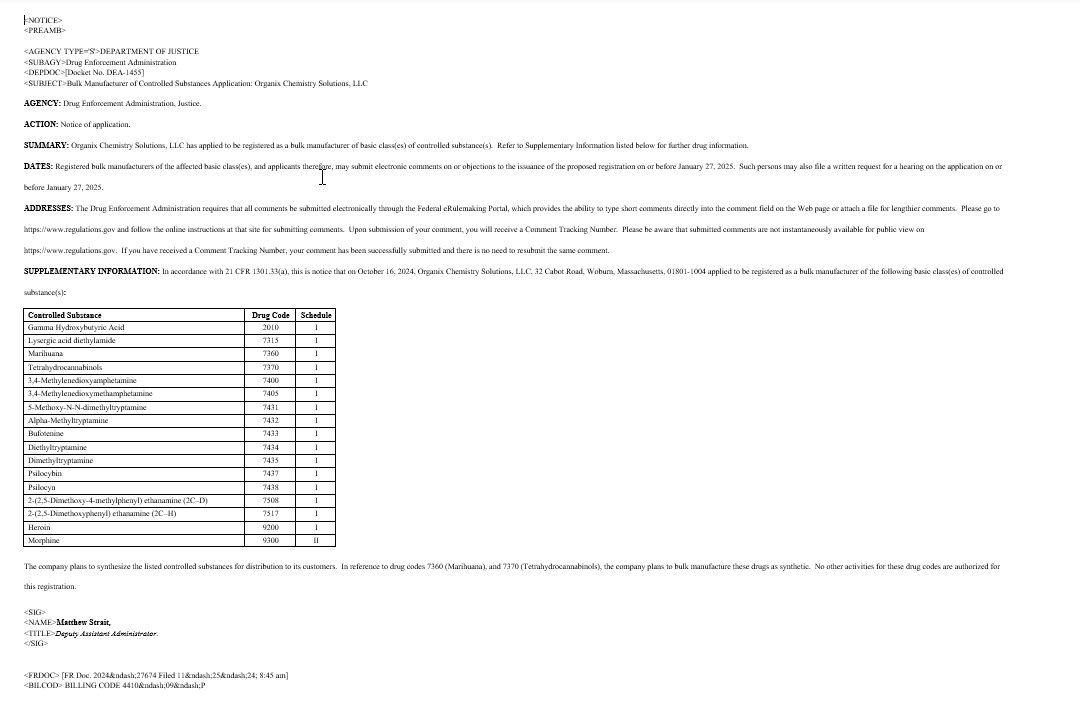
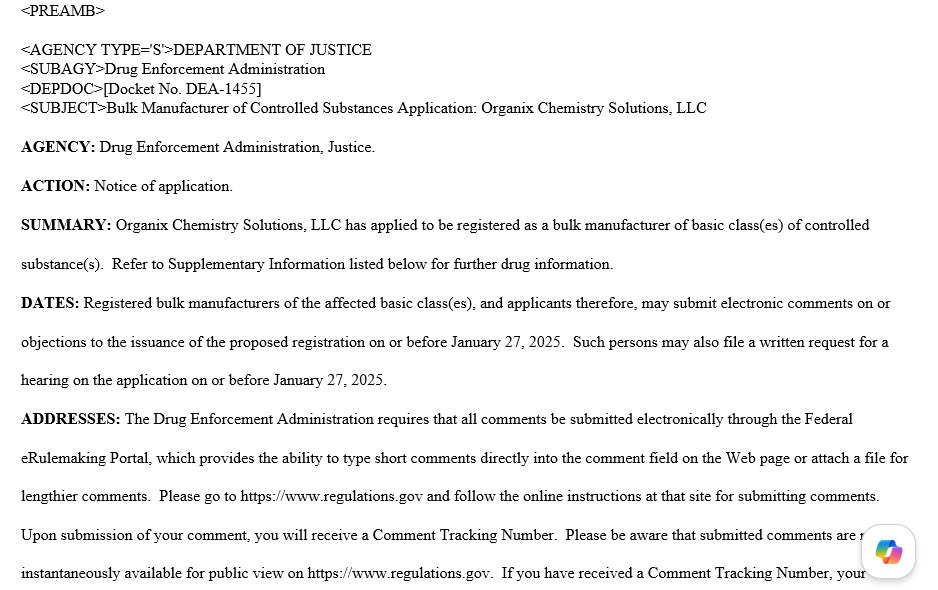
The PREAMB section has the most semantic SGML tags. The PREAMB section is highly structured but there are variations of the types of information that is in this section. There can also be plain paragraphs, tables and lists that don't require structural elements. A common problem with the conversion is placing an end marker for the PREAMB because of the variations of the data. If the end marker is missing or 2 end markers are output because of an unanticipated variations the structure of the whole documents gets skewed. Luckily as we have been working with a larger corpus of data we don't see these kind of problems very often.
Figure 2: Sample PREAMB Word File
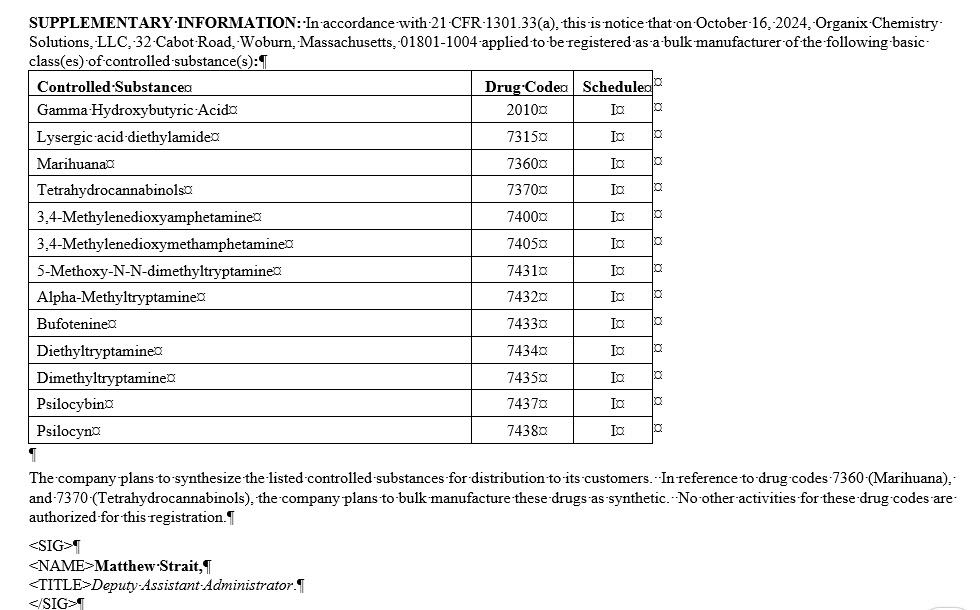
Some users will put the SGML tag <SUPPLINF> in the Word file but we can't rely on the element being available in the file. We have also found that the word 'SUPPLEMENTARY' can be misspelled. We have accommodated some of the misspelling when we find them. Most of the time the heading is uppercase but sometimes it is camel cases (Supplemental Information:). The conversion needs to accommodate every variation provided by the agencies.
Figure 3: Sample SUPPLEMENTARY INFORMATION Word File
The current production process for converting the Word files is a home-grown program called Doc2Xstyles. This program exports an SGML file from the Word document. The OFR staff then uses the output of the Doc2XStyles conversion to create edits.
Microsoft Word to USLM Conversion
In this section I will talk about some of the issues we had and are continuing to have with the Microsoft Word to USLM conversion. The challenges we experience will be similar to any organization doing a Word Conversion to XML. One of the cool features of the Word .docx file is it basically a bunch of XML files contained in a zip file. These files that have most or all the information you need to understand the document. Unfortunately, the XML documents and structure are not always intuitive.
If you haven't actually looked at the structure of the docx file, you can unzip the docx file and navigate the structure and files. This also true for Excel spreadsheets and Powerpoint files.
GPO has developed a program/service to convert any Word document to USLM format - hasn't been specifically structured toward the Federal Register. USLM schema has been designed support any legislative document. The USLM schema is very loose. The resulting USLM document from the Word conversion is called 'Intermediate XML'. It is designed to be an intermediate format that can be converted to any other document. Unfortunately it is basically a 'flat' file. You have a root element and a single child 'content' element, followed by 'p', 'list' and 'table' elements. There is no hierarchy.
Internal Agency Styles
Microsoft Word allows the user to create their own styles. We see a lot of custom styles in the Word files. Initially we had no insight into the meaning or physical attributes of the custom styles. Each organization can use the same style name to represent different styles. This was initially a challenge. It isn't prudent to modify the XSLT whenever we see a new style in a document. We worked with the folks who were doing the Word to USLM conversion to have them add a 'style' attribute and use CSS styles for styled names.
The class attribute holds the name of the style and the style attribute contains the style information that can be harvested during our XML to Federal Register conversion to determine the appropriate styles. Putting all the style information into the style attribute allows us to parse the different components in the style to help identify the piece of information we are trying to convert.
Figure 4: Example of 'class' and 'style' attributes
<uslm:p class="BodyA"
style="line-height:24pt;font-family:Courier;color:#000000;font-size:12pt;text-decoration-color:#000000;">
<uslm:span style="font-family:Times New Roman;font-weight:bold;color:black;"
><PART><HED>PART </uslm:span>
<uslm:span style="font-family:Times New Roman;font-weight:bold;color:black;"> 431—STATE
ORGANIZATION AND GENERAL ADMINISTRATION</uslm:span>
<uslm:span style="font-family:Times New Roman;color:black;"> </uslm:span>
</uslm:p>
Word Style Nuances
Everytime an individual mouse clicks in a Word file, Word makes a <w:r> element. The w:r element contains a fair amount of information, including text. When a user creates bolded text Word puts the bold information into the file. If the person decides "I don't want this bolded" and unbolds the data, Word keeps the original w:r but turns the bold off.
The listing below shows text that was bolded but then turned off. The XML statement in the /w:p/w:pPr/w:rPr/w:b tells Word to bold the text in the w:t element "Cumulative Across MYs 1978". However the case below the attribute w:val='0' which states ignore the bold. If the value was "1" then the text would be bolded.
The original Word to USLM conversion was styling (bold, italic and underscore) even when the value was turned off. The user will occasionally use color but the Federal Register doesn't allow color so it is ignored in the conversion. The Intermediate XML filw will still maintain color information.
<w:p w14:paraId="5AF87D86" w14:textId="77777777" w:rsidR="008D3BB4" w:rsidRPr="00AF5ABC"
    w:rsidRDefault="008D3BB4" w:rsidP="0024392A">
    <w:pPr>
        <w:pStyle w:val="TableText"/>
        <w:rPr>
            <w:b w:val="0"/>
        </w:rPr>
    </w:pPr>
    <w:r>
        <w:t>Cumulative Across MYs 1978</w:t>
    </w:r>
    <w:r w:rsidRPr="00AF5ABC">
        <w:t>-2029</w:t>
    </w:r>
</w:p>
Initially we were also missing tabs from the original Word to USLM conversion. Tabs can sometimes (not always) give you clues on the type of data. Federal Register has several paragraph elements (P, FP#) which indicate how the paragraph is formatted in the Federal Register. The w:tab element is now converted to a tab character.
Figure 5: Example of Tabs in the Raw Word XML
<w:p w14:paraId="696E9733" w14:textId="77777777" w:rsidR="00521FA4" w:rsidRPr="002754EC"
    w:rsidRDefault="00521FA4" w:rsidP="008C0A13">
    <w:pPr>
        <w:pStyle w:val="Heading3"/>
        <w:keepNext w:val="0"/>
        <w:tabs>
            <w:tab w:val="left" w:pos="2160"/>
        </w:tabs>
        <w:spacing w:before="240" w:after="240" w:line="480" w:lineRule="auto"/>
        <w:ind w:left="2160" w:hanging="720"/>
        <w:rPr>
            <w:rFonts w:eastAsiaTheme="minorHAnsi"/>
        </w:rPr>
    </w:pPr>
    <w:bookmarkStart w:id="138" w:name="_Ref34871600"/>
    <w:r w:rsidRPr="002754EC">
        <w:rPr>
            <w:rFonts w:eastAsiaTheme="minorHAnsi"/>
        </w:rPr>
        <w:t>Calculation of Physical Impacts</w:t>
    </w:r>
    <w:bookmarkEnd w:id="138"/>
</w:p>
Word to USLM Conversion
Figure 6 below shows an example of the beginning of the Intermediate USLM XML file.
Figure 6: Snippet of the Intermediate XML File
<uslm:document xmlns:uslm="http://schemas.gpo.gov/xml/uslm"
xmlns:xhtml="http://www.w3.org/1999/xhtml">
<uslm:meta/>
<uslm:content>
<uslm:p class="Normal">
<uslm:span><NOTICE></uslm:span>
<uslm:span/>
</uslm:p>
<uslm:p class="Normal" style="padding-bottom:10pt;line-height:13pt;text-align:left;">
<uslm:span><PREAMB></uslm:span>
<uslm:span/>
</uslm:p>
<uslm:p class="Normal" style="padding-bottom:0pt;line-height:12pt;text-align:right;"/>
<uslm:p class="Normal" style="padding-bottom:0pt;line-height:24pt;">
<uslm:span style="font-family:Times New Roman;font-weight:bold;font-size:12pt;"
><AGENCY TYPE='S'></uslm:span>
<uslm:span style="font-family:Times New Roman;font-weight:bold;font-size:12pt;"
>DEPARTMENT OF COMMERCE</uslm:span>
</uslm:p>
<uslm:p class="Normal" style="padding-bottom:0pt;line-height:24pt;">
<uslm:span style="font-family:Times New Roman;font-weight:bold;font-size:12pt;"
><SUBAGY>
<uslm:span style="font-family:Times New Roman;font-weight:bold;font-size:12pt;">
</uslm:span>
<uslm:span style="font-family:Times New Roman;font-weight:bold;font-size:12pt;"
>International Trade Administration</uslm:span>
</uslm:p>
<uslm:p class="Normal" style="padding-bottom:0pt;line-height:24pt;">
<uslm:span style="font-family:Times New Roman;font-weight:bold;font-size:12pt;"
><DEPDOC>[</uslm:span>
<uslm:span style="font-family:Times New Roman;font-weight:bold;font-size:12pt;"
>C-</uslm:span>
<uslm:span style="font-family:Times New Roman;font-weight:bold;font-size:12pt;"
>469</uslm:span>
<uslm:span style="font-family:Times New Roman;font-weight:bold;font-size:12pt;"
>-8</uslm:span>
<uslm:span style="font-family:Times New Roman;font-weight:bold;font-size:12pt;"
>18</uslm:span>
<uslm:span style="font-family:Times New Roman;font-weight:bold;font-size:12pt;"
>]</uslm:span>
</uslm:p>
<uslm:p class="Normal" style="padding-bottom:0pt;line-height:24pt;">
<uslm:span style="font-family:Times New Roman;font-weight:bold;font-size:12pt;"
><SUBJECT></uslm:span>
<uslm:span style="font-family:Times New Roman;font-weight:bold;font-size:12pt;">Ripe
Olives from Spain: Preliminary </uslm:span>
<uslm:span style="font-family:Times New Roman;font-weight:bold;font-size:12pt;"
>Results</uslm:span>
<uslm:span style="font-family:Times New Roman;font-weight:bold;font-size:12pt;"> of
Countervailing Duty </uslm:span>
<uslm:span style="font-family:Times New Roman;font-weight:bold;font-size:12pt;"
>Administrative Review</uslm:span>
<uslm:span style="font-family:Times New Roman;font-weight:bold;font-size:12pt;"> </uslm:span>
<uslm:span style="font-family:Times New Roman;font-weight:bold;font-size:12pt;">and </uslm:span>
<uslm:span style="font-family:Times New Roman;font-weight:bold;font-size:12pt;">Partial </uslm:span>
<uslm:span style="font-family:Times New Roman;font-weight:bold;font-size:12pt;"
>Rescission of </uslm:span>
<uslm:span style="font-family:Times New Roman;font-weight:bold;font-size:12pt;"
>Review</uslm:span>
<uslm:span style="font-family:Times New Roman;font-weight:bold;font-size:12pt;">;
2022</uslm:span>
</uslm:p>
The Intermediate XML file has the same issues that any Word file has when you are converting to XML. Every click that a user makes in a Word file results in underlying tagging. The file has a lot of noise that has to be filtered out. Notice how many uslm:span are in the above figure for a single paragraph. Each span element represents a single 'w:r' structure in the Word file. I have found single paragraphs that have hundreds of spanelements.
We have had our challenges with the conversion from Word to a flat USLM XML document.
Different Document Types
The Federal Register contains multiple document types. Each type of document has variations in what elements are allowed and order of elements. The document types are:
-
NOTICE: Informs the public about federal agency actions, including meetings, investigations, and funding availability. There are different types of notices and data can be handled differently depending on the type of notice and/or the agency it came from.
-
PRORULE: The PRORULE is a proposed rule. It provides a plan to create, amend, or repeal a regulation. There is usually a comment period provided for the public to comment on the rule.
-
RULE: The RULE provides information on a new or amended federal regulation.
-
PRESDOC: The PRESDOC is a presidential document. This is an official document issued by the President of the United States. This document types has subtypes of documents
-
-
Executive Orders:Official documents issued by the President to manage operations of the federal government.
-
Proclamations:Signed documents that typically relate to ceremonial matters, national observances, or trade matters.
-
Presidential Memorandums:Directives that may be published in the Federal Register.
-
Determinations: Official decisions by the President.
Administrative Orders: Notices, letters, and other miscellaneous orders.
-
Reorganization Plans: Plans submitted to Congress for restructuring executive agencies.
-
-
Conversion Processes
In this section I am going to describe the conversion process and some of the thought processes that were used to get the correct hierarchy.
Identification of the Information
As you can see in Figure 6 the USLM file is very verbose. The first step is to identify as many components as possible during the first pass of the data. The following tasks are performed during the first pass at the file.
-
Assign id's to paragraphs.
-
Identify all the styles as possible. For example, " <uslm:span style="font-family:Times New Roman;font-weight:bold;font-size:12pt;" >Administrative Review</uslm:span>" gets converted to <b>Administrative Review</b>
-
Identify the elements and add them to an <element> tag. This isn't always possible in the first pass because the elements can span across multiple span elements. The element tag will be deleted when the structures are created.
-
When the information is identifiable, add a 'class' attribute that will help in creating correct structures.
-
Where possible, add a <marker> element. I will describe it's use later in this paper.
Figure 7: XML After Pass 1
<document xmlns:m="http://schemas.openxmlformats.org/officeDocument/2006/math"
          xmlns:mml="http://www.w3.org/1998/Math/MathML">
   <content class="root"
            id="rootcontent-d29e2"
            uri="file:/D:/FederalRegisterConversion/Conversion/Testing/2024-20623.ixml.xml">
      <heading>Federal Register</heading>
      <heading class="HD1">
         <element location="start">NOTICE</element>
      </heading>
      <heading class="HD1">
         <element location="start">PREAMB</element>
      </heading>
      <p class="AGENCY" id="AGENCY4-d29e12">
         <element location="start">AGENCY TYPE='S'</element>
         <b>DEPARTMENT OF COMMERCE</b>
      </p>
      <p id="process-def-d29e17" class="Normal">
         <element location="start">SUBAGY</element>
         <b>International Trade Administration</b>
      </p>
      <p class="DEPDOC" id="DEPDOC-d29e22">
         <element location="start">DEPDOC</element>[
         <b>C-</b>
         <b>469</b>
         <b>-8</b>
         <b>18</b>
         <b>]</b>
      </p>
      <p class="SUBJECT">
         <element location="start">SUBJECT</element>
         <b>Ripe Olives from Spain:  Preliminary </b>
         <b>Results</b>
         <b> of Countervailing Duty </b>
         <b>Administrative Review</b>
         <b>and </b>
         <b>Partial </b>
         <b>Rescission of </b>
         <b>Review</b>
         <b>; 2022</b>
      </p>
Merging Like Formatting Elements
During the first pass it was impossible to merge all the like elements (bold, italic, underline, etc.) because of the different variations of the span styles because of spacing, font styles, etc. The second phase of the conversion merges all the adjacent like tagging into a single tag. All adjacent bold, italic and underscore elements get combined into a single element.
Figure 8: Results After Merging Formatting Elements
<document>
   <content class="root" id="rootcontent-d29e2"
      uri="file:/D:/FederalRegisterConversion/Conversion/Testing/2024-20623.ixml.xml">
      <heading>Federal Register</heading>
      <heading class="HD1">
         <element location="start">NOTICE</element>
      </heading>
      <heading class="HD1">
         <element location="start">PREAMB</element>
      </heading>
      <p class="AGENCY" id="AGENCY4-d29e12">
         <element location="start">AGENCY TYPE='S'</element>
         <b>DEPARTMENT OF COMMERCE</b>
      </p>
      <p id="process-def-d29e17" class="Normal">
         <element location="start">SUBAGY</element>
         <b>International Trade Administration</b>
      </p>
      <p class="DEPDOC" id="DEPDOC-d29e22">
         <element location="start">DEPDOC</element>[<b>C-469-818]</b>
      </p>
      <p class="SUBJECT">
         <element location="start">SUBJECT</element>
         <b>Ripe Olives from Spain: Preliminary Results of Countervailing Duty
            Administrative Review and Partial Rescission of Review; 2022</b>
      </p>
Cleanup and Identifying Hierarchy
After the merge there can be elements that didn't get identified because they spanned mulitple uslm:span elements and they weren't identifiable until after the merge happened. Elements are identified as starting with an < and ending with a > entity. This process can also be flawed because often both < and > are used in the same paragraph as content.We had to modify our initial REGEX because we were occasionally picking up paragraph data and assigning it the <element> tag.
During this phase we identify the heirarchical structure. We use an element called <marker> with a class and id attributes to determine the beginning an end of the structure. These elements are the building blocks for actually structuring the hierarchy in following processes. We try to identify hierarchical structure in phase 1 but it is not always possible because of the multiple span elements.
The end marker has a rid or 'reference identifier' for the beginning marker.
Figure 9: Beginning Marker for PREAMB Structure
<marker class="beginPREAMB" id="beginPREAMB-1d102e8"/>
. . .
<marker class="endPREAMB" id="endPREAMB22-d29e160" rid="beginPREAMB-1d102e8"/>
Creating Content Elements
The conversion has many steps. Low level hierarchies are created first. We are following the USLM schema but have deviated by adding the <marker> element. The conversion calls a template that picks up all the elements inside the class="beginPREAMB" and class="endPREAMB".
The class attribute and the id of the beginning marker and the reference id (rid) are used to guide the conversion into creating the following <content> heirarchy.
The next step after creating the <content> hierarchy is to removes the original content between the 2 marker elements. If this step isn't completed then duplicate text will be included in the file.
Figure 10: Marker Example
<marker class="beginPREAMB" id="preamb-1d215e8"/>
      <p id="preamb-ad215e8" class="">
         <element>PREAMB</element>
      </p>
      <p class="AGENCY" id="pp-AGENCY4-d29e12">
         <element>AGENCY TYPE='S'</element>SECURITIES AND EXCHANGE COMMISSION</p>
      <p class="DEPDOC" id="depdoc2-d215e15">
         <element>DEPDOC</element>[Release No. 34-84997; File No. 4-678]</p>
. . .
<marker class="endPREAMB" id="endPREAM3-d215e824" rid="preamb-1d215e8"/>
Below is the result after the content structure is completed.
Figure 11: Example Content for PREAMB
   <content class="PREAMB">
         <p class="AGENCY" id="pp-AGENCY4-d29e12">
            <element>AGENCY TYPE='S'</element>
            <b>DEPARTMENT OF COMMERCE</b>
         </p>
         <p class="SUBAGY">
            <element>SUBAGY</element>
            <b>International Trade Administration</b>
         </p>
   . . .
   </content>
During the last stage of process after all the lower-level content elements have been created we have the following markup:
Figure 12: Final PREAMB Structure
<PREAMB>
      <AGENCY>DEPARTMENT OF COMMERCE</AGENCY>
      <SUBAGY>International Trade Administration</SUBAGY>
      <DEPDOC>[C-469-818]</DEPDOC>
      <SUBJECT>Ripe Olives from Spain: Preliminary Results of Countervailing Duty Administrative Review and Partial Rescission of Review; 2022</SUBJECT>
      <AGY>
         <HED>AGENCY:</HED>
         <P>Enforcement and Compliance, International Trade Administration, Department of Commerce.</P>
      </AGY>
. . .
</PREAMB>
Lower Level Structures
Each structure in the lower-level structures have their own challenges. Below is an example of a pretty easy structure called <ANNEX>. In this case we got luck because there is a begin and end element. You will also notice in this example the user also put in <P> tages which are unnecessary. I will use this section to walk through the conversion:
Figure 13: Raw Intermediate XML
<uslm:p class="Normal">
<uslm:span><ANNEX><HED>ANNEX</HED></uslm:span>
</uslm:p>
<uslm:p class="Normal">
<uslm:span> <P>1. Antonio José Benavides Torres [Commander of the Central Integral
Strategic Defense Region of the National Armed Forces, former Director of Operations
for the National Guard; born June 13, 1961] </P></uslm:span>
</uslm:p>
<uslm:p class="Normal">
<uslm:span> <P>2. Gustavo Enrique González López [Director General of the National
Intelligence Service and President of the Strategic Center of Security and
Protection of the Homeland; born November 2, 1960]</P></uslm:span>
</uslm:p>
<uslm:p class="Normal">
<uslm:span> <P>3. Justo José Noguera Pietri [President of the Venezuelan
Corporation of Guayana, </uslm:span>
<uslm:span>former General Commander of the National Guard; born March 15, 1961]
</P></uslm:span>
</uslm:p>
<uslm:p class="Normal">
<uslm:span> <P>4. Katherine Nayarith Haringhton Padron [National Level Prosecutor
of the 20th District Office of the Public Ministry; born December 5, 1971]
</P></uslm:span>
</uslm:p>
<uslm:p class="Normal">
<uslm:span> <P>5. Manuel Eduardo Pérez Urdaneta [Director of the National Police;
born May 26, 1962] </P></uslm:span>
</uslm:p>
<uslm:p class="Normal">
<uslm:span> <P>6. Manuel Gregorio Bernal Martínez [Chief of the 31st Armored
Brigade of Caracas, former Director General of the National Intelligence Service;
born July 12, 1965] </P></uslm:span>
</uslm:p>
<uslm:p class="Normal">
<uslm:span> <P>7. Miguel Alcides Vivas Landino [Inspector General of the National
Armed Forces, former Commander of the Andes Integral Strategic Defense Region of the
National Armed Forces; born July 8, 1961] </P></uslm:span>
</uslm:p>
<uslm:p class="Normal">
<uslm:span></ANNEX></uslm:span>
</uslm:p>
This is the structure of the ANNEX before it gets converted to hierarchy. You will see a begin marker and an end marker. Later we will walk through the code to convert it to a hierarchy element.
Figure 14: ANNEX Before Hierarchy
<marker class="beginANNEX" id="beginANNEX-d29e759"/>
<heading>ANNEX</heading>
<p class="Normal" id="Default-pp22-d244e278"> 1. Antonio José Benavides Torres [Commander of the Central Integral Strategic Defense Region of the National Armed Forces, former Director of Operations for the National Guard; born June 13, 1961] <element location="end">P</element></p>
<p class="Normal" id="Default-pp22-d244e281"> 2. Gustavo Enrique González López [Director General of the National Intelligence Service and President of the Strategic Center of Security and Protection of the Homeland; born November 2, 1960]<element location="end">P</element></p>
<p class="Normal" id="Default-pp22-d244e283"> 3. Justo José Noguera Pietri [President of the Venezuelan Corporation of Guayana, former General Commander of the National Guard; born March 15, 1961] <element location="end">P</element></p>
<p class="Normal" id="Default-pp22-d244e285"> 4. Katherine Nayarith Haringhton Padron [National Level Prosecutor of the 20th District Office of the Public Ministry; born December 5, 1971] <element location="end">P</element></p>
<p class="Normal" id="Default-pp22-d244e287"> 5. Manuel Eduardo Pérez Urdaneta [Director of the National Police; born May 26, 1962] <element location="end">P</element></p>
<p class="Normal" id="Default-pp22-d244e289"> 6. Manuel Gregorio Bernal Martínez [Chief of the 31st Armored Brigade of Caracas, former Director General of the National Intelligence Service; born July 12, 1965] <element location="end">P</element></p>
<p class="Normal" id="Default-pp22-d244e291"> 7. Miguel Alcides Vivas Landino [Inspector General of the National Armed Forces, former Commander of the Andes Integral Strategic Defense Region of the National Armed Forces; born July 8, 1961] <element location="end">P</element></p>
<marker class="endANNEX" id="endANNEX-d29e777" rid="beginANNEX-d29e759"/>
Now let's walk through the code to make the ANNEX hierarchy.
Each phase of the conversion relies on using modes. The use of modes ensures that we don't get any unexpected output during each phase.
Every mode has a default template for the elements that are not included in the creation of the heirarchy
Figure 15: Default 'element' Template
    <xsl:template match="element()" mode="createANNEX" >
        <xsl:variable name="el-name" select="name()"/>
        <xsl:variable name="ANNEX-id" select="preceding-sibling::marker[1][@class = 'beginANNEX']/@id"/>
        <xsl:choose>
           <!--Remove ANNEX internal content-->
            <xsl:when test="preceding-sibling::marker[@class='beginANNEX'][@id = $ANNEX-id] and
                following-sibling::marker[@class = 'endANNEX'][@rid = $ANNEX-id]">
            </xsl:when>
          <!--Output content that isn't included in the ANNEX-->
          <xsl:otherwise>
                <xsl:element name="{$el-name}">
                    <xsl:copy-of select="@*"/>
                    <xsl:apply-templates mode="createANNEX"/>
                </xsl:element>
            </xsl:otherwise>
        </xsl:choose>
    </xsl:template>
The ANNEX is a very simple structure so the beginANNEX marker creates a content with a class attribute. The class attribute is used in the final conversion to create the Federal Register structure.
Figure 16: Begin Marker for ANNEX
    <xsl:template match="marker[@class = 'beginANNEX']" mode="createANNEX">
        <content class="ANNEX" id="{@id}">
            <xsl:call-template name="createANNEXChildren"/>
        </content>
    </xsl:template>
The following code uses the begin marker id and end marker rid attribute values to determine the child elements.
Figure 17: Create Children Elements
    <xsl:template name="createANNEXChildren">
        <xsl:variable name="id" select="@id"/>
        <xsl:for-each select="following-sibling::element()[following::marker[@class='endANNEX'][@rid = $id]]">
            <xsl:choose>
                <xsl:when test="contains(child::element[1], 'HD2')">
                    <heading class="HD2">
                        <xsl:apply-templates mode="createANNEX"/>
                    </heading>
                </xsl:when>
                <xsl:otherwise>
                    <xsl:copy-of select="."/>
                </xsl:otherwise>
            </xsl:choose>
        </xsl:for-each>
    </xsl:template>
Figure 18: Intermediate Structural Output
 <content class="ANNEX" id="beginANNEX-d29e759">
        <heading>ANNEX</heading>
        <p class="Normal" id="Default-pp22-d244e278"> 1. Antonio José Benavides Torres [Commander of the Central Integral Strategic Defense Region of the National Armed Forces, former Director of Operations for the National Guard; born June 13, 1961] <element location="end">P</element>
                  </p>
        <p class="Normal" id="Default-pp22-d244e281"> 2. Gustavo Enrique González López [Director General of the National Intelligence Service and President of the Strategic Center of Security and Protection of the Homeland; born November 2, 1960]<element location="end">P</element>
        </p>
        <p class="Normal" id="Default-pp22-d244e283"> 3. Justo José Noguera Pietri [President of the Venezuelan Corporation of Guayana, former General Commander of the National Guard; born March 15, 1961] <element location="end">P</element>
        </p>
        <p class="Normal" id="Default-pp22-d244e285"> 4. Katherine Nayarith Haringhton Padron [National Level Prosecutor of the 20th District Office of the Public Ministry; born December 5, 1971] <element location="end">P</element>
        </p>
        <p class="Normal" id="Default-pp22-d244e287"> 5. Manuel Eduardo Pérez Urdaneta [Director of the National Police; born May 26, 1962] <element location="end">P</element>
        </p>
        <p class="Normal" id="Default-pp22-d244e289"> 6. Manuel Gregorio Bernal Martínez [Chief of the 31st Armored Brigade of Caracas, former Director General of the National Intelligence Service; born July 12, 1965] <element location="end">P</element>
        </p>
        <p class="Normal" id="Default-pp22-d244e291"> 7. Miguel Alcides Vivas Landino [Inspector General of the National Armed Forces, former Commander of the Andes Integral Strategic Defense Region of the National Armed Forces; born July 8, 1961] <element location="end">P</element>
        </p>
 </content>
This structure will go through one more conversion to make it valid according to the Federal Register schema. This is the final ANNEX structure.
Figure 19: Final ANNEX Structure
<ANNEX>
    <HED>ANNEX</HED>
    <P>1. Antonio José Benavides Torres [Commander of the Central Integral Strategic Defense Region of the National Armed Forces, former Director of Operations for the National Guard; born June 13, 1961] </P>
    <P>2. Gustavo Enrique González López [Director General of the National Intelligence Service and President of the Strategic Center of Security and Protection of the Homeland; born November 2, 1960]</P>
    <P>3. Justo José Noguera Pietri [President of the Venezuelan Corporation of Guayana, former General Commander of the National Guard; born March 15, 1961] </P>
    <P>4. Katherine Nayarith Haringhton Padron [National Level Prosecutor of the 20th District Office of the Public Ministry; born December 5, 1971] </P>
    <P>5. Manuel Eduardo Pérez Urdaneta [Director of the National Police; born May 26, 1962] </P>
    <P>6. Manuel Gregorio Bernal Martínez [Chief of the 31st Armored Brigade of Caracas, former Director General of the National Intelligence Service; born July 12, 1965] </P>
    <P>7. Miguel Alcides Vivas Landino [Inspector General of the National Armed Forces, former Commander of the Andes Integral Strategic Defense Region of the National Armed Forces; born July 8, 1961] </P>
</ANNEX>
Complicated Structures (<REGTEXT>
The most complicated structure that we have to deal with in regulatory text. This structure allows repeating structures for:
-
Headings
-
Paragraphs
-
Legislative Structures, i.e., section, part, subpart
-
Table of Contents
-
Extract data from other documents.
The REGTEXT element has 2 attributes that are required in the output.
Figure 20: Word Begin REGTEXT
<REGTEXT TITLE='12' PART='1041'>
<PART><HED>PART 1041—PAYDAY, VEHICLE TITLE, AND CERTAIN HIGH-COST INSTALLMENT LOANS
After the first process where content is identified and the like 'span' elements are merged the following structure is created to identify the attributes associated with the REGTEXT elements. This process should be straight-forward but because of the variances between how organizations provide data there are multiple paths that need to be created. Creating a <metadata> element ensures that the data is normalized before the final output is created. This particular example of a <REGTEXT> section is over 1500 pages long with thousands of lower-level structures.
Figure 21: Pre-process for Normalizing REGTEXT
<content class="REGTEXT" id="REGTEXT6-d4531e15882">
         <meta>
            <set>
               <property class="TITLE">
                  <text>12</text>
               </property>
               <property class="PART">
                  <text>1041</text>
               </property>
            </set>
         </meta>
         <marker class="beginPart" id="beginPart2-d4531e15886"/>
         <heading class="beginPart" id="p-d25e28327">PART 1041—PAYDAY, VEHICLE TITLE, AND CERTAIN HIGH-COST INSTALLMENT LOANS</heading>
         <marker class="endPart" id="endPart2-d4531e15886"/>
...
</content>
Tables
GPO has their own publishing system called Microcomp. Microcomphas been used for the last 40+ years. The modernization process wants to move away from Microcomp to another publishing system. However, until that happens we still have to convert the table into a format that Microcomp can consume. GPO has its own table model which is drastically different from either HTML or OASIS-Open (nee CALS) table model.
In our conversion process we have to support the following table models:
-
Word Table Model
-
HTML Table Model. The Word table model gets converted to HTML table model during the Word to IXML conversion.
-
GPO Table. Currently the GPO table model gets converted from the HTML table model during the conversion to the Federal Register XML.
-
OASIS-Open (CALS) Table Model. The CALS table model will be used by the new publishing engine.
In the XSLT conversion we have a parameter that tells the conversion whether to convert to the GPO table model or the CALS table model. The attributes in the GPOTABLE element tells Microcomp the typography of the table.
Figure 22: GPO Table Model Example
<GPOTABLE CDEF="s50,xs40" COLS="3" OPTS="L2,tp0,p7,7/8,i1">
    <TTITLE>Table Title</TTITLE>
    <BOXHD> <!--Equivalent to 'thead'-->
       <CHED H="1">First Column Head</CHED>
       <CHED H="1">Second Column Head</CHED>
       <CHED H="1">Second Column Head</CHED>
    </BOXHD>
    <ROW>
       <ENT>First body column</ENT>
       <ENT>Second body column</ENT>
       <ENT>Third body column</ENT>
    </ROW>
</GPOTABLE>
Problems Encountered
The Word document is created by individuals in hundreds of agencies. People come, people go, processes change. Tweaking the conversion process is a never-ending process because we are always encountering variations on how individuals construct the Word document. Any organization that embarks on a Word to XML conversion project will hit many of the pitfalls that we have encountered in this process.
Misspellings and Phrase Variations
The conversion relies mostly on creating the hierarchy by headings and/or phrases in the text. For example, one of the top level sections is called SUPPLINF relies on a heading "SUPPLEMENTARY INFORMATION:" in the text. We have encountered multiple variations of spelling "SUPPLEMENTARY", i.e., "SUPPLEMENTAL".
The majority of the Federal Register files identify the SUPPLEMENTARY INFORMATION: either as a bolded paragraph or a styled heading. Occasionally the heading will be included in the first paragraph of the section and we will need to parse the text to determine the beginning of the section and create a <marker> marker element.
We have also encountered case differences: "Supplementary Information".
Determining the Levels of Heading
We caught a break because the Federal Register schema does not enforce hierarchy in what is considered standard structural sections of most documents. We only need to identify the heading and the level of heading. The Federal Register has 3 levels of heading: HD1, HD2 and HD3. The heading element HED is usually reserved for the first heading in a semantic structure.
The Word files are all over the place with how headings are identified. Most of the time they are just regular paragraphs with formatting (italic, bold or underline). There are roman numeral, alphabetic, numbered and unnumbered headings. The order in which the heading appears in the file after the <SUPPLINF> section determines the level of heading. For example, a "I. " could be a <HD1> in one document or a <HD2> in another document. The conversion is required to parse the document and make heading determinations.
There are so many rules that have been created to determine what constitutes a heading and what doesn't. Sometimes the Word file will have standard Word heading styles attached. However, you can't rely on the heading style. The conversion has to rely on context , as well as ending punctuation. Normally, if the text ends in a period, semi-colon, colon or question mark it is not a heading.
Figure 23: Example 1 of Heading levels
HD1 - Bolded Text
...
I. HD2 - Upper-case Roman Numeral
...
A. HD3 - Upper-case Letter
...
1. HD3 - numbered text
Figure 24: Example 2 of Heading levels
I. HD1 - Upper-case Roman Numeral
...
B.  This is considered a paragraph.
...
A. HD2 - Upper-case Letter
...
1. HD3 - numbered text
The heading issue gets even stickier because you need to determine whether lettered or numbered text is actually a list rather than headers. We have built rules to determine an actual list from headers.
Line Breaks vs. Carriage Returns
In Word if you type a Shift + Enter you will get a linefeed (break) instead of a new paragraph. There are some editors who will use a linefeed instead of a straight Enter because they don't want the extra space in front the paragraph. The problem is that in reality the text is actually a new paragraph and in the initial conversion from Word to Intermediate XML the text comes out as one long paragraph with <br/> elements in the text.
The conversion has to parse the <br/> elements and create individual paragraphs and/or semantic elements). It is impossible to determine where the <br/> will occur in the text.
Figure 25: Actual Example of Paragraph With Breaks
<uslm:p>
<uslm:span><AGENCY TYPE='S'></uslm:span>
<uslm:span>ENVIRONMENTAL PROTECTION AGENCY</uslm:span>
<uslm:span><uslm:br/></uslm:span>
<uslm:span><DEPDOC>[</uslm:span>
<uslm:span>FRL OP-OFA-192]</uslm:span>
<uslm:span><uslm:br/></uslm:span>
<uslm:span><SUBJECT></uslm:span>
<uslm:span>Environmental Impact Statements; Notice of Availability</uslm:span>
<uslm:span>;</uslm:span>
<uslm:span><uslm:br/>Responsible Agency: Office of Federal Activities,
General Information 202-564-5632 or </uslm:span>
<uslm:span>https://www.epa.gov/nepa.</uslm:span>
<uslm:span><uslm:br/></uslm:span>
<uslm:span>Weekly receipt of Environmental Impact Statements (EIS)</uslm:span>
<uslm:span><uslm:br/>Filed August 11, 2025 10 a.m. EST Through
August 18, 2025 10 a.m. EST</uslm:span>
<uslm:span><uslm:br/>Pursuant to CEQ Guidance on 42
USC 4332.</uslm:span>
<uslm:span><uslm:br/>Notice: Section 309(a) of the
Clean Air Act requires that EPA make public its comments on EISs issued by other
Federal agencies. EPA's comment letters on EISs are available at:
https://cdxapps.epa.gov/cdx-enepa-II/public/action/eis/search.</uslm:span>
<uslm:span><uslm:br/>EIS No. 20250118, Draft, FEMA,
OR,</uslm:span>
<uslm:span><uslm:br/>Oregon Implementation Plan for
National Floo</uslm:span>
<uslm:span>d Insurance Program - Endangered Species
Act Integration, </uslm:span>
<uslm:span><uslm:br/>Comment Period Ends:
10/06/2025,</uslm:span>
<uslm:span><uslm:br/>Contact: Pxxxx Rxxx ###-###-###.</uslm:span>
<uslm:span><uslm:br/>EIS No. 20250119, Draft, USFWS, HI,</uslm:span>
<uslm:span><uslm:br/>Kauai Island Utility Cooperative Habitat Conservation Plan, </uslm:span>
<uslm:span><uslm:br/>Comment Period Ends: 10/21/2025,</uslm:span>
<uslm:span><uslm:br/>Contact: Kxx Mxxxxxx ###-###-####.</uslm:span>
<uslm:span><uslm:br/>EIS No. 20250120, Final, BLM, WY,</uslm:span>
<uslm:span><uslm:br/>West Antelope III Coal Lease Application, </uslm:span>
<uslm:span><uslm:br/></uslm:span>
<uslm:span>Review Period Ends: 09/22/2025,</uslm:span>
<uslm:span><uslm:br/>Contact: Axxxxx Exxx ###-###-####.</uslm:span>
<uslm:span><uslm:br/></uslm:span>
</uslm:p>
The process of breaking content into paragraphs cannot be done until the file is cleaned up and the <span> elements are merged. Also, unique id's are added to the <br> elements. The id's are used to parse through the data.
Figure 26: Paragraph After Merging and ID's Added
<p class="AGENCY" id="AGENCY4-d29e12">
         <element location="start">AGENCY TYPE='S'</element>
         <b>ENVIRONMENTAL PROTECTION AGENCY</b>
         <br id="br-p2-d29e17"/>
         <element location="start">DEPDOC</element>[<b>FRL OP-OFA-192]</b>
         <br id="br-p2-d29e23"/>
         <element location="start">SUBJECT</element>
         <b>Environmental Impact Statements; Notice of Availability;Responsible Agency: Office of
            Federal Activities, General Information 202-564-5632 or https://www.epa.gov/nepa.</b>
         <br id="br-p2-d29e37"/>Weekly receipt of Environmental Impact Statements
        (EIS)<br id="br-p1-d29e42"/>Filed August 11, 2025 10 a.m. EST Through August 18, 2025 10 a.m.
            EST<br id="br-p1-d29e45"/>Pursuant to CEQ Guidance on 42 USC 4332.<br id="br-p1-d29e48"
         />Notice: Section 309(a) of the Clean Air Act requires that EPA make public its comments on
         EISs issued by other Federal agencies. EPA's comment letters on EISs are available at:
            https://cdxapps.epa.gov/cdx-enepa-II/public/action/eis/search.<br id="br-p1-d29e51"/>EIS
         No. 20250118, Draft, FEMA, OR,<br id="br-p1-d29e54"/>Oregon Implementation Plan for
         National Flood Insurance Program - Endangered Species Act Integration, <br
            id="br-p1-d29e59"/>Comment Period Ends: 10/06/2025,<br id="br-p1-d29e62"/>Contact:
         Pxxxxx Rxxx ###-###-###.<br id="br-p1-d29e65"/>EIS No. 20250119, Draft, USFWS, HI,<br
            id="br-p1-d29e69"/>Kauai Island Utility Cooperative Habitat Conservation Plan, <br
            id="br-p1-d29e72"/>Comment Period Ends: 10/21/2025,<br id="br-p1-d29e75"/>Contact: Kxx
         Mxxxxxx ###-###-###.<br id="br-p1-d29e78"/>EIS No. 20250120, Final, BLM, WY,<br
            id="br-p1-d29e81"/>West Antelope III Coal Lease Application, <br id="br-p2-d29e83"
         />Review Period Ends: 09/22/2025,<br id="br-p1-d29e88"/>Contact: Axxxxx Exxxx
         ###-###-###.</p>
Below is example code that is being used to parse a paragraph with breaks. The templates CreateParaBeforeMarkers and CreateParaAfterMarkers create the markers for creating the hierarchy.
Figure 27: Example Code for Creating Paragraphs
  <xsl:for-each select="br">
       <xsl:variable name="current-id" select="@id"/>
       <xsl:variable name="preceding-id" select="preceding::br[1]/@id"/>
       <xsl:call-template name="CreateParaBeforeMarkers"/>
       <p>
          <xsl:call-template name="getClassAtt">
                  <xsl:with-param name="firstNode" select="following-sibling::node()[1]">
                  </xsl:with-param>
          </xsl:call-template>
          <xsl:attribute name="id">SIG-Break-3-<xsl:value-of select="generate-id()"/></xsl:attribute>
           <xsl:iterate select="following-sibling::node()">
                 <xsl:choose>
                      <xsl:when test="name() = 'br'"><xsl:break/></xsl:when>
                      <xsl:otherwise>
                            <xsl:copy-of select="."/>
                       </xsl:otherwise>
                 </xsl:choose>
           </xsl:iterate>
                  </p>
              </xsl:for-each>
       </p>
    <xsl:call-template name="CreateParaAfterMarkers"/>
There are multiple stages between creating the paragraphs and the final output. Below is the resulting output from the single paragraph with <br/> elements.
Figure 28: After Conversion
<AGENCY>ENVIRONMENTAL PROTECTION AGENCY</AGENCY>
<DEPDOC>[FRL OP-OFA-192] </DEPDOC>
<SUBJECT>Environmental Impact Statements; Notice of Availability;Responsible Agency: Office of Federal Activities, General Information 202-564-5632 or https://www.epa.gov/nepa. </SUBJECT>
<P>Weekly receipt of Environmental Impact Statements (EIS)</P>
<P>Filed August 11, 2025 10 a.m. EST Through August 18, 2025 10 a.m. EST</P>
<P>Pursuant to CEQ Guidance on 42 USC 4332.</P>
<P>Notice: Section 309(a) of the Clean Air Act requires that EPA make public its comments on EISs issued by other Federal agencies. EPA's comment letters on EISs are available at: https://cdxapps.epa.gov/cdx-enepa-II/public/action/eis/search.</P>
<P>EIS No. 20250118, Draft, FEMA, OR,</P>
<P>Oregon Implementation Plan for National Flood Insurance Program - Endangered Species Act Integration, </P>
<P>Comment Period Ends: 10/06/2025,</P>
<P>Contact: Portia Ross 425-487-4713.</P>
<P>EIS No. 20250119, Draft, USFWS, HI,</P>
<P>Kauai Island Utility Cooperative Habitat Conservation Plan, </P>
<P>Comment Period Ends: 10/21/2025,</P>
<P>Contact: Koa Matsuoka 808-210-6295.</P>
<P>EIS No. 20250120, Final, BLM, WY,</P>
<P>West Antelope III Coal Lease Application, </P>
<P>Review Period Ends: 09/22/2025,</P>
<P>Contact: Alfred Elser 307-775-6146.</P>
Table Issues
We have encountered several issues when converting Word tables to XML content.
Tables Within Tables
Word allows tables within tables. In fact the original CALS model allowed tables within tables. In practice I haven't seen anyone actually use tables within tables in SGML or XML. Some organizations talked about it in theory but I don't personally know of an organization that actually implemented it.
We have encountered several documents which had tables within tables. The hierarchy of the tables are sometimes 4 levels deep.
Figure 29: Table Within Tables
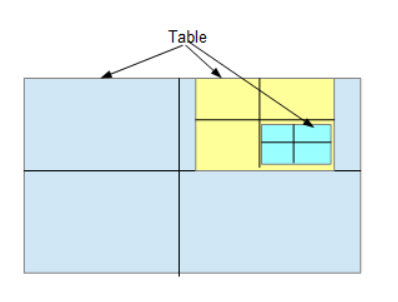
Intermediate XML converts the Word table to HTML tables. HTML tables also allow tables within tables. The GPO and CALS table model does not allow tables within a table.
This wasn't an easy problem to solve and we really haven't completely solved it. Until we can come up with a valid approach we have unwrapped the table structure when a table is within a cell. This isn't ideal but it is a semi-reasonable solution until we can find a better mechanism. Luckily we haven't encountered too many of these tables.
Table Headings and Table Notes
All table headings and table notes are created outside the table in the Word file. The conversion is required to pick up the table head and place it in the <TTITLE> element for GPO tables or <title> element for CALS. The table title is relatively easy if the preceding sibling of the table starts with "Table #.". However, this isn't always case. We need to evaluate the preceding sibling(s) - yes sometimes there are 2 paragraphs - and place the text in the appropriate element, then remove the paragraph from its original location.
The same goes for table notes. GPO table model has a child element called TNOTE. The conversion iterates through the following siblings that start with "(a)" or "a." or "1." and creates the TNOTE or <tfoot> constructs. It then removes the paragraphs from the original location.
Word Style Differences
We cannot change or modify how the Word files are constructed by the various organizations. We must take what we get and process the files. As a result, each organization uses their own template or no template. Some have created their own named styles in the Word file. We are able to capture the name of the style but are not able (currently) to determine what that named style actually means. We are looking into the possibility of pulling the style information for a named style into the Intermediate XML file.
Figure 30: Real Example of Word Named Style
<w:rStyle w:val="dewidow"/>
The w:val attribute gets turned into a class attribute during the Word to Intermediate XML conversion. We are able to manually go into the Word XML file and find the 'style.xml' file to determine how to process this information. However, this is always a one-off process and only done when we encounter a difference in the formatting from the Word to the XML.
Hopefully we will be able to capture the style from named styles in the Word file to the Intermediate XML file.
We have also found that the 'standard' (using this term loosely) Word styles are not consistently formatted in the same way across organizations. A good example of this is the standard 'Emphasis' style in Word. Normally, the Emphasis style is italics. We have found instances where an organization and/or user has modified the standard Emphasis to mean 'bold' or no style.
Once we can get all the style information included in the Intermediate XML file some of the issues we have encountered will go away.
Word Style Nuances
A problem that we encountered in the Intermediate XML file which has been solved is 'ghost' styles. Everytime a user clicks in a Word file something happens. A user may create italicized or bolded text then change their mind. The style attributes are still included in the underlying Word XML. Initially, the unhighlighted text was being included as highlighted in the Intermediate XML.
We were able to get the Word to Intermediate XML conversion modified to not include the highlighting based on the w:val attribute in the Word file.
Figure 31
Word XML Encoding
<w:i/>           <!--Italicized Text-->
<w:i w:val="0"/> <!--Text Not Italicized-->


<w:b/>           <!--Bolded Text-->
<w:b w:val="0"/> <!--Text Not Bold-->
Text Manipulation
We now have subject-matter experts reviewing and commenting on the converted files. They have been making requests for enhancing the text manipulation of the actual text in the file. Where possible we are trying to accommodate their requests. Here are a few requests that we have received and implemented.
-
Move punctuation outside of formatting (italics, and bold) except for phrases such as 'i.e.,', 'et al.,', etc.
-
Add italic tags to all URL's and email addresses.
Another critical part of the conversion is removing the SGML elements from the file. Identifying the elements early in the process makes this relatively easy. However, there are occasions where and element will not get identified because of some anomaly in the file and we have to make adjustments to the XSLT.
Validation Efforts
A preliminary authoring environment in Oxygen has been created by Joel Kalvesmaki. Joel has done an incredable job of creating an environment that enhances the authoring/editing process for the users. The user experience thus far has been excellent. A pipeline has been created that takes a Word file and passes it along to a service that converts the Word to USLM XML. The Word to USLM file is provided to the user which can then be converted to the Federal Register XML format. There are also postprocess scripts that looks at the file and does some clean up GPO protocol.
There is a SGML Document Type Definition (DTD) has been available for the Federal Register for decades. A RelaxNG schema as been developed that relies on the structure of the original Federal Register DTD makes some dramatic enhances. The schema allows both GPO tables and OASIS-Open tables. Currently GPO publishes the Federal Register using the GPO table model. However, in the future the OASIS-Open table model will be used.
The RelaxNG schema gets converted to an XML Schema that is used internally in Oxygen.
Anyone who has worked with Oxygen knows that it flags any parsing errors against a schema. Schematron rules are being developed to provide further validation of GPO rules, i.e., title casing, punctuation, etc.
Conclusion
I am sure there are many ways to approach the problem of creating XML hierarchy from flat files. This is just our approach. Even while I was writing this paper I found a few places where we could make the code more efficient. When we first embarked on this project we were given only a few sample files. These files were NOTICE files which are simplist files are normally only several pages long.
However, as we started receiving more document types and more complex documents we found that we were dealing with a much harder problem than we anticipated. If I could go back to the beginning knowing what I know now I might have done a few things differently.
References
[bharvey-uslm1] United State Markup Language, https://www.govinfo.gov/features/beta-uslm-xml
[bharvey-uslm2] USLM Schema and Supporting Information, https://github.com/usgpo/uslm