Introduction
XProc is a language that excels at performing operation sequences, known as pipelines, to process documents. A pipeline is composed of smaller steps, and a pipeline is itself a step that other pipelines can use. Active support for XProc version 3 includes two processors, a collection of resources at https://xproc.org/, a public mailing list, a series of virtual user group meetings, and a published book [S]. XProc 3 is well positioned for use in applications that have one or more of the following characteristics: large-scale, widely used, enduring, important. Software applications having one or more of those characteristics tend to be good candidates for automated testing and behavior-driven development techniques. And yet, in 2025, I had multiple, unrelated conversations with XProc users who brought up the shortage of tools for testing their XProc code.
XSpec version 4 narrows the testing gap for XProc 3. XSpec [XS] is an open-source software product for testing several languages in the XML space: XSLT, XQuery, Schematron, and now XProc. Support for testing XProc is new in XSpec 4.0, released in June 2026.[1]
In this paper, I’ll show the XML vocabulary you use to write an XSpec test suite for a custom XProc step or pipeline. I’ll explain some non-obvious semantics related to execution of the test suite, as well as some limitations of the support for testing XProc steps. After that, I’ll dive into an implementation aspect that demonstrates the versatility of custom XProc steps beyond the typical chaining into pipelines. If you’ve found it useful that XProc can call XSLT and wished that it could work the other way, too, you’ll be pleased to know that it can.
Testing background
Imagine that you’ve created an XProc step with type
my:count-words (for some namespace binding of the
prefix my) that counts words in one or more
documents, and you want to test this step. I’ll refer to it as a
test target. At a high level, when you
test the my:count-words step, you’re doing two
things:
-
Running (that is, calling) the step
-
Verifying its results
You decide what input documents or option values to use when
running the my:count-words step. You also decide
what aspects of the results are useful to verify. You express
each verification in a way that accommodates a
pass
or fail
status.
For instance, suppose you want to verify that exactly one
document appears on the result output port of the
step and that the document equals a particular one you expect. If
exactly one document appears on the result output
port but the content of the document doesn’t match your
expectation, then the first verification passes and the second one
fails.
When you create a set of specific instructions for the call and the verification, you have a test case. For any given test target, you might create multiple test cases, such as one test case that calls the step with one input document, and another that calls the step with two input documents.
Ingredients of an XSpec file
As a software product, XSpec has two main pieces: an XML vocabulary for writing a test file that expresses one or more test cases, and the software that can carry out the specific instructions in your test cases and report the pass/fail status of each verification. When you create an XSpec file, you’re using the vocabulary. When you run your test file to see which verifications passed or failed, you’re using the XSpec software (which in turn calls other software, such as Saxon).
At the highest structural levels of an XSpec test file,
testing XProc code is analogous to testing code in the other
languages that XSpec supports. For starters, the outermost element
of an XSpec file is <x:description>, where the
prefix x is bound to the XSpec namespace. The
<x:description> element uses an attribute named
xproc to point to the XProc step file or library
file that contains (directly or through imports) your test
target(s). The xproc attribute is analogous to
attributes named stylesheet for testing XSLT,
query-at for testing XQuery, and
schematron for testing a Schematron schema.
If you have one test case, then within
<x:description>, you use the
<x:scenario> element to contain elements that
express how you want to call the test target and what you want to
verify. If you have multiple test cases, you use multiple
<x:scenario> elements. To simplify explanations
in this paper, we’ll assume the file has no nesting of scenarios,
so multiple <x:scenario> elements are all siblings
of each other.
In a given <x:scenario> element, you use a
child <x:call> element to express how you want to
call the test target. Following <x:call>, you use
a child <x:expect> element for each verification
you want to perform. To make test files and reports easier to
understand, you also label each <x:scenario> and
<x:expect> element with a text description. The
label can be an attribute named label or a child
element named <x:label>; for simplicity, we’ll use
the attribute here.
The described structures look like Figure 1. If fully populated, it would be a test file with two test cases, each of which performs two verifications.
Figure 1: Structure of XSpec file (not fully populated)
<x:description xmlns:c="http://www.w3.org/ns/xproc-step"
  xmlns:my="http://example.com/syntax"
  xmlns:p="http://www.w3.org/ns/xproc"
  xmlns:x="http://www.jenitennison.com/xslt/xspec"
  xproc="count-words.xpl">

  <x:scenario label="With one document having 3 words">
    <x:call/>
    <x:expect label="there is exactly one output document"/>
    <x:expect label="an XML c:result document with content 3"/>
  </x:scenario>

  <x:scenario label="With two documents, requesting total count">
    <x:call/>
    <x:expect label="there is exactly one output document"/>
    <x:expect label="for the number of words in both documents"/>
  </x:scenario>

</x:description>
In Figure 1, the xproc
attribute is the only thing specific to testing XProc. However,
populating the <x:call> and
<x:expect> elements with details about each test
case reveals other ways in which the XSpec vocabulary is tailored
for XProc.
Type of step to run
Any XProc step you test using XSpec must have a
type attribute on the
<p:declare-step> element. To configure the
<x:call> element for your test target, you set
the step attribute to the type as a qualified name
(e.g., my:count-words). The step
attribute is analogous to attributes named template
and function for testing XSLT.
As usual in XML files, the XSpec file must declare any namespace prefixes that appear.
Input documents and option values
The <x:call> element often needs more
configuration than merely the type of step to call. Your test case
might require non-default documents on any of the step’s input
ports, or it might require non-default values of any of the step’s
options. The <x:call> element supports two kinds
of child elements in tests for XProc only:
-
<x:input>, which specifies zero or more documents on an input port. Theportattribute is the name of the input port. -
<x:option>, which specifies a value of a step option. Thenameattribute is the qualified name of the option.
As for how you specify documents or values using these
elements, you have several choices. Most of them are analogous to
behaviors and markup patterns that XSpec supports across
languages. You can embed custom XML content directly within
<x:input> or <x:option>; point
to an external XML file; provide an XPath expression that derives
something from the embedded content or external XML file; or
provide a standalone XPath expression that constructs a document
or value.
In tests for XProc only, XSpec offers one additional choice,
which is the ability to insert one or more XProc
<p:document> elements as children of XSpec
<x:input> or <x:option>
elements. Using <p:document> is especially
convenient for specifying multiple documents on an input port,
specifying non-XML documents, or modifying the set of document
properties of a document.
When you execute the test suite, these
<p:document> elements get passed to the XProc
processor for evaluation. By contrast, the other ways of
specifying input documents and option values are evaluated in
XSLT, for reasons I explain later, in the implementation-related
portion of this paper.
Figure 2 continues the structural
example in Figure 1, by populating the
<x:call> elements with the step type, input
documents, and an option value.
Figure 2: Calling a step from XSpec file
<x:description xmlns:c="http://www.w3.org/ns/xproc-step"
  xmlns:my="http://example.com/syntax"
  xmlns:p="http://www.w3.org/ns/xproc"
  xmlns:x="http://www.jenitennison.com/xslt/xspec"
  xproc="count-words.xpl">

  <x:scenario label="With one document having 3 words">
    <x:call step="my:count-words">
      <x:input port="source" as="document-node(element(doc))">
        <doc>One two three</doc>
      </x:input>
    </x:call>
    <x:expect label="there is exactly one output document"/>
    <x:expect label="an XML c:result document with content 3"/>
  </x:scenario>

  <x:scenario label="With two documents, requesting total count">
    <x:call step="my:count-words">
      <x:input port="source">
        <p:document href="three-words.xml"/>
        <p:document href="two-words.xml"/>
      </x:input>
      <x:option name="total" select="true()"/>
    </x:call>
    <x:expect label="there is exactly one output document"/>
    <x:expect label="for the number of words in both documents"/>
  </x:scenario>

</x:description>
Documents vs. elements
Experienced users of XSpec might see the first
<x:input> element in Figure 2 (repeated below) and wonder what
the my:count-words step is actually processing: a
<doc> element, or a document node containing
a <doc> element.
<x:input port="source" as="document-node(element(doc))">
  <doc>One two three</doc>
</x:input>
A reason for wondering is that if you embed an XML element
in an XSpec element like <x:param>, within an
XSpec test for other languages, then XSpec assumes you want
the parameter value to be the element. If you instead want the
parameter value to be a document node containing that element,
you add select="/" to the
<x:param> element.
Tests for XProc work differently. Because XProc is so
document-oriented, XSpec tests for XProc don’t require you to
add select="/" to <x:input>
elements in order to get a document node instead of an
element. If you specify a <doc> element as an
input document, the element gets wrapped in a document node,
and the step sees the document node. If you specify five
sibling XML elements as input documents,
each element gets separately wrapped in
a document node, and the step sees five input documents. The
automatic wrapping of one <doc> element is why
the as attribute above says
as="document-node(element(doc))", not
as="element(doc)".
This automatic wrap-each
behavior is relevant
for both new and experienced users of XSpec to know about when
writing tests for XProc steps. The behavior will come up again
in the discussion of the <x:expect> element,
next.
Output documents and verifications
A fully configured <x:call> element
accomplishes the first part of the two-part testing process,
namely, running the test target step with your choice of input
documents and/or option values. The second part is to use
<x:expect> elements to verify the results of
running the step. This element can appear in XSpec tests for any
of the supported languages. It can check whether a boolean
condition you specify evaluates to true. An example
is a condition like exists($x:result//p) using a
variable named x:result that XSpec predefines—or
exists(//p) for short, if exactly one document
appears on a particular output port. Alternatively,
<x:expect> can check whether an actual result
equals a corresponding expected result that you specify.
Longstanding XSpec features that also work in tests for XProc can help you implement use cases like verifying only a portion of a result and integrating your own filtering or normalization (canonicalization) behaviors into the verification process.
While being largely consistent across supported test target
languages, the <x:expect> element also has a few
ways in which it is tailored for testing XProc. First,
<x:expect> has an optional port
attribute whose value is the name of an output port of the step.
This attribute says which output port you are interested in for
that verification. If you set the port attribute,
XSpec predefines its variable named x:result as the
sequence of output documents on that port only. Specifying the
port also makes certain other aspects of the
<x:expect> element more convenient, as the
next three subsections describe.
Predefined variable for document properties
When <x:expect> has a port
attribute, XSpec predefines an additional variable, named
x:document-properties. It stores properties of
the documents on the specified output port. You can use both
$x:result and $x:document-properties
in verification expressions.[2]
Automatic wrapping of embedded expected results in document nodes
If you are embedding an XML expected result within
<x:expect> for XSpec to compare with the
unmodified actual result on the specified port, then XSpec
interprets each child node as a separate document and
automatically wraps each in a document node. Here,
unmodified
means you are not using a
test attribute of <x:expect>
either to drill down into the actual result (e.g.,
$x:result//p) or to derive data from the actual
result (e.g., count($x:result)).
For instance, Figure 3
compares the sequence of actual result documents on the output
port named result with a pair of expected
documents. One document contains the element
<a/> and the other document contains the
element <b/>. Your intention is probably more
likely to be this pair of unrelated documents than a single
document containing sibling top-level elements
<a/> and <b/>. Also, you are
unlikely to expect the step to produce bare elements on its
output port, because XProc steps that produce XML documents
represent them as document nodes.
Figure 3: Two embedded XML elements
<x:expect label="..." port="result">
  <a/>
  <b/>
</x:expect>
Failure details in HTML report
Another consequence of setting a port attribute
on the <x:expect> element affects the display of
verification failures in the HTML report of test results. For
all the supported languages, the report has a section of details
about each verification failure. If the failure section of the
report shows diffs between actual and expected results, then you
probably want the displayed actual result to be only the result
on the XProc output port that you specified as your port of
interest. Indeed, that’s what XSpec does.
In case the failure is caused by a boolean condition that
evaluates to false, the failure section of the
report shows an actual result, and it’s up to you to determine
why the condition was false for that result. Here, too, XSpec
shows the actual result on that output port only. Without a
port attribute, the actual result appearing in
this section of the report would be a multiple-level map that
stores results across all the output ports. This map would be
cumbersome to read when investigating the failure.
Fully populated XSpec file
We can now complete the syntax example. Figure 4 shows a fully populated XSpec file that calls a step with particular documents and option values and then verifies some results. (The XProc and XML files are not shown, as the purpose of the example is merely to illustrate XSpec syntax.)
Figure 4: XSpec file that calls a step and verifies results
<x:description xmlns:c="http://www.w3.org/ns/xproc-step"
  xmlns:my="http://example.com/syntax"
  xmlns:p="http://www.w3.org/ns/xproc"
  xmlns:x="http://www.jenitennison.com/xslt/xspec"
  xproc="count-words.xpl">

  <x:scenario label="With one document having 3 words">
    <x:call step="my:count-words">
      <x:input port="source" as="document-node(element(doc))">
        <doc>One two three</doc>
      </x:input>
    </x:call>
    <x:expect label="there is exactly one output document"
      port="result" test="count($x:result)" select="1"/>
    <x:expect label="an XML c:result document with content 3"
      port="result">
      <c:result>3</c:result>
    </x:expect>
  </x:scenario>

  <x:scenario label="With two documents, requesting total count">
    <x:call step="my:count-words">
      <x:input port="source">
        <p:document href="three-words.xml"/>
        <p:document href="two-words.xml"/>
      </x:input>
      <x:option name="total" select="true()"/>
    </x:call>
    <x:expect label="there is exactly one output document"
      port="result" test="count($x:result)" select="1"/>
    <x:expect label="for the number of words in both documents"
      port="result" select="5"/>
  </x:scenario>

</x:description>
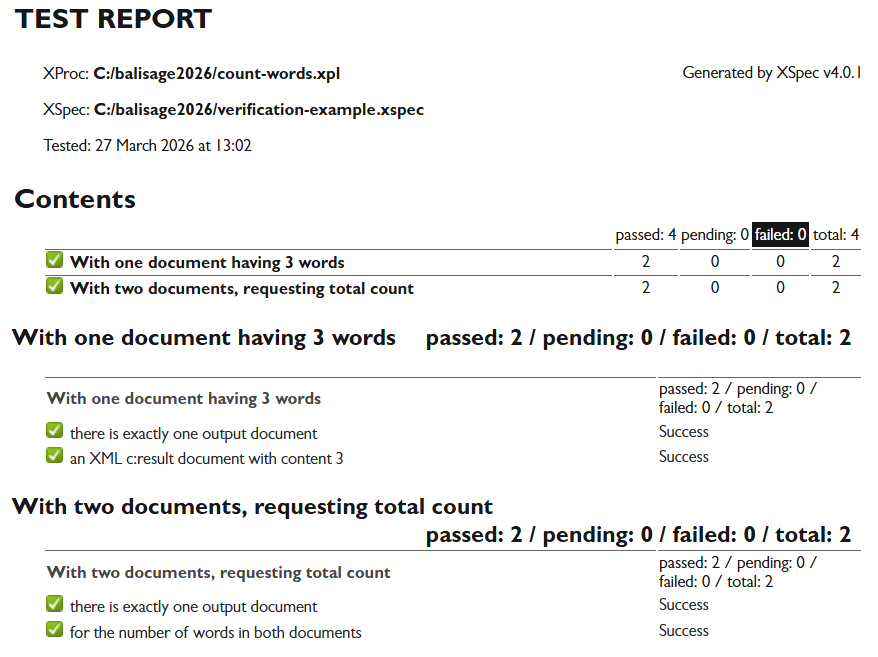
Running this test suite produces an HTML report that looks like Figure 5.
Figure 5: HTML report of test results
Familiar XSpec features
The preceding descriptions of testing XProc steps have pointed out some ways in which the XSpec vocabulary expresses XProc-specific information, as well as some ways in which the XSpec semantics align with XProc handling of data and documents. At the same time, many features of XSpec work the same way in tests for either XProc or other languages that XSpec supports. Here is a non-comprehensive list of such language-agnostic features:
-
<x:scenario>element for individual test cases and for grouping -
<x:import>element for importing from another XSpec file -
<x:helper>element for integrating custom code into the testing process (where the custom code’s language depends on the language of the test target; tests for XProc can use custom code written in either XProc or XSLT) -
<x:like>element for reusing XSpec code -
<x:variable>element for defining test-specific variables -
<x:pending>element andpendingattribute for disabling portions of a test file -
focusattribute for enabling only specific scenarios and disabling all others -
Attribute value templates
-
Text value templates that behave like those in XSLT
-
Three-dot syntax (
...) for skipping pieces of XML content when comparing results -
Inheritance and override semantics in nested
<x:scenario>elements -
Whitespace handling (default behaviors and ways to override them)
-
HTML report of test results
Limitations
You should be aware of the following limitations of XSpec v4.0 support for testing XProc:
-
It requires XML Calabash 3 as the XProc processor. The reason for this limitation is that the implementation depends on a nonstandard feature of XML Calabash 3 (discussed in the second half of this paper). Furthermore, the support in XSpec v4.0 expects the XSLT processor to be the Saxon version that is bundled with XML Calabash. Other versions might happen to work, but there is no guarantee.
Note
Upcoming XSpec version 4.1, scheduled for September 2026, will be able to use MorganaXProc-IIIee (v1.8.16 or later) as the XProc processor.
-
It requires the step referenced by
<x:call>to have atypeattribute in the step declaration. -
It cannot test steps that are private or locally defined within a step.
-
It cannot directly test steps that are part of the XProc specifications themselves (core specification, standard step library, and additional step libraries listed at [XPS]). However, XSpec can test custom steps that invoke standard steps that the XProc processor supports. That includes steps like
p:runandp:file-copy. -
It cannot assign a non-default value to an XProc option that is declared as static.
-
It cannot verify informational messages that go to the console. (It can verify information about dynamic errors, however.)
-
Any configuration you specify for the XProc processor takes effect throughout the test suite, not per scenario.
Some XProc steps present testability challenges even though
XSpec can call the steps. Testing code that has side effects
(that is, the code modifies its environment) is tricky. For
instance, suppose your step invokes p:file-copy,
and you want to verify existence of the copied file. Maybe the
copy existed even before your step ran. Maybe calling your step
to copy the file interferes with a subsequent test case. XSpec
doesn’t give you a way to set up the environment before a test
case executes, clean up afterward, or enforce an order of
operations; this is an XSpec limitation across languages, not
specific to testing XProc.
This concludes the part of this paper about user-facing aspects of XSpec support for testing XProc. Readers not interested in the implementation may skip to the conclusion.
Implementation: XSLT-based test runner
Now that we’ve glimpsed how to write an XSpec test suite for XProc, let’s look more at what happens when you execute the test suite. Somehow, an XProc processor has to invoke your test target with the input documents and option values that each test case specifies.
A precedent worth considering is how XSpec executes a test suite for XQuery. An XSLT stylesheet known as the XSpec compiler generates an XQuery main module known as the test runner. The test runner is what calls the XQuery code being tested and determines which verifications pass or fail.
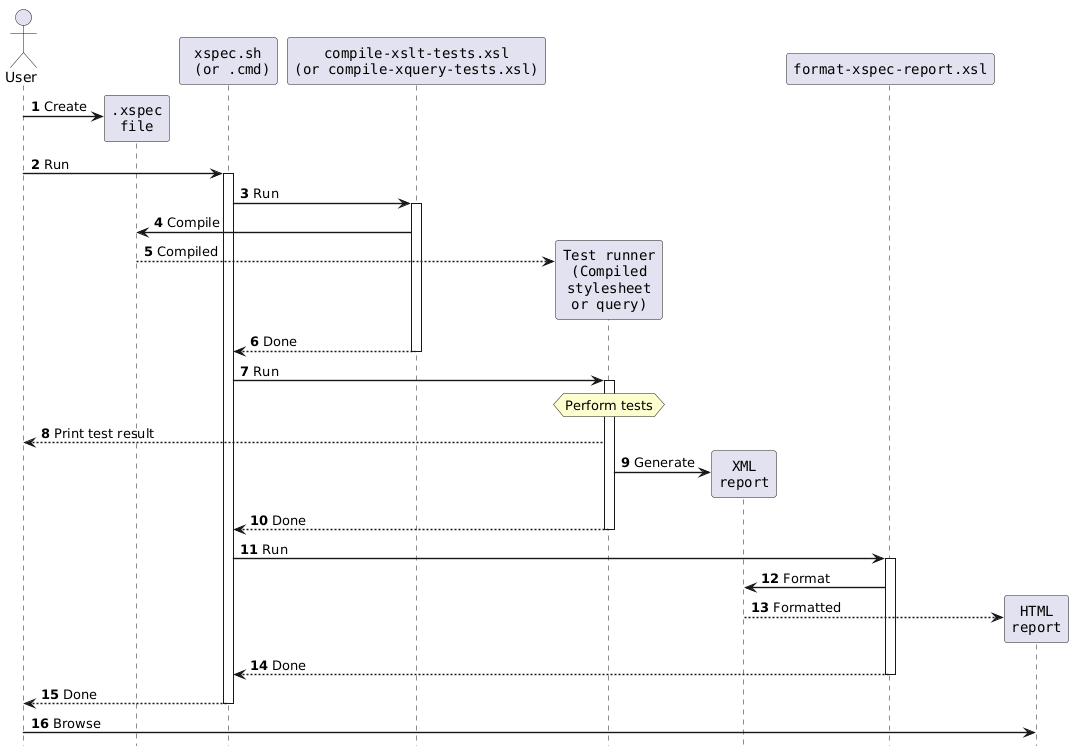
The XSpec repository’s associated wiki contains a UML
diagram that shows how XSpec works internally, and
it appears with minor labeling modifications in Figure 6
[XW]. In this diagram, the XSpec compiler is
the box near the top that says, compile-xslt-tests.xsl (or
compile-xquery-tests.xsl). The test runner is the box to
which arrow 5 points.
Figure 6: XSpec processing
One logical way to extend XSpec for testing XProc would be to make the XSpec compiler generate an XProc pipeline as the test runner, instead of generating a stylesheet or query. After all, an XProc pipeline is capable of calling the XProc step being tested. XProc is also capable of determining which verifications pass or fail.
Although generating an XProc-based test runner would be a logical implementation path, I chose to do it differently. Before explaining that, I need to share some XProc processor background.
Nonstandard feature: Step functions
The XML Calabash documentation has a topic named
Calling steps as functions
[XC] about a nonstandard feature that creates
so-called step functions. A step function
is an XPath function that the XProc processor creates,
corresponding to a custom step that declares an explicit type.
The step function behaves like the step and is callable from
XPath expressions. For instance, if you create a typed XProc
step that counts words in a document, then you can use its
corresponding step function to count words in a document that
is accessible from an XPath expression. That XPath expression
can reside within XProc, XSLT, XQuery, and so on—as long as
the XPath processor knows how to access the step function that
the XProc processor created. The knowing how to
access
part is related to the scope of steps in
XProc or the configuration of a non-XProc processor, and you
can find those details in the XProc processor’s
documentation.
Connection with XSpec test runner
Returning to the matter of the XSpec test runner for testing XProc code: XSpec has mature capabilities for testing stylesheet functions that it calls from XPath expressions. I figured that XSpec should be able to test XProc steps if it can call XProc step functions and capture their results. In step functions, I saw an opportunity to support testing XProc by building on the existing, solid XSpec compiler code for testing stylesheet functions. To me, that approach seemed easier than generating a new, XProc-based test runner that would have most or all of the features that XSpec users are accustomed to. Therefore, I modified the XSpec compiler so that the test runner for testing XProc is an XSLT stylesheet. That is, the way XSpec executes a test suite for XProc is by generating and executing an XSLT-based test runner that relies on the step function feature of the XProc processor.
When I talk about XSLT relying on the step function feature of the XProc processor, I mean that the XSLT processor is configured so that it is capable of telling the XProc processor to perform an XProc step’s operation and return results back to XSLT. The XSLT processor and XProc processor hand control back and forth as the XSLT-based test runner dictates. It doesn’t mean that the XProc step is being translated into XSLT or executed by an XSLT processor.
As of the XSpec v4.0 release date, step functions are a nonstandard feature of XML Calabash only. Therefore, the ability to test XProc using XSpec v4.0 depends on XML Calabash and cannot run with MorganaXProc-III. Although depending on a nonstandard feature of one processor is not ideal, support for testing XProc with one processor is much better than no support at all. At least the step function feature is documented, and it is included in the XML Calabash automated test suite. As noted earlier, the upcoming XSpec version will be able to use MorganaXProc-IIIee, which recently started supporting step functions [MX].
Calling XProc steps as XPath functions
The support for testing XProc in XSpec v4 uses step functions for two distinct tasks that only an XProc processor can accomplish:
-
Reporting the version number of the XProc processor being used
-
Invoking the step being tested
Let’s look at these in order. The first case is simpler and helps explain the paradigm, while the second case is more central to the implementation.
From XSLT to XProc, to get a version number
When you run an XSpec test suite for XProc, part of the
console output indicates the versions of the XSLT and XProc
processors that are in use. (In the UML diagram in Figure 6, this text is part of item 8,
Print test result.
)
Running Tests...
Testing with SAXON HE 12.9 and XML Calabash 3.0.42
This command-line output comes from the test runner,
specifically from an XSLT message instruction. XML Calabash
can report its own version number using a function named
p:system-property, but how can a test runner
written in XSLT call a function that belongs to an XProc
processor? The p:system-property function is not
callable from XSLT.
The answer is that the step function feature acts as a
bridge from XSLT to XProc and back. Figure 7 shows a small XProc step
of type pf:system-property that wraps around the
p:system-property function. (The prefix
pf binds to an XSpec-related namespace URI,
http://www.jenitennison.com/xslt/xspec/xproc/steps/wrap-standard-functions.)
Figure 7: Step calling p:system-property
function
<p:declare-step type="pf:system-property" name="system-property">
  <p:output port="result"/>
  <p:option name="property" required="true" as="xs:string"/>
  <p:identity>
    <p:with-input select="string()">
      <p:inline>{ p:system-property($property) }</p:inline>
    </p:with-input>
  </p:identity>
</p:declare-step>
Under appropriate configuration circumstances, a stylesheet
like the test runner can enjoy the behavior of the custom
pf:system-property step by calling it as a
function within an XPath expression anywhere in the stylesheet.
To provide a value for the property step option,
the function call provides a map with key property
as a function argument. This function syntax is part of how the
step function feature works. In Figure 8, the select
attribute illustrates the function call in an XSLT element taken
from the XSLT-based test runner that XSpec produced.
Figure 8: XSLT element calling pf:system-property step
as a function
<xsl:value-of select="
  Q{http://www.jenitennison.com/xslt/xspec/xproc/steps/wrap-standard-functions}system-property(
    map{'property': 'Q{http://www.w3.org/ns/xproc}product-version'}
  )?result"/>
The function is executed by the XProc processor, which
reports its version number as a document (in this case, a
string) on the output port named result. As a
function output, the XProc processor returns a map containing
output documents organized by output port. To get the string,
the XPath expression in the stylesheet uses map lookup syntax
?result after the function call.
Summary of simple usage of step function
To recap, the objective was to have the XSLT-based test runner fetch some data that only the XProc processor knows. When developing this feature, I:
I also ensured that the process of invoking the XSpec test runner has a suitable configuration for calling the step function.
From XSLT to XProc, to run the test target
The creation of step functions also applies to steps that return documents more complicated than a string. There is no limit on the number of ports, options, or documents. Initially, I thought the XSLT-based test runner could use an XPath function call to invoke the test target. However, that turned out to be inadequate.
Relevance of XProc document properties
The reason is that document properties, which are not
relevant for the pf:system-property step we
looked at earlier, might be relevant in an arbitrary XProc
test target. When you travel from XSLT to XProc and back, by
calling a step function and then examining the result in XSLT,
the process doesn’t necessarily handle document properties in
the way you need for proper testing.[3] For instance, the XProc notion of content type
doesn’t translate precisely to the XPath/XDM world.
To make it a little more concrete, suppose your test
target is a step whose input and output documents have
content type text/csv. The XSLT-based test
runner can provide comma-separated text in an input argument
to a step function but lacks a way to assign a content type.
Therefore, the step sees a more generic content type: plain
text. Upon receiving an output map from the step function,
the XSLT-based test runner can retrieve a document, but its
content-type property is gone. Therefore, the
XSpec <x:expect> element cannot verify the
content type.
To make an XSLT-based test runner work well, the system needs some opportunities to provide properties of input documents and to make XSLT aware of the properties of output documents. Having the XSLT-based test runner call the step function corresponding to the XProc test target doesn’t offer any such opportunities; the transition between XSLT and the test target is too abrupt.
Overview of document property handling from XSLT to XProc and back
To handle document properties adequately for testing, the XSpec support for testing XProc has two levels of indirection that serve as a kind of anteroom for transferring properties back and forth between XSLT and XProc. The code in these levels of indirection performs the following tasks in XProc, for each XSpec test case:
-
Receive any input documents and option values that the XSLT test runner already computed. (The reason for computing some input data in XSLT is to reuse pre-existing XSpec compiler code that was written to support tests for XSLT.) For instance, the XSpec element
<x:option name="my-opt" select="1"/>causes the test runner to set up the option value in XSLT and pass it to XProc. -
Compute any input data that requires processing in XProc, namely,
<p:document>elements within XSpec<x:input>or<x:option>elements. The resulting document has the document properties you expect from an XProc processor. -
Call the XProc test target, passing in the data from steps 1 and 2.
-
Capture the properties of output documents in a data structure that can be returned back to the XSLT world, so that XSpec can proceed with evaluating
<x:expect>verification elements. -
Return output documents and the additional data from step 4 back to XSLT.
Returning to the example with CSV documents, we can learn how performing these tasks (especially items 2 and 4) solves the problems mentioned earlier. Suppose we are testing a step that has CSV documents on both the input and output port. Consider the following XSpec test scenario for this step:
Figure 9: XSpec test case with CSV input/output
<x:scenario label="Call a step">
  <x:call step="my-csv:test-target-step">
    <x:input port="source">
      <p:document href="document.csv"/>
    </x:input>
  </x:call>
  <x:expect label="Verify content" port="result">1,2</x:expect>
  <x:expect label="Verify content type" port="result"
    test="$x:document-properties?(QName('', 'content-type'))"
    select="'text/csv'"/>
</x:scenario>
Item 2 in the task list causes the
document.csv file to be loaded by the XProc
processor, not the XSLT processor. The XProc processor also
assigns the document the text/csv content type
as expected, not the more generic text/plain
type. Item 3 runs the test target
(my-csv:test-target-step) using this document
that has content type text/csv. Items 4 and 5
return data to the XSLT-based test runner, and this data
includes all properties of output documents. Tasks 2, 3, 4,
and 5 all happen in the same XProc process. When the
XSLT-based test runner regains control, it evaluates the
<x:expect> elements. In that context, the
XSpec variable named x:document-properties
enables the test author to verify properties of output
documents, including the content-type
property.
Step runner
The overview mentioned two levels of indirection. The
first is what I call a step runner.
It’s a
small XProc step that uses the standard p:run
step to call a dynamically generated XProc step that appears
on the input port. The step runner’s corresponding step
function is what the XSLT-based test runner calls during
test execution. It’s the same function call from XSLT to
XProc for any test target or test case.
The step runner looks like the following:
Figure 10: Step runner
<p:declare-step xmlns:impl="urn:x-xspec:compile:impl"
  xmlns:p="http://www.w3.org/ns/xproc"
  type="impl:step-runner" name="step-runner" version="3.1">

  <p:input port="step-to-call-test-target" content-types="application/xml"/>
  <p:output port="map-of-outputs" pipe="map-of-outputs@call-test-target"
    content-types="application/json"/>
  <p:option name="map-of-inputs" as="map(*)"/>
  <p:option name="map-of-options" as="map(*)"/>

  <p:run name="call-test-target">
    <p:with-input pipe="step-to-call-test-target@step-runner"/>
    <p:run-option name="map-of-inputs" select="$map-of-inputs"/>
    <p:run-option name="map-of-options" select="$map-of-options"/>
    <p:output port="map-of-outputs" primary="true"/>
  </p:run>
</p:declare-step>
Generic names like map-of-inputs are a hint
that this step is not at all customized for a specific test
target or test case.
Generated test-case step
The dynamically generated XProc step that appears on the
step runner’s input port is more interesting, and that’s the
second level of indirection. I call it a test-case
step.
The XSpec compiler generates a test-case step
for each test case in your XSpec test suite. When generating a
test-case step, the XSpec compiler relies on information
located in the XSpec document, as indicated in Table I.
Table I
Mapping XSpec test case to corresponding XProc code
| Information in XSpec | Resulting code in test-case step |
|---|---|
Location of XProc file containing the test target,
from the <x:description> element’s
xproc attribute
|
<p:import> |
Type of step to call, from the
<x:call> element’s step
attribute
|
XML element that invokes the step |
Any documents to pass in, from
<x:input> elements
|
<p:with-input> |
Any option values to pass in, from
<x:option> elements
|
<p:with-option> |
Any input ports and options that should use defaults
that the step declares, implied by the absence of
<x:input> or
<x:option> elements
|
Absence of <p:with-input> or
<p:with-option> |
Whether to catch any dynamic errors, from the
optional catch attribute of ancestor
<x:scenario> elements
|
<p:try> |
For instance, the <x:call> element in
Figure 9 corresponds to the following
XProc code within the test-case step:
Figure 11: Invocation of test target in test-case step
<my-csv:test-target-step xmlns:my-csv="http://example.com/csv"
  name="test-target">
  <p:with-input port="source">
    <p:document
      xml:base="file:/C:/.../example/csv-example.xspec"
      href="document.csv"/>
  </p:with-input>
</my-csv:test-target-step>
The process of generating a test-case step also relies
on parsing the XProc code that declares the test target
step, to find the names of output ports. That is because the
test-case step needs to organize output data into a map to
send back to the step runner, which in turn sends it back to
the XSLT world. The XSLT test runner needs the data in this
map when defining the variables named x:result
and x:document-properties, among other
things.
Organizing data into the output map is straightforward,
relying mostly on the p:identity and
p:json-merge steps. Figure 12 and Figure 13 give the idea. There is also
a little extra processing to accommodate the case of an output
port that produces no documents and the case of a caught
dynamic error.
Figure 12: Storing document and properties in map
<p:identity>
  <p:with-input
    select="map{ 'result':
      map{ 'document': ., 'document-properties': p:document-properties(.) }
    }"
    pipe="result@test-target"/>
</p:identity>
Figure 13: Combining maps across output ports
<p:json-merge duplicates="combine" name="merged">
  <p:with-input port="source">
    <p:pipe step="map_result"/>
    <p:pipe step="map_secondary"/>
  </p:with-input>
</p:json-merge>
Summary of more complicated usage of step function
To recap this more complicated case, the primary objective was to invoke the test target, but that wasn’t actually enough. It was also necessary to set up input documents in true XProc fashion and provide the XSLT-based test runner with information about document properties and caught errors. For a given test case, all these operations needed to happen in the same journey from XSLT to XProc and back. To that end, when developing this feature, I:
-
Determined all the information the test runner might need for verification, and designed a map data structure capable of storing that information.
-
Made the (generated) test runner declare, for each test case, an XProc step that does all the necessary XProc work for that test case and creates a map having the desired structure.
-
Created a fixed XProc step that uses
p:runand that the XSLT-based test runner can call as an XPath function. -
Made the test runner call the step function in item 3, passing in the step declaration in item 2 plus any input data that the test runner itself computed in XSLT.
I also made the XSpec compiler’s verification operations retrieve documents, properties, and error information from the output map as needed.
Conclusion
If you believe that the future of markup includes the XProc
language and you want to bolster the future of your own XProc
code, then it’s wise to invest in readable, runnable
descriptions of how your code behaves. I’m delighted that XSpec
now extends its capabilities for automated testing and
behavior-driven development into the XProc realm. When designing
user-facing aspects of XSpec for XProc, I wanted XProc users to
find it sufficiently tailored for XProc, and I also wanted
existing XSpec users to find it familiar. The tailored-for-XProc
features include dedicated XSpec elements to represent input
port documents and option values; the ability to use the XProc
<p:document> element within your test suite
for full control over input data; access to document properties;
and verifications that optionally focus on one output port at a
time. XSpec for testing XProc still has an XSpec feel, though,
because the way you do things like organize and label test
cases, express what you want to verify, and examine your test
results is consistent across supported languages.
We saw that the extension of XSpec for testing XProc depends
on the ability of an XSLT processor and an XProc processor to
call an XProc step as if it were an XPath function. This
capability shortened my development time for this XSpec
enhancement and, more critically, motivated me to attempt it in
the first place. In my opinion, this step
function
feature is worth knowing about so that you
can apply it in situations where the feature fits well. Such
situations might even include an XSpec test suite, where
<x:helper> integrates your custom XProc step
into the testing process (e.g., for normalization, whitespace
handling, or filtering) and you then call the step as a step
function. More generally, an XProc step that wears an XPath hat
can gain entry to—and exhibit its special XProc behaviors
in—XPath expressions that reside within XProc or other languages
that use XPath as an expression language.
Appendix A. How XSpec Tests Itself
This section gives high-level information about the XSpec repository’s way of testing its own support for testing XProc steps. The testing has multiple independent parts:
-
Unit-level tests for selected XSLT templates and functions in the XSpec compiler. These tests help verify that the templates and functions generate the expected code in the test runner or test-case step.
-
XProc steps and XSpec tests for them, in which all verifications are supposed to pass. The emphasis is on verifying XSpec features (e.g., access to properties of documents on output ports, or inheritance in nested test scenarios) as they pertain to testing XProc, not testing the underlying XProc processor.
-
XProc steps and XSpec tests for them, in which an error is supposed to occur at compile time or run time. These tests verify that the expected error messages occur.
-
XProc steps and XSpec tests for them, in which we compare the HTML report, JUnit report, and an intermediate test-result format against previously stored files. These tests don’t require all verifications to pass, so the tests are especially useful for verifying the test failure information in the HTML report.
-
Commands that execute XSpec tests, to verify that the command syntaxes (shell/batch scripts, Ant build script, and XProc harness) work as expected. These tests are especially useful for verifying informational messages in the console or error-producing situations that cannot be tested in other ways.
References
[XC] “Calling steps as functions,” XML Calabash documentation, https://docs.xmlcalabash.com/userguide/current/pipelineception.html
[S] Siegel, Erik. XProc 3.0 Programmer Reference. XML Press: Laguna Hills, CA, 2020.
[XPC] Walsh, Norman, Achim Berndzen, Gerrit Imsieke, and Erik Siegel, Editors. XProc 3.1: An XML Pipeline Language, Community Group Report 30 May 2025, https://spec.xproc.org/3.1/xproc/
[XD] Walsh, Norman, Achim Berndzen, Gerrit Imsieke, and Erik Siegel, Editors. XProc 3.1: dynamic pipeline execution, Community Group Report 30 May 2025, https://spec.xproc.org/3.1/run/
[XP] XProc, https://xproc.org
[XPS] XProc 3.1 Specifications, https://xproc.org/specifications.html
[MX] “XProc steps as XPath functions (in XSLT or XQuery),” MorganaXProc-III documentation, https://www.xml-project.com/manual/ch05.html
[XS] XSpec, https://github.com/xspec/xspec
[XW] XSpec wiki, https://github.com/xspec/xspec/wiki (Source files available by cloning https://github.com/xspec/xspec.wiki.git in Git. The content of the XSpec wiki is released under the Creative Commons 3.0 BY license.)
[1] I’m especially grateful to the following people for their contributions to the XSpec support for testing XProc steps: Norm Tovey-Walsh, Adrian Bird, Achim Berndzen, Wendell Piez, Christophe Marchand, and Sheila Thomson.
[2] An <x:expect> element without a
port attribute can access the same
information, but it requires lookups in a multiple-level map
that stores results across all the output ports.
[3] Thanks to Adrian Bird for asking about document properties when reviewing my code.