Introduction
In the following paper I will discuss the question of how to extend the TEI Processing Model's (TEI PM) behaviours with interactive functionality. The TEI PM facilitates attaching behaviours to TEI XML elements (Turska, Cummings & Rahtz 2016); using these behaviours, projects can describe the desired presentation of their encoding. However, almost all behaviours that are currently available are static: there is no way for a project to describe how a user can interact with the generated site. I will discuss here some issues that arise when defining interactive behaviours and propose a number of experimental (but implemented) behaviours.
The paper is part of a project that proposes to create a fully declarative specification for the user interface of digital editions. Earlier work includes Boot 2024 and Boot [under review].[1] Here, I begin with a brief recap of the TEI PM. Then we look at the problem formulated at a very abstract level, followed by a description of the (very concrete) interactive behaviours available in TEI Publisher, to date the only implementation of TEI PM. Then I discuss the various issues we'll have to deal with. Finally, I propose some experimental behaviours.
TEI Processing Model recapitulation
The TEI Processing Model
(TEI Consortium 2026, section 23.5.4.1)
makes it possible to provide a declarative specification for the presentation of XML
documents.[2] It describes a number of behaviours that can be attached to XML elements. Behaviours
include general textual behaviours such as
paragraph, block, and figure, as well as more specialised edition behaviours, such as
alternate (inline element with default and alternate display) and note. TEI elements can be mapped to behaviours
using the model element. The predicate attribute on the model element can contain an XPath expression that determines appropriate
processing based on an element's position in the document.[3] That makes it possible, for example, to handle the title of the TEI document
itself (predicate="parent::titleStmt") and the titles of bibliographical items (predicate="parent::bibl")
differently.
Models can have parameters (param elements) to further specify their behaviour.
The most important parameter is content: if it isn't specified, the children of the currently processed element form the
content of a model, but the PM can override that. For example, if we are processing
a pb (page begin) element, we can use the
corresponding graphic as its content.
There are various hooks for attaching CSS styling, such as the cssClass attribute on the model element.
The mapping of elements to behaviours is described in the TEI schema definition
'ODD' (One Document Does all) document. elementSpec elements describe the behaviours
appropriate for that element. The model element that is applied is the first model where there is no
predicate or where evaluation of the predicate results in true.
As TEI schema definitions can import other schema definitions, it is
possible to provide a set of standard behaviours for all elements, and selectively
override these in the
importing schema definition.
The behaviours included in the TEI PM are user-level behaviours. They offer functionality
that a user would recognise
and abstract away from implementation details. For example, the note behaviour takes care of the mechanics
that implement the bidirectional link between the note and the note number. Although
the processing might remind one of XSLT
templates, the TEI PM is much closer to the world of the user. This becomes more important
when we want to describe
more complex aspects of edition functionality, such as interactivity.
Here are some examples. In the first example, we see that the predicate is used to
distinguish the case where the TEI salute
element is used inline or on its own:
<elementSpec ident="salute" mode="change">
    <model predicate="parent::closer" behaviour="inline"/>
    <model behaviour="block"/>
</elementSpec>
In the following example, we see how parameters are used in the alternate behaviour.
That behaviour is assigned to the choice element if it has sic and corr children
(a mistake and its correction). The param's
value attribute is again an XPath expression:
<elementSpec ident="choice" mode="change">
    <model predicate="sic and corr" behaviour="alternate">
        <param name="default" value="corr[1]"/>
        <param name="alternate" value="sic[1]"/>
    </model>
</elementSpec>
The TEI PM is agnostic with respect to the implementation environment. Most of its
behaviours
could be realised on the web, in print or even in plain text. Where necessary, specific
instructions
for certain output environments can be created with the output attribute.
Projects that use the TEI PM will normally start from a default ODD (for instance, the ODD of the TEI simplePrint customisation or the default ODD used in TEI Publisher). They will create their own ODD that only defines those elements where they want the behaviour to be different from the default behaviour. The XML files that contain the edited texts remain untouched, they do not need to contain any processing information. The implementation will then jointly process the XML content files and the ODD files and produce the presentation.
As mentioned, TEI Publisher is an implementation of the TEI PM. TEI Publisher is used by an impressive number of edition projects. It is a tool maintained by the e-editiones non-profit organisation. Recently e-editiones announced the Open Processing Model, an initiative to create a second implementation of the TEI PM. Given the wide adoption and the existing software environment around it, TEI PM seems the natural starting point for a declarative interface specification.
The view from afar
Put at its most abstract, the issue that we discuss is how to describe changes of the digital edition from one state to another. Note that, for the purposes of this paper, we assume read-only interfaces. A state of the digital edition consists of three things: (i) the edition source data, presumably a collection of XML files, (ii) a hierarchically organised set of content panels, which I will assume are defined in HTML, combined with (iii) an internal state. The internal state can contain user preferences and other settings, as well as, for instance, a set of current search results. A change of state is a mapping from one state (source, HTML, internal state) to another. Modelling the interactive aspects of the edition implies describing how user actions trigger execution of these mappings. The user actions translate in events happening to nodes in the HTML tree. So, what we model is actually a function that maps events on nodes in the HTML tree to state transformations of the edition, that is: a new HTML tree and a new internal state. (In a read-only environment the sources remain unchanged.)
To make this more concrete, some examples:
-
The user clicks a checkbox that toggles a display of paragraph numbers for the edited texts.
-
The user selects a sort order from a drop-down box and a list of persons mentioned in the edition is sorted by date of birth rather than by last name.
-
The user clicks a forward arrow and the display moves to the next (say) charter in the list of current search results (here is a case where we need to take into account the edition's internal state).
-
A mouseover on a line of verse in a manuscript transcription highlights that line in the manuscript image, or in one or more panels displaying the same text as given in other manuscripts.
-
A click on a menu item takes us from the edited text to supporting material such as a list of witnesses, an introduction or a bibliography.
The abstract formulation of what we are trying to achieve makes immediately clear
that this task is much more complicated than what the TEI PM initially set out to
do. The TEI PM currently describes a mapping of essentially a single XML source document
to behaviours, which an implementation then translates into HTML. Some of these behaviours
have interactive aspects (alternate, link, perhaps note) but by and large the result
is a static tree. The predicate and value attributes that govern the generation of that tree contain XPath expressions that
refer to a single source document. Describing interaction requires us to model the
following aspects:
-
not just the output tree, but changes in the output tree;
-
the internal state of the edition;
-
events happening to nodes;
-
switches in the input: rendering another XML file of the same type (another charter or another letter) or of a different type (an introduction, a personography);
-
associations between these four aspects.
An example of an abstract high-level description of (modifying) user interfaces is
given in the User Interface
Markup Language (UIML) standard (Helms et al. 2009). UIML describes UIs in very generic terms
as a hierarchy of parts under a structure element.
These parts are of a certain class and these classes are meant to be mapped to the classes of specific user
interface platforms such as HTML or GTK or Java Swing. parts have an id and can have various properties.
Modifications of the interface (i.e., the result of interaction) are described in
rules that are contained in behavior
elements. Rules consist of conditions and actions. Conditions can refer to events
(the occurrence of an event of a certain type to an object with a certain id) and
to properties of parts,
combined by simple ops (operations, such as equal, notequal, lessthan, etc.).
Actions can change the values of properties, do a function call or restructure the
interface. An interface
restructure consists in deleting, replacing or adding structures in the parts hierarchy.
As far as I see, there are some obvious limitations to the usefulness of UIML for our case. For one thing, it doesn't describe how the user interface depends on the data that it needs to accommodate (it mentions at a very general level how this might be accomplished (page 4) but gives no details, not even that it is left to the implementation). It also describes all variation in interface construction as the result of first creating the interface and then changing it, rather than facilitating selection of parts in the initial creation of the interface. However, the ideas (i) of parts having properties that one can get and set, (ii) that one can combine with event logic using operators resulting in (iii) interface restructure operations are potentially very useful.
The view from close by
Fortunately, our modelling effort need not start at the most abstract level. There is a collection of user interface components available in TEI Publisher. Set the task of developing usable editions on the basis of the TEI PM, the creators of TEI Publisher have developed a set of web components that provide a large part of the interaction widgets without which the digital edition would be as static as its printed predecessors. These components are available in a separate library and documentation is available.[4] Examples include:
-
pb-facsimile(for displaying facsimiles) andpb-facs-link(for activating (regions on) facsimiles); -
pb-lang(for setting the interface language) andpb-i18n(for displaying translations of text, depending on the interface language); -
pb-toggle-feature(for toggling display features on or off); -
pb-highlight(for highlighting a corresponding piece of text elsewhere on the page).
Given the availability of these components, we could wonder whether the TEI couldn't just adopt the interactive components as defined by TEI Publisher and include these as new behaviours in the TEI Guidelines. Indeed, for some components that might be the case. But in general, I believe that we should not adopt these components wholesale but rather ask: if we would start anew, how would we design these behaviours? Maybe in some cases the TEI Publisher components, being part of a specific toolset, were designed with the choices of that toolset in mind. Or maybe in some cases the definitions include technicalities that do not belong in a more abstract specification.
Functionality overview
What follows here gives an indication of the scope of interactive functionality that modern read-only digital editions exhibit. It is based on the documentation of TEI Publisher's web components as well as on an inspection of a number of recent editions. No doubt there will be functionality that I have missed. With every item, I mention the corresponding behaviours in TEI Publisher.
Global
-
Set language (
pb-lang) and other user preferences -
Allow access based on authorisations (
pb-logonandpb-restrict)
On overview pages
-
Data selection, based on properties of items (
pb-split-list,pb-toggle-feature) -
Faceted search (
pb-browse-docs) -
Full-text search (
pb-browse-docs) -
Sorting (
pb-browse-docs) -
Grouping
On Detail pages
-
Interface options, such as turning numbering on or off, displaying abbreviations or expansions, displaying a critical or a diplomatic text, displaying actionable references or not, etc. (
pb-toggle-feature,pb-select-feature) -
Interface actions, such as highlighting corresponding elements (
pb-highlight), showing popups (pb-popover), scroll to a certain object or phrase in a certain panel, opening or closing panels, resizing panels -
Load other content, e.g., a next or previous page (
pb-navigation), load other content from embedded table of contents or similar (pb-link, the embedded table of content might be realised as apb-drawer)
Various
-
Messages and dialogs (
pb-message,pb-dialog) -
Copy to clipboard (
pb-clipboard) -
Autocomplete search terms (
pb-search) -
Print (
pb-print-preview) -
Downloads (
pb-download)
Issues to consider
Modelling (interaction with) internal state
As an example, let us use the case of a user interface language toggle. Suppose an edition should be available in Dutch and in English. On every page, the user can switch the user interface language. That has consequences for literal text in the interface as well as for some data: letters and artworks in the edition have titles in both languages, we want a notes panel, if present, to switch language, and artwork dimensions should use a decimal point in English or comma in Dutch.
To handle GUI texts, we can create two behaviours inspired by TEI Publisher's pb-lang and pb-i18n: pb-lang provides a widget to set the preferred language and i18n is a component that changes the language of text content based that preferred language.
We will need to define a mechanism that provides a list of available languages and
the data necessary for translation. (TEI Publisher allows us to provide an HTML select element
within pb-lang to select the languages or creates the select itself; it doesn't describe howw to provide a translation table.)
What TEI publisher also provides is a mechanism for the components to talk to each other: all of its web components can send events to and listen to so-called channels. When we use a web component we can rely on a global channel or choose specific channel(s) to which it will emit events and to which it listens. The channel mechanism is a flexible way of letting components talk to each other without them needing to know anything about each other's internal workings. At the level of defining application-independent behaviours, I think we don't need to provide such a messaging mechanism, but we will need to think about how behaviours can refer to each other's state.
It gets more complicated when we want to go beyond the interface literals and want
to select text from our
edition XML based on the UI language setting. Remember that in the TEI PM, selection
of text to be displayed
is either done in a predicate attribute on a model or in a
value attribute in a model param element, both of which contain
XPath expressions. These expressions refer to the content of the XML file that we
are processing.
How could we, in this context, bring in a current application state, such as the user-selected
language preference?
An option that I explored is a UIML-like explicit formalism of formulating conditions and rules. Rather than:
<param name="content" value="tei:title"/>
which would select titles in Dutch and in English, we could write:
<param name="content">
    <if>
        <condition>
            <op name="equals">
                <property name="user-language"
                        part-id="language-control"/>
                <constant type="string">nl</constant>
            </op>
        </condition>
        <then value="tei:title[@xml:lang='nl']"/>
        <else value="tei:title[@xml:lang='en']"/>
    </if>
</param>
This has the advantage that it creates an explicit dependency of the selected content
on the state of the
language-control (the UI element with id='language-control'), but it is really verbose,
and it wouldn't work when the number of choices grows.
The more flexible choice is using parameters in XPath expressions, the choice that
TEI Publisher made.
(The disadvantage of this is that the application needs to parse the XPath expression
in order to find
assignments that depend on application state.) TEI Publisher allows the developer
to set
parameters for the PM in various ways, for instance, from the HTML template that
will embed the output of the PM or from any behaviour within the PM. Some variables
are
provided by the system, such as the root of an application's data collection. The
parameters
can then be used in downstream predicate and value attributes.
Cases mentioned in the documentation where parameters are useful are selections based
on a processing mode or
the selection of data in the user's preferred language. Assuming a variable $user-language we could write:
<elementSpec ident="title">
    <model behaviour="heading" predicate="@xml:lang=$user-language"/>
</elementSpec>
There exists a potential problem for this solution. Unlike eXist-db, TEI Publisher's
environment, some execution environments for dynamic XPath (notably, the XSLT standard,
and also FontoXPath and the Saxon evaluate function) require that when using dynamic
XSLT, parameters in the expression are explicitly provided with a value. To avoid
excluding these implementation environments, the TEI PM would need a way of specifying
parameters' values. The simplest solution would probably be an agreement to provide
all necessary parameters as entries in a single map with a standardized name, e.g.,
$context. We could then rewrite the previous model as:
<elementSpec ident="title">
    <model behaviour="heading"
            predicate="@xml:lang=$context?user-language"/>
</elementSpec>
and an XSLT implementation of the PM could then execute the statement as:
<xsl:evaluate context-item="..." xpath="@predicate">
    <xsl:with-param name="context" select="$context"/>
</xsl:evaluate>
Modelling (interaction with) events
As an example, let us look at the TEI Publisher pb-highlight component. The component has the effect that on click or mouseover it highlights
(other) pb-highlight components with the same key value. The key can be set to an arbitrary value. It can be used, for instance, to highlight the
same line of verse in multiple versions of a poem. It is clear that the component
has to listen to events (click or mouseover), but the creator of the edition just specifies click or mouseover on the trigger parameter. There is no need for an explicit reference to something like the UIML
event elements at the level of the PM.
As another example, suppose we want a checkbox that determines whether paragraph numbers
are shown in the margin of a transcription. Again, the component will have to listen
to events on the checkbox (click or change), but for specifying the behaviour on the paragraph numbers, we could just have:[5]
<param name="displayiff">
    <condition>
        <property name="checked" part-id="cb-paranum"/>
    </condition>
</param>
or even shorter:
<param name="displayiff" value="$context?cb-paranum-checked"/>
This is true for all interactive widgets that I have been able to think of. The definition
of the widget will state what events it listens to, and the developer of an implementation
might formalise that definition using event elements; the creator of an edition can refer to a property of a widget. As a final
example, think of the link behaviour. By definition the link is executed on a click, and on a mouseover some
clarifying information will be shown. The creator of the edition just specifies the
target and the extra information, not the events.
'Re-entry' into the PM, location of execution
Many types of interactivity take the form of either displaying or not some information. Displaying paragraph numbers or not is a clear case, opening or closing an extra panel (e.g., of a translation) is another case. Cases where we display one thing or another (a correction in a text or the original form) can be seen as a combination of two things that are displayed or not, but with the condition reversed. One could even think of any page in an edition (say a chapter page) as a display of an entire book's edition, with all other chapters turned off.
When thinking of 'turning off' display of bigger or smaller html fragments we tend
to think of an action at the client side, in JavaScript, setting style.display = none or something similar. But the TEI PM itself has no notion of a client or server.
There is no a priori reason why entire PM definitions couldn't be processed on the
client, but even if there were such a reason, the PM doesn't specify which parts should
be processed where.
TEI Publisher has a pb-toggle-feature component, that can do its processing server side or client side,
depending on the supplied params. In the context of TEI Publisher, that is fine, but in the context of the TEI PM,
the
distinction should be between reprocessing the panel's PM definitions or taking a
shortcut. Sometimes the shortcut
will be appropriate (hiding or displaying paragraph numbers), sometimes processing
the PM will be appropriate
(display a new panel), sometimes either has advantages (showing abbreviations or showing
their expansions).
When we want to trigger (re-)execution of the PM from an action on the HTML page,
we will have to know which part(s) of the PM we need to re-execute. Are we going to
regenerate the whole page? We will also have to know which XML document or which nodes
in XML documents we are going to use for re-generating content. TEI Publisher uses
the pb-view component for this. pb-views are defined in the HTML templates that TEI Publisher uses to organize the page.
They listen to a pb-document component to know what document they have to process, they can make a selection from
that document using an XPath expression and they can refer to a specific ODD in order
to select certain PM definitions. A behaviour such as pb-view (or a behaviour-like thing) is definitely needed to support interaction in the TEI
PM.
Further interaction settings
Lazy or eager execution
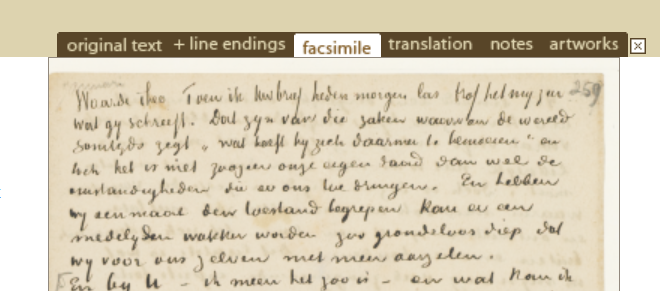
For behaviours whose display is optional, it will usually be possible to tie their display to the state of a user interface component. If we think of the tabbed display used in the Van Gogh edition, the panel to be displayed depends on the state of the tabselector above the panels (Figure 1). In those cases, an implementation of the TEI PM will know that certain content is not needed in the initial display of the page. In other cases, it may be desirable to be able to explicitly indicate to the implementation that processing steps should be postponed until certain content is needed. And there will also be UI functionality whose display is not dependent on a specific state of a widget, e.g., most popups. For a complicated popup, we might also want to be able to provide a directive that its preparation should wait until the popup is requested.
Figure 1: Tabs in Van Gogh Letters
To indicate this situation to the implementation, it might be useful to add to the
TEI model element an extra attribute loadpreference, with the values eager or lazy. The value eager directs the implementation to generate the content immediately; the value lazy means the generation should wait; without the attribute, the implementation is free
to decide what seems most appropriate.
Theoretically, we could also use a param with name loadpreference rather than a model attribute.
An attribute is more appropriate, I believe, because the params will only be evaluated when the decision to
process a model has already been taken. An attribute can be evaluated before processing the model.
Immediate or deferred execution
Whereas the distinction between eager and lazy execution refers to the generation of a behaviour's
own content, the distinction between immediate and deferred execution is relevant to behaviour widgets
that govern the display of other behaviours. Suppose, for example, we have a widget
that determines the sort
order on our edition's persons overview page. When the user changes the desired order,
is that to be
effectuated immediately or only on the next page refresh?
I propose an extra param on the behaviour that defines the widget. The parameter name could be effective, its permitted
values immediate or deferred. In this case the setting is only relevant if the behaviour is generated,
so there is no need to define an extra attribute for the model element.
Maintaining settings
For widgets that allow users to choose certain settings for a display, we can ask
another question.
How permanent should these settings be? For instance, if we choose a text rendering
that signals deletions and
additions in the text, do we want that choice to be applied to the next text that
we open? Do we want it to
be applied when we come back to the text the following day? This can be indicated
in another parameter,
which we might call duration.
Appropriate values could be page, session, browser, and user.
The value user, in editions that have no login feature, would have the same effect as the
value browser.
Proposed behaviours
Many of the questions that I have brought up above obviously need more discussion.
One of the purposes
of this paper is to get that discussion started. To provide some concrete food for
thought,
I propose the following behaviours: conditional-highlight, facs-link,
i18n, language-control, margin-text,
sort-control, sort-order, toggle.
conditional-highlight:
The conditional-highlight behaviour is a minimal version of TEI Publisher's pb-highlight. It accepts the
params additionalCSSClass (that describes the highlighting), key (elements with the same key will be
highlighted), duration (duration of the highlight, in milliseconds), and trigger
(click or mouseover). It can be activated in the following way:[6]
<model behaviour="paragraph">
    <param name="conditionalHighlight">
        <model behaviour="conditionalHighlight">
            <param name="additionalCSSClass">highlightclass</param>
            <param name="key"
                value="concat('para',tokenize(@xml:id,'\.')[last()])"/>
            <param name="duration">1500</param>
            <param name="trigger">mouseover</param>
        </model>
    </param>
</model>
facs-link:
The facs-link behaviour is inspired on TEI Publisher's pb-facs-link.
Unlike pb-facs-link, it cannot, as yet,
send data about a region to be highlighted in the image; it just sends the URL of
the facsimile to be displayed to the facsimile behaviour. It accepts the parameters
url
and content.
i18n:
The i18n behaviour is inspired on TEI Publisher's pb-i18n.
It subscribes to changes in the language-control
behaviour and when these occur, it changes the language of its text content to the
new language.
Currently it accepts
content and language-control params. The language-control param,
which points to the language-control behaviour,
is probably superfluous. I should add a param for the key to be used in the translation
table.[7]
language-control:
The language-control behaviour is inspired on TEI Publisher's pb-lang. At the moment,
the implementation provides the information about languages that should be available.
A parameter
should be added to provide that information from the processing model.[8]
margin-text: The margin-text behaviour has no equivalent in TEI Publisher. It can be used for
paragraph numbers, line numbers, etc.
It might also have been realised as an option on, for example, the
paragraph behaviour, but a behaviour of its own seemed cleaner. Its invocation can look like
this:
<elementSpec ident="p">
    <model behaviour="paragraph"
            predicate="ancestor::tei:text" cssClass="para-plus-num">
        <param name="paranum">
            <model behaviour="margin-text"
                    cssClass="margin" conditional="yes">
                <param name="content" value="string(@n)"/>
                <param name="displayiff">
                    <epm:property
                            part-id="showparanum" name="checked"/>
                </param>
            </model>
        </param>
    </model>
</elementSpec>
The epm:property (epm refers to the namespace for the Edition Publication Model) refers to
the checked property of the widget with id showparanum.[9] That widget is created by the toggle behaviour (see below).
sort-control and sort-order:
The sort-control has no equivalent in TEI Publisher. Its only parameter at the moment is id.
block behaviours that are to be sorted can refer to the id.
The sort-control creates a
drop-down list with the sort orders as defined on the referring block. sort-order as a behaviour has
already been proposed in TEI
GitHub issue 2773. That issue suggests we can leave it to the implementation to
generate the sort-control. To have better control over the location of the
sort-control, I now propose a separate behaviour. The sort-control
behaviour is simple:
<model behaviour="sortcontrol">
    <param name="id">sortselect</param>
</model>
The sort-order behaviour can be specified (repeatedly) as a parameter on the
blocks that are to be sorted.
The specification can have the form of the example below. Here we specify three possible
orderings
for an element. Each ordering is provided with a label (for the drop-down box)
and a key for the sort-order.
<model behaviour="block">
    ....
    <param name="sortcontrol">sortselect</param>
    <param name="ordering">
        <modelSequence>
            <model behaviour="sort-order">
                <param name="label">Date</param>
                <param name="key"
                    value="string(analyze-string(tei:date/text(),
                        '\d{4}')/*[local-name()='match'][1]/text())"/>
                <param name="default" value="true()"/>
            </model>
            <model behaviour="sort-order">
                <param name="label">Illustration number</param>
                <param name="key"
                    value="substring-before(
                        substring-after(
                            ./tei:head[@xml:lang='en'],'Ill. '),')')"/>
            </model>
            <model behaviour="sort-order">
                <param name="label">Title</param>
                <param name="key"
                    value="substring-before(
                        ./tei:head[@xml:lang='en'],' (')"/>
            </model>
        </modelSequence>
    </param>
</model>
toggle:
The toggle behaviour is inspired on TEI Publisher's pb-toggle-feature. However,
pb-toggle-feature (in its client-side version) toggles by setting a CSS class. The toggle
behaviour that I propose here governs the behaviour of other behaviours that subscribe
to it. (We saw above
how the margin-text behaviour stated how its display depended on the state of a
toggle behaviour with id showparanum.)
These behaviours have all been implemented in the Edition Publication Model.[10] The behaviours can be seen at work in the Isaac Israëls letter demo. The demo is based on these PM definitions and has been generated by this implementation.
Conclusion and coda
We have seen that specifying interaction is, on various levels, more complicated than specifying static publications. There exists a great variety of interactive behaviours, and it is unlikely that at a first attempt we get everything right. Accordingly, I have ended this paper with a number of possible interactive behaviours; experimentation is probably the right approach. We're fortunate in being able to build on the work already done in TEI Publisher.
On a personal note: I started working with digital editions and XML in 1999. A few years later I began to think about a declarative specification for edition publication functionality, but that always remained at the level of speculation. Only with the advent of the TEI Processing Model a declarative specification began to seem feasible. And it took a few more years of incubation before I understood that. Now, I'm close to the age of retirement and finally working out these ideas. I also, finally, feel I may have something to contribute at Balisage—and apparently only just in time.
Figure 2: Gartner Hype Cycle 1999
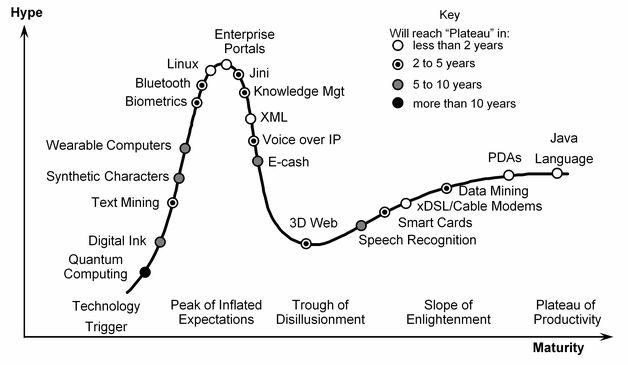
Figure 3: Gartner Hype Cycle 2000
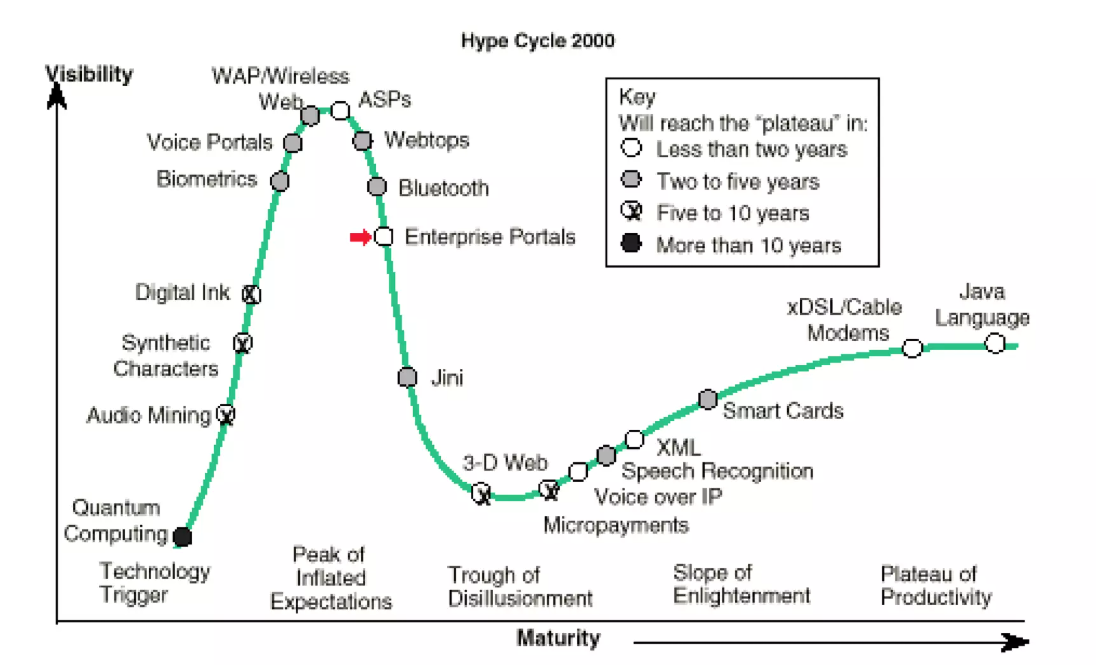
Figure 4: Gartner Hype Cycle 2001
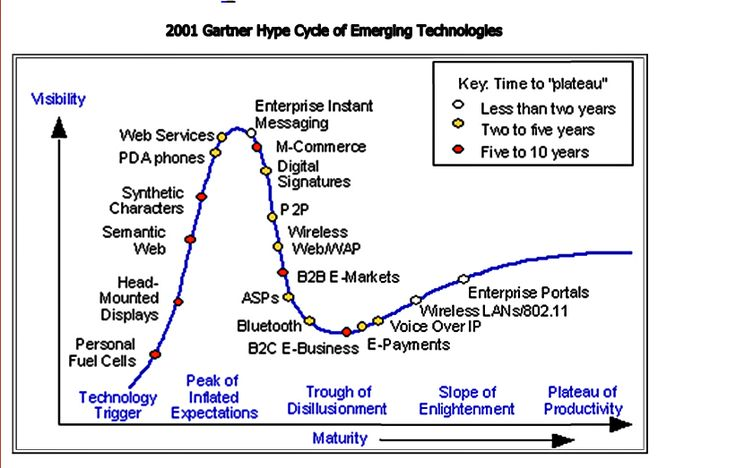
When I joined the XML world, XML was, according to the Gartner hype cycle, just beyond the 'peak of inflated expectations' (Figure 2). In 2000 it was on the 'slope of enlightenment' (Figure 3) and in 2001 it had already progressed so much on the 'plateau of productivity' that it had dropped out of the picture (Figure 4). At least, that is how I interpret its absence from the figure. Apart from following my heart I had also, apparently, made a sensible decision careerwise. But since then, XML seems to have lost the attention of the world. I've sat through a number of presentations on digital edition conferences where someone argued, based on statistics from StackExchange, that XML was no longer hot and that we should switch to something else. And indeed, when I search on Google Scholar for terms relevant to this project, I tend to be shown publications from the early 2000's or even before.
Still, as long as people keep writing and reading, and therefore publishing, we'll need some form of markup. All word processor documents are XML documents internally. XML is no longer that hot, but how hot are, say, relational databases? And as long as we'll have the web, we'll have HTML, and XML will be just around the corner. I'm not too pessimistic about the future of markup languages.
References
[Boot 2024]
Boot, Peter. The TEI Processing Model: Introduction, limitations and potential extensions
.
In Proceedings Declarative Amsterdam. 2024. [Cited 31 March 2026].
doi: https://doi.org/10.1075/da.2024.boot.tei-processing-model.
[Boot [under review]]
Boot, Peter. An edition publication specification for the TEI
[under review].
[TEI Consortium 2026] TEI Consortium. Guidelines for Electronic Text Encoding and Interchange, Version 4.11.0. 2016. [Cited 31 March 2026]. link.
[Helms et al. 2009] Helms, James, Robbie Schaefer, Kris Luyten, Jean Vanderdonckt, Jo Vermeulen, Marc Abrams. eds. User Interface Markup Language (UIML), Version 4.0. Committee Specification 01. 2009. [Cited 31 March 2026]. link.
[Turska, Cummings & Rahtz 2016]
Turska, Magdalena, James Cummings, Sebastian Rahtz. Challenging the myth of presentation in digital editions
.
In Journal of the Text Encoding Initiative, vol 9. 2016. [Cited 31 March 2026].
doi:https://doi.org/10.4000/jtei.1453.
[1] See the Edition Publication Model project.
[2] While the TEI PM was developed in a TEI context, its functionality can be used in the context of any XML vocabulary. For example, the TEI Publisher documentation is written in DocBook but published using TEI PM definitions. TEI Publisher also publishes JATS.
[3] Note this use of 'predicate', essentially as a filter mechanism, is quite different from the meaning of 'predicate' in the RDF world.
[5] The value displayiff is meant to suggest 'display if and only if'.
[6] In the TEI PM, param is an empty element. The code samples in this section use text
content in param, as proposed in TEI GitHub issue 2770, and
model elements in param, as
proposed in TEI GitHub issue 2771.
[7] Currently it uses as key the text content in English with spaces replaced by underscores.
[8] I would not be in favour of allowing the edition creator to provide the code
for an HTML select, as does pb-lang. HTML choices should be left to the implementation.
[9] We stumble upon a problem here: how do we assure the widget has a checked
property? The control that it points to is created in a toggle behaviour, and if the implementation
chooses to use an HTML checkbox for that purpose, it will have a checked property. But the implementation
is not obliged to use specific HTML elements. So maybe it becomes necessary
to specify in behaviour definitions not just the params they accept but also the properties that they
expose to other behaviours.
[10] The implementation of the Edition Publication Model generates static HTML on the basis of Processing Model definitions and some additional settings. The implementation is not meant to be attractive or usable for the creation of real editions. Its only aim is to check whether the proposed constructs can actually be implemented.