Passin, Thomas B. “The Zettelkasten: Topic Maps, Back to the Future.” Presented at Balisage: The Markup Conference 2026, Washington, DC, August 3 - 7, 2026. In Proceedings of Balisage: The Markup Conference 2026. Balisage Series on Markup Technologies, vol. 31 (2026). https://doi.org/10.4242/BalisageVol31.Passin01.
Balisage: The Markup Conference 2026 August 3 - 7, 2026
Balisage Paper:
The Zettelkasten: Topic Maps, Back to the Future
Thomas B. Passin retired from Noblis, a descendant of The MITRE Corporation, as a
Principal Systems Engineer. With an ongoing interest in modeling systems and in enterprise
architecture, he was an early adopter of XML. He is the author of the 2004 book Explorer's Guide To The Semantic Web.
He has long standing interests in Topic Maps, Mind Maps, and highly simplified markup
for exploratory purposes. His 2003 Topic Maps based bookmark manager [Passin 2003] was in essence an ancestral "Zettelkasten-light: application.
His papers from past Extreme Markup Languages conferences can be found here: http://www.tompassin.net
The Zettelkasten ("card case"), introduced by the German social scientist Niklas Luhmann
in 1981, is an external memory system composed of notes linked through explicit cross-references.
A mesh of cross-references allows larger conceptual structures to emerge as the collection
grows. Luhmann regarded his system as an indispensable combination of outboard memory
and research assistant.
Luhmann was known for his exceptional productivity and attributed much of it to his
Zettelkasten. Others have tried to emulate his system with varying degrees of success.
Luhmann's Zettelkasten was entirely paper-based; later times have seen efforts to
computerize the design. Few seem to have achieved or even understood the levels of
engagement that Luhmann wrote about: how his card collection supported fluid thinking,
creativity, and serendipity.
This paper presents a framework for understanding how such a system can achieve Luhmann-level
support, why and how so many users fall short of these ideals. It pulls together aspects
of information theory, cognitive and psychological science, human interface, movie
production practice, Topic Maps data modeling, and library science to illuminate key
concepts underlying highly effective thinking support.
The work reported here is the outgrowth of four main threads dating back to the early
2000s. First was a series of browser bookmarks managers that were in essence lightweight
zettelkastens that worked with bookmarks instead of notes [Passin 2003]. Second was a program to allow writing XML source text, including RDF, in a highly
simplified and intuitive way that relies on a few simple conventions [Passin 2007]. Third was the development of a Topic Maps engine and various applications built
on it. The fourth was extensive experience with systems modeling and enterprise architecture.
Together these threads lead to an understanding that modeling systems need to be highly
adaptable to changes and reorganization, that more semantics is captured by the structure
than by individual information items, and that a flexible and adaptive system needs
to present the user with extreme simplicity and intuitive operation as far as possible.
This paper proposes that successful Zettelkasten implementations must provide very
low cognitive friction so users do not feel impeded by their system. They should provide
an outline-style view, and a user should be able to restructure the outline at any
time in a convenient manner. Metadata is included by extremely simple markup that
relies on a few conventions. Finally, though the underlying model is a Topic Map,
most of the Topic Map machinery and details should be left implicit. This is essential
to keep the cognitive friction low.
Even though the framework presented in this paper seems complex, implementations can
be surprisingly simple. This is demonstrated by the author's third-generation Zettelkasten
implementation.
"So essential do I consider an Index to be to every book, that I proposed to bring
a Bill into Parliament to deprive an author who publishes a book without an Index
of the privilege of copyright; and, moreover, to subject him, for his offense, to
a pecuniary penalty."
— Baron Campbell, Lives of the Chief Justices (1857)
"If a man insists on having infinity in a convenient form — infinity in a box — it
would be hard to find anything better to have it in than a card catalogue."
— Gerald Stanley Lee, The Lost Art of Reading (1902)
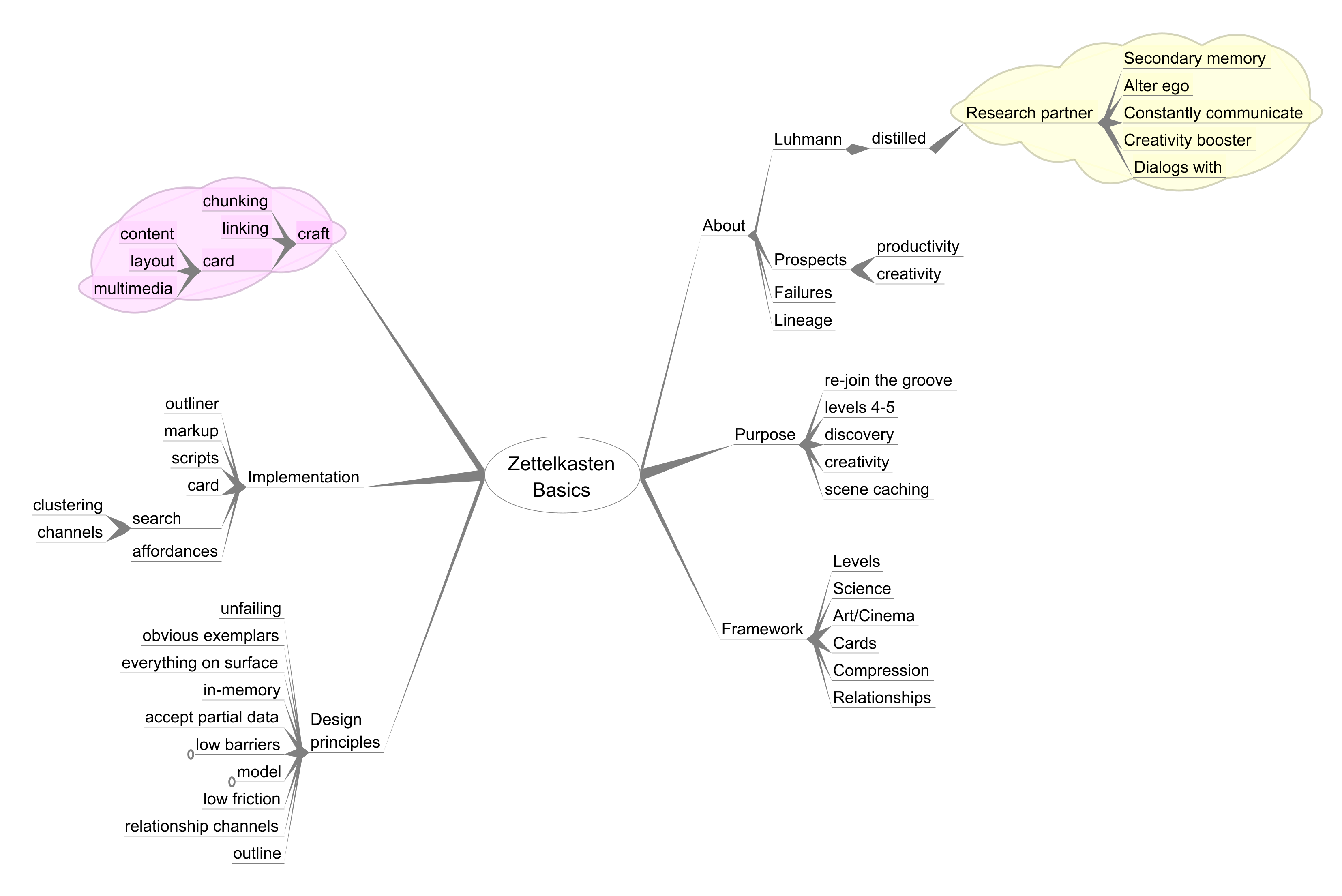
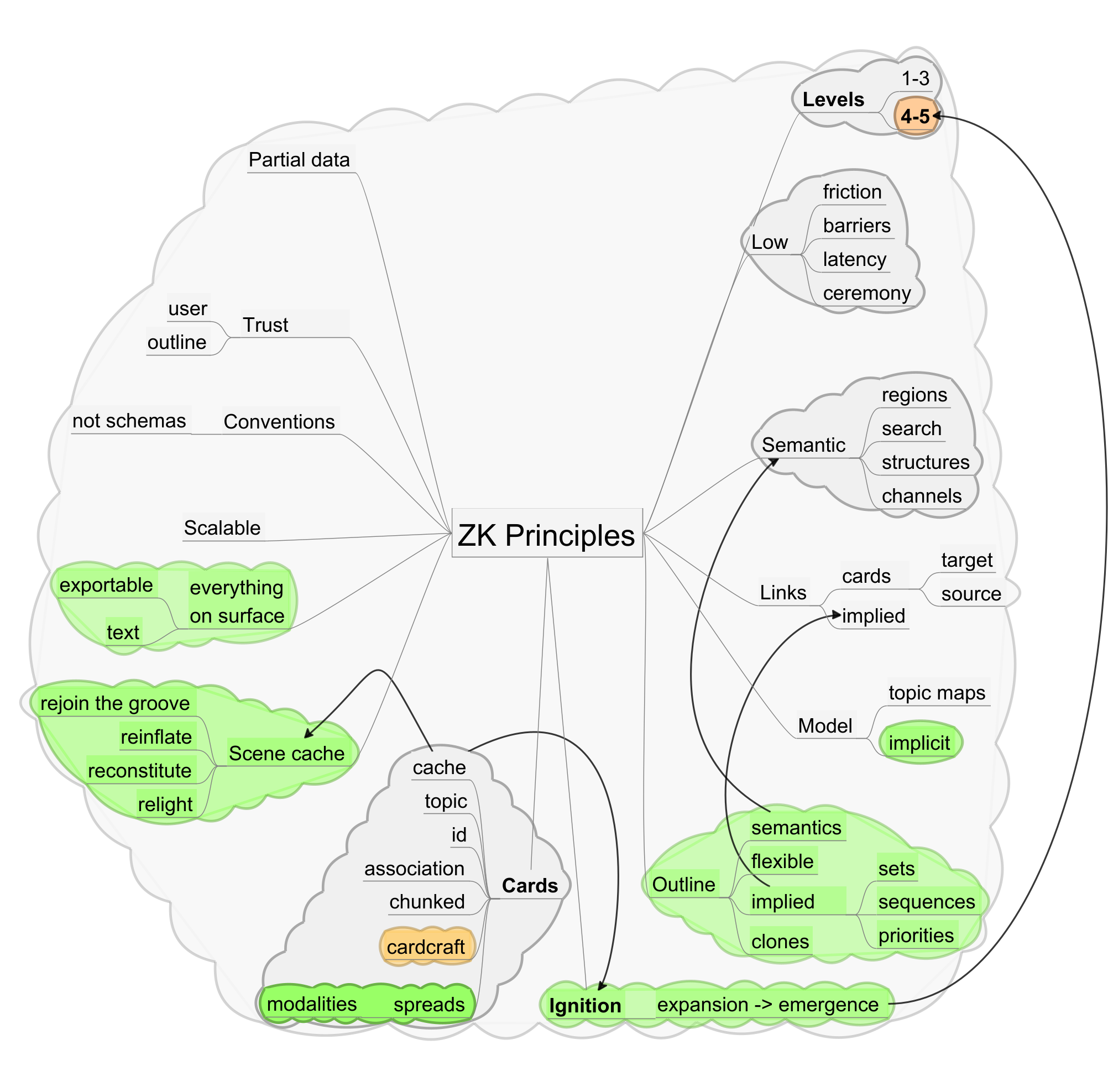
Figure 1: Mind Map Of Entire Paper
1.1 Index Cards and Card Catalogs
The card index — it goes back to at least the 16th century. It blooms in the late
19th and early 20th century. Moving through the late 20th century and into the present
time, much of its utility has been computerized and the physical means replaced. Yet
its essence remains: slips of paper and index cards (and their computerized equivalents)
still store facts, ideas, and quotations.
In German, the slip or card is sometimes called a "zettel", and a box to hold them
a "zettelkasten", or in English, a "slip case" or "card case". Many ways have been
devised to index and organize these cards. In this paper, we use the capitalized version
"Zettelkasten" to mean a particular kind of card case with a particular way of creating
and using the cards, introduced in 1968 by Niklas Luhmann, a German sociologist.
Why does anyone care about some particular variety of card index, especially in this
age of computerization? Because Luhmann was exceptionally prolific and he attributed
much of his success to his Zettelkasten. He even wrote of it as if it was an active
research assistant, one he could have dialogs with. He wrote of discovering connections
he would never have noticed on his own.
The prospect that a particular annotation scheme and a particular usage pattern could
multiply one's creativity is exciting to a small but dedicated group of people. They
hope to emulate Luhmann's Zettelkasten or go it one better. They want some of his
creativity and productivity to rub off on them.
This paper delves into Luhmann's Zettelkasten and its workings, and why computerized
versions have not lived up the their potential. A strong theoretical framework is
introduced, supported by elements drawn from many disciplines, that makes clear the
fundamentals needed for success. The key elements, as distilled from the framework
and experience, are demonstrated by a working implementation.
Some of the topics are touched on only lightly since to go deeper would take too much
space.
This work is the outcome of some 20 years experience by the author in building and
using several "Zettelkasten-light" programs culminating in his current "ZK++"[1] implementation.
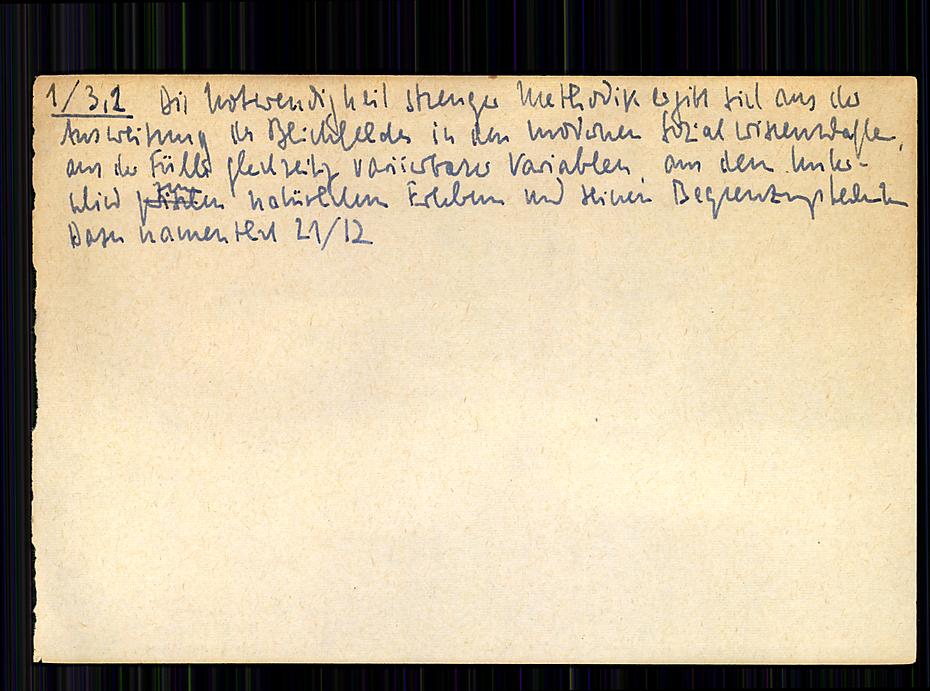
Figure 2: Image of one of Luhmann's index cards
An index card. Its index number is in the upper left; a continuation link follows
the text. Luhmann also used various colored inks for links inserted into the text.
1.2 Topic Maps, Index Cards, and Book Indexes
Slips of paper, then, and much of their content comes from books. Books, non-fiction
ones at least, usually have back-of-the-book indexes. A book without its index stands
sullen and uncooperative, resisting exploration and revisitation. But an index is
a peculiar beast, with inconsistent categories and several modes of referencing. Its
human user manages anyway, with experience, intuition, possibly shared semantics,
and trial and error. For a fuller discussion, see the section titled "What Do The
Folders Mean?" in [Passin 2003].
Computerization comes in the late 20th century, and it expects consistency, uniform
classification categories, explicit semantics — not the human-oriented qualities of
the standard book index.
Topic Maps (the capitalized phrase refers to the data model) was developed to model back-of-the-book
indexes. The model is built around two ideas: the topic, which represents anything that can be discussed, and associations between two or more of them. Details, such as the content of those discussions, make
the computerized version complicated, but the ideas are simple.
The essence of index cards and book indexes can be modeled well by a Topic Maps model.
1.3 Back to Simplicity
Many if not most computerized ZK systems are complex to use because they expose too
many moving parts to the user. They tend to be carefully structured, making it hard
for a user to deviate from the structure.
Even with a somewhat more flexible system, few users seem to have grasped how to use
and operate a ZK to best advantage.
This paper brings back the flexible, adaptable, human-based nature of a back-of-the-book
index, using the gist of Luhmann's linking ideas, the theoretical framework, and an
implicit Topic Maps model. It presents design principles that can be used when creating
a practical system. The paper presents a way of creating effective zettels — note
cards — using a simple markup language combined with a few conventions.
Even with all the above, an effective Zettelkasten depends on a degree of craftsmanship.
The system, computerized or paper-based, cannot succeed without this human aspect.
By incorporating the framework, the design principles, and the craftsmanship aspect
it is possible to create a modernized Zettelkasten system that surpasses Luhmann's
paper-based card case in ease of use and effectiveness.
2.0 The Longing
People read of Niklas Luhmann's work and his productivity, and want some of it too.
But Luhmann's writing on his Zettelkasten was hard to understand, even in the original
German let alone in translation. This has lead to widespread misunderstanding of the
fundamental workings of his system. This has caused would-be users to think of their
own ZK efforts as being useful but not transformative, as they had hoped. They have
also failed to realize its full potential.
Here are some examples of Luhmann's observations, translated from his own zettels
[Luhmann 2022]. See how they are idiosyncratic, more in the nature of reminders to himself than
paragraphs of published writing.
As a result of extensive work with this technique a kind of secondary memory will
arise, an alter ego with who we can constantly communicate.
There is also more information than was ever stored in the form of notes, The slip
box provides combinatorial possibilities which were never planned, never preconceived,
or conceived in this way.
Luhmann wrote of being in a dialog with his ZK, of how it would have a different way
of seeing relationships than he, and how that difference stimulated his productivity.
But more inscrutably:
The productivity problem has to be based on a relation, namely on the relation of
Zettelkasten and user.
Zettelkasten as a cybernetic system. Combination of disorder and order, of lump formation,
and unexpected, in ad hoc access realized combination. Prerequisite: Abandonment of
fixed order. The upstream differentiation: Search aids vs content; index, questions,
[spontaneous] ideas vs what already exists, reshapes and makes in part obsolete the
inner order that must be assumed.
2.1 Luhmann on his Zettelkasten
Luhmann was more forthcoming in his published writings on his ZK [Luhmann 1981], but even so he is hard to fully appreciate.
A loose ZK organization, leaving room for the unexpected, the surprising search result,
is a feature not a bug:
If a communicative system is to hold together for a longer period, we must choose
either the rout of highly technical specialization or that of incorporating randomness
and information generated ad hoc. Applied to collections of notes, we can choose the
route of thematic specialization (such as notes about governmental liability) or we
can choose the route of an open organization. We decided for the latter. After more
than twenty-six years of successful and only occasionally difficult co-operation,
we can now vouch for the success or at least the viability of this approach.
The person is always going to be an essential component, and the structure of the
ZK is going to be an important part:
Naturally, the route that creates a partner in communication that is meant for the
long haul, is open, and not thematically limited (but only limiting itself), makes
certain structural demands on the partners. You might, given the great trust that
is still being put in the abilities of human beings, trust that I fulfill these presuppositions.
A ZK must not be highly classified or ordered:
For the inner life of the card index, for the arrangement of notes or its mental history,
it is most important that we decide against the systematic ordering in accordance
with topics and sub-topics and choose instead a firm fixed place (Stellordnung). A
system based on content (like the outline of a book) would mean that we make a decision
that would bind us to a certain order for decades in advance!
2.2 The Exciting Prospect
So Luhmann had found that his ZK acted as a partner in his research, that it worked
over a long span of his productive period, and that over-organizing the contents was
entirely counter-productive. Most people read these passages as saying that they could
write better notes and link them according to Luhmann's examples, and that they would
gain access to the notes; they would somehow by serendipity find a fount of ideas.
And who wouldn't want that? The vision has stirred many practitioners.
2.3 The Grind of Reality
In actual practice, many people who got excited about the ZK prospect ended up drifting
to other note-keeping approaches. Others write up their successes — usually successes
in improving their papers, books, or graduate level theses.
One rarely reads about ZK users having the experiences that Luhmann wrote of — fruitful
serendipity, unexpected dialogs with the system, large creativity enhancements. Much
of the writing seems to be about workflow and numbering aspects of keeping notes.
Some key part, some critical understanding, seems to be missing.
2.4 Book indexes and topic maps
Topic Maps were developed to model back-of-the book indexes. The model turned out to be fruitful
beyond its original target. The heart of the Topic Map model, the topic, maps directly to a zettel, that is to say an index card or, as we will also write,
a z-card. A z-card is a representation of a topic because it contains (or should contain) a subject that is the object of discourse,
that can be talked about, annotated, and have related data attached to it.
Topics can be related by associations, and these connections can be instantiated by links to other cards and backlinks
from them. A card's title maps to a topic's name attribute.
Topic Maps has much more machinery, such as roles and scopes, but these can be considered to be either specialized forms of associations or annotations.
In this way, Topic Maps provides a principled grounding for the ZK card-and-link construction. One could
create a formal Topic Map system underneath a ZK-like user interface.
It could be done, but that is not the direction of the work reported in this paper.
The reasons will become clear. Yet the Topic Map model remains valuable in that it
provides a clear underlying model for the z-cards and their links. The model also
gives guidance for the structure of cards.
2.5 The prospect — practical knowledge management
ZK enthusiasts seem to see their ZKs as a special kind of Personal Knowledge Management
(PKM) system. This is not wrong, but it is limiting, as will be seen. By applying
the framework mentioned earlier, combined with examples and pieces of information
theory, library science, cognitive science, Topic Maps, mind mapping, human interface,
movie production practice, and more, this paper provides both understanding and guidance.
2.6 Lost in a sea of ceremony
A person engaged in fluid, creative thinking and research should not be hindered by
the system. Dialog boxes, database popup dialogs, predefined or complex schemas, too
many finicky details, all conspire to block the state of flow. Their irritation factor
becomes more and more intolerable. More and more mistakes get made. Inspiration and
unexpected associations become more rare.
Some ZK computer systems keep each note in its own separate file. This incurs latency
in opening the notes, but worse, the design cannot scale to large numbers of z-cards.
Luhmann's own biggest ZK contained some 90,000 index slips. Any solution must be able
to scale to many tens of thousands of z-cards.
The Topic Maps model in its fullest form contains far too many structural details to be practical
for a user to deal with on the fly. Even though Topic Maps provides a solid intellectual foundation for the structure of a ZK, it is necessary
to bypass much of the detail, because handling the detail consumes far too much cognitive
power and interferes with the flow too much.
ZK practitioners need a way to improve on Luhmann's manual, paper-based system by
reducing the ceremonial or boilerplate barriers, not by adding to them.
2.7 Users in Letdown
We feel a tension here. ZK enthusiasts searching for a key to unlock their own productivity
as Luhmann did; feeling let down when that didn't happen. Or for some, they got real,
tangible improvements in their research or their writing, but somehow keep missing
out on some extra dimension that their reading of Luhmann's accounts offered. What
was it? There must be a way!
3.0 The Framework
There is a way. The way has been implicitly known by artists, craftsmen, playwrights, and
the like for a very long time, but it's not to be found solely in computer technology.
Rather, the technology must provide the environment, the fluidity, the support. A
Zettelkasten can be more than a searchable file cabinet.
This section highlights elements that when put into play make this possible. They
are drawn from psychology, information theory, cognitive science, library science,
and personal experience. These elements, and others introduced in later sections,
point the way to designing and using a ZK beyond plain notes in a file cabinet.
3.1 The Levels of Thinking Support
Systems that support thinking can be seen as supporting as many as five levels of
activity. This 5-level framework illuminates the ways in which these systems, including
the Zettelkasten, are able to assist users. It also makes clear how many users limit
themselves in how they make use of the assistance.
Table I
Level 1
Facts
What paint I used last time I painted this room
Level 2
Threads
Chains of thought, steps of an argument, related facts or ideas
Level 3
Extension
Create new threads, e.g., for writing
Level 4
Expansion
Connections
Level 5
Emergence
Spawning new discovery and creation
Users operating at levels 1 - 3 are operating in an essentially linear manner. The
system may be helping them get work done, good writing, for example. It may even help
them find unexpected connections from time to time. This is the world of the ordinary
search engine, the world that seeks both high relevance and high precision of recall
with its search functions. There are many systems that help organize their users'
notes into searchable collections, and many users drift from one to another.
Luhmann cautioned against letting a ZK devolve into this kind of functionality. According
to him, it works against the kind of engagement that he found so valuable. The current
paper claims that Luhmann was so limited by the confines of the paper-based notes
that a note system could only act effectively as one or the other. With the right
computerized support, the system can function on all five levels.
Deep down, Levels 1 - 3 represent competent but uninspiring support for a user. They
are important in a comprehensive thought support system, but they do not usually cause
users to talk as Luhmann did of his Zettelkasten experiences. This all changes with
levels 4 and 5.
3.2 Levels 4 and 5 - The Heights
Once again, the higher levels:
Table II
Level 4
Expansion
Connections
Level 5
Emergence
Spawning new discovery and creation
These are the levels that Luhmann wrote about in his difficult prose. Here is the
support for the results he claimed. Here is the prospect that excited new ZK users,
and here is where many have felt let down. They felt let down because they didn't
grasp what these levels were all about and didn't know how to (or could not) use their
systems to its fullest extent.
Levels 4 and 5 provide for happening upon new connections, for ideas that pop, for
new papers that ask to be written, for what Tony Buzan called "Radiant Thinking" [Buzan 1993].
The rest of Section 3 fills in the missing parts and forms a base for understanding
the ways that a person can use their ZK to promote Level 4 and 5 engagement.
3.3 The Scene and the Creative Act
Caching Creativity
Have you taken notes at a meeting and been able to bring it all back into your mind
five years later? The author has. He took notes in the form of mind maps. Five minutes
with the mind map re-installed the meeting in his head. The mind map helped rebuild
the connections in his mind and the meeting came back to life.
The meeting created a "conceptual scene", or a "cognitive stance" in the author's
mind at the time. The mind map helped to rebuild it five years later. Another case
of scene restoration comes from cinematic practice. When a film scene must be continued
on another day, the director, the cast, and the crew must all be synced up on the
physical, mental, and emotional state at the close of shooting on the previous time.
Common techniques to re-create the conceptual scene are marked-up scripts, continuity
notes, rushes (roughly edited film clips), actor's marks, and lighting charts among
others.
In a like way, creative activity carried over from one time to another requires a
way to bring back the conceptual scene to the mind of the user. Other terms are "inflate",
"reconstitute", "relight", and "rejoin the groove". Whatever the term, a person in
a creative state has created a mental scene. While the scene is alive, it tends to
expand itself, either by filling in more details or by sparking new ideas. The person
feels more alive, and ideas pop.
Scenes fade from mind (more in Section 3.5). A Zettelkasten that can help rebuild
them is a zettelkasten that provides Levels 4 and 5 support. When a creative effort
is spread out over time, even from one day to the next, at every return a user needs
to reconstitute his mental state as best as possible. Psychological science has a
concept of "Retrieval Cues", which help to retrieve information. [McDermott and Roediger 2015] advise "The key to good retrieval is developing effective cues, ones that will lead
the rememberer back to the encoded information".
We would like a Zettelkasten to prompt the retrieval of memories, yes, but a conceptual
scene involves more than episodic memories. It is a state, not an individual collection
of facts, and that state is complex and may be multimodal.
Simply put, a Zettelkasten should function as a scene cache.
3.4 Truth And Fiction
An Example: Stimulating Creativity
By way of illustration, the present author created an imaginary footnote in an imaginary
book. Then ideas started to pop.
The work is a (fictional) review of a (fictional) novel. The footnote:
"The characters of Sally and Martin, in chapter four, keep circling each other in
a curiously formal way, with modifications at every turn. It has been overlooked before,
but their actions mimic very closely the courtship ritual of the peacock."
On reading this over, the (real) author discovered that he:
wanted to re-read the chapter because he never noticed this
wanted to read up on the peacock's courtship ritual to see if he agrees
wanted to read up on other animal courtship rituals to see if they might map even
closer to the book's story
wondered if other books have incorporated (on purpose or otherwise) similar known
mating rituals
wondered how many other parts of books are drawn directly from animal behavior
and wondered how many other stereotypic human activities appear to be similarly ritualistic
Here a single footnote has stimulated a surprising array of interesting notions and
research directions - and even though it was imaginary, the responses were real. They
came as a surprise to the author, one right after another. A well-crafted z- card
in a good ZK can do the same. Of course, the user has to be receptive at that moment.
3.5 Fading
Any idea, and especially a new or complicated one, tends to fade over time. Everyone
knows this. It's just as true for the intense, creative conceptual scenes that were
introduced in Section 3.3. Even vivid ones fade away, leaving only relics. Later
even these may fade, and one can forget their very existence.
This is not a tragedy, but a fact of life to be dealt with. These scenes, these traces
of creative activity, are the most valuable of all to preserve. Notes are one common
way to deal with fading, and if a ZK cannot bring something to this party, it will
not be worth the effort. There is more to the anti-fade story than just note cards,
text, and search.
A conceptual scene might involve a cartoon, a musical theme or fragment, an abstract
painting, a painter's sketches, and so on. If the ZK can manage to include other modalities
in addition to text, it can be more powerful.
3.6 Saccades
The human vision system can only view sharply a small part of the the whole field
of view. The eyes jump from place to place quickly, favoring the most interesting
or relevant bits, to build up the illusion that the view is sharp everywhere. These
movements are called saccades.
The brain cannot keep this composite image intact for long, and parts start to fade.
Saccades can refresh them. A similar phenomena takes place in working memory - the
parts start to fade and need to be periodically refreshed. One needs to revisit the
parts to keep them in mind. People can learn to keep more pieces in temporary memory,
but there is always a limit. For example, how many sections of the outline of a technical
paper can the reader remember? The author? If the paper has four main sections, these
can probably be remembered, and something about each one. If it has a dozen, probably
not as much can be thought about without some aid, perhaps re-reading or taking notes.
The parts kept in temporary memory can have structure, and this structure can hold
more information than simple facts. These structures are often called chunks. Claims that the human brain can hold about 6 chunks in temporary memory are commonly
assigned to Miller (who, however, wrote that this claim is such an oversimplification
that he wished he were not associated with it) [Miller 1956].
A Zettelkasten system, then, should help and not hinder these mental saccades.
3.7 Surprise and Information
According to Shannon's information theory, a message must contain some unexpected
information or it might as well not have been sent. It does not add to the recipient's
information. Here a message with no content is called a null message. Filling up a ZK with null messages is pointless. Only a message that conveys a surprise
is worth while, that is if we want to support Levels 4 and 5 of thinking support.
A message is more than the sum of its parts. No one part may convey much. The whole
pattern of the message is needed. Likewise we will be well advised to pay attention
to the patterns we create in a ZK. Niklas Luhmann wrote about his ZK talking to him,
having conversations. For this to happen, we have to be able to decode the messages
and they need to surprise us. A message might surprise us because we have forgotten
its content; because it is vivid at a time when its trace has faded; because we are
receptive in the moment and it sparks a connection.
"The ability to find valuable or agreeable things not sought for" [Merriam-Webster] is called serendipity. When these valuable or agreeable things show up as we work with our ZK, we want
to be able to notice, and the way they are patterned helps make it happen.
Level 4 support promotes serendipity.
When the structure of the system emerges without being completely designed, then unexpected
patterns can be exposed.
3.8 Purpose
To realize a Zettelkasten's potential, it is clear, a ZK needs to strongly support
Levels 4 and 5: Expansion and Emergence. We seek to enhance discoverability, serendipity,
and creativity, and to cache conceptual scenes so that the user can rebuild them later.
Levels 1 - 3 are not left out, but many Personal Knowledge Management systems provide
good support for them already. Here we are interested in moving beyond them, to bring
back the special qualities that Niklas Luhmann wrote about. We may even be able to
surpass him.
The path to this goal depends on design and implementation considerations. A variety
of views into the system's information are better than one or two. There must be a
minimum of ceremony and gestures so that a user's flow is not hindered. The system
must be able to scale up to tens of thousands of z-cards and retain low latency. Flexibility
must be built in so as to adapt as the user's concepts evolve.
A Zettelkasten system for the current era should be thought of as a cognitive instrument or a cognitive workspace, in contrast to a database with good retrieval, or to a sophisticated note repository.
But technology alone is not enough. The user must bring a degree of craftsmanship
to devise effective z-cards, position them, link them productively, and to create
semantic neighborhoods.
4.0 The Amen Corner
This section expands on some of the concepts introduced in Section 3. This will prepare
the way for the design and implementation sections to come.
Advice about how to write a zettel — the actual slip or index card itself — frequently
emphasizes that a card should be "atomic". However, the term "atomic" does not seem
be well specified. It is used to indicate one idea per card, one idea together with links and meta data, or atoms as knowledge-building blocks, among others.
The use of the term "atoms" is reminiscent of the triples of the Resource Description
Framework (RDF). In the practical world of everyday objects, though, most building
blocks are molecules, not atoms. The topics of the Topic Maps (TM) model are more like molecules of knowledge. A topic is a subject of discourse, that is, something we can talk about. Topics are usually
associated with other topics by means of associations, which are themselves topics since an association is a suitable subject of discourse.
Z-cards are best thought of as being TM topics and associations.
To support Levels 1 and 2 of the Levels of Thinking Support, a card need only contain
a short reference, quote, or summary, plus a title suitable to help with search.
A few links to other cards may be useful. To support Level 3, cards may need to contain
coherent parts of a sequence or argument. Here, "coherent" means a part that can be
talked about in its own right, even if it is a part of a larger subject.
To support Levels 4 and 5, cards and their semantic neighborhoods need to do more.
They need to activate the practitioner's mental associations so as to re-awaken the
conceptual scene of its creator when the card was created. They should aim to serve
as a cache for that scene, as mentioned earlier. They should work with the brain's
natural ways of functioning as far as possible.
4.1 Chunking For Fun And Profit
Beyond What They Tell You
Even if a z-card is at heart a Topic Maps-style topic or association, there is more
to crafting a Level 4 or 5 z-card than just making it a coherent subject of discourse.
Chunking is a well-known way to extend a person's "span of immediate memory". With exceptions,
most people tend to be able to keep a mere handful of items, typically roughly seven,
in active play [Miller 1956]. These items can be structured, and the mind will still treat them as units. These
structured units are sometimes called chunks.
To be the most effective for bringing the material back, it should be recoded, that is, rewritten by the practitioner (e.g., [McDermott and Roediger 2015]). Breaking it up into chunks is one way of recoding; rewriting its parts is another.
To create a good Level 4-5 z-card, therefore, the practitioner should craft the material
as coherent, well structured, recoded chunks, not too many. Working through this process
will help the practitioner keep the card material in mind while working with it, and
will help bring it back to mind later. The chunks should be arranged physically on
the z-card so that they stand out, thus attracting the eye.
Chunking will repay the effort. Do not forget it.
4.2 Doing The Work
Cardcraft and Engagement
A Zettelkasten-like system cannot rely on mechanical means alone to promote Levels
4 and 5 thinking support. The practitioner must be involved with the work at every
step. The involvement happens in several areas:
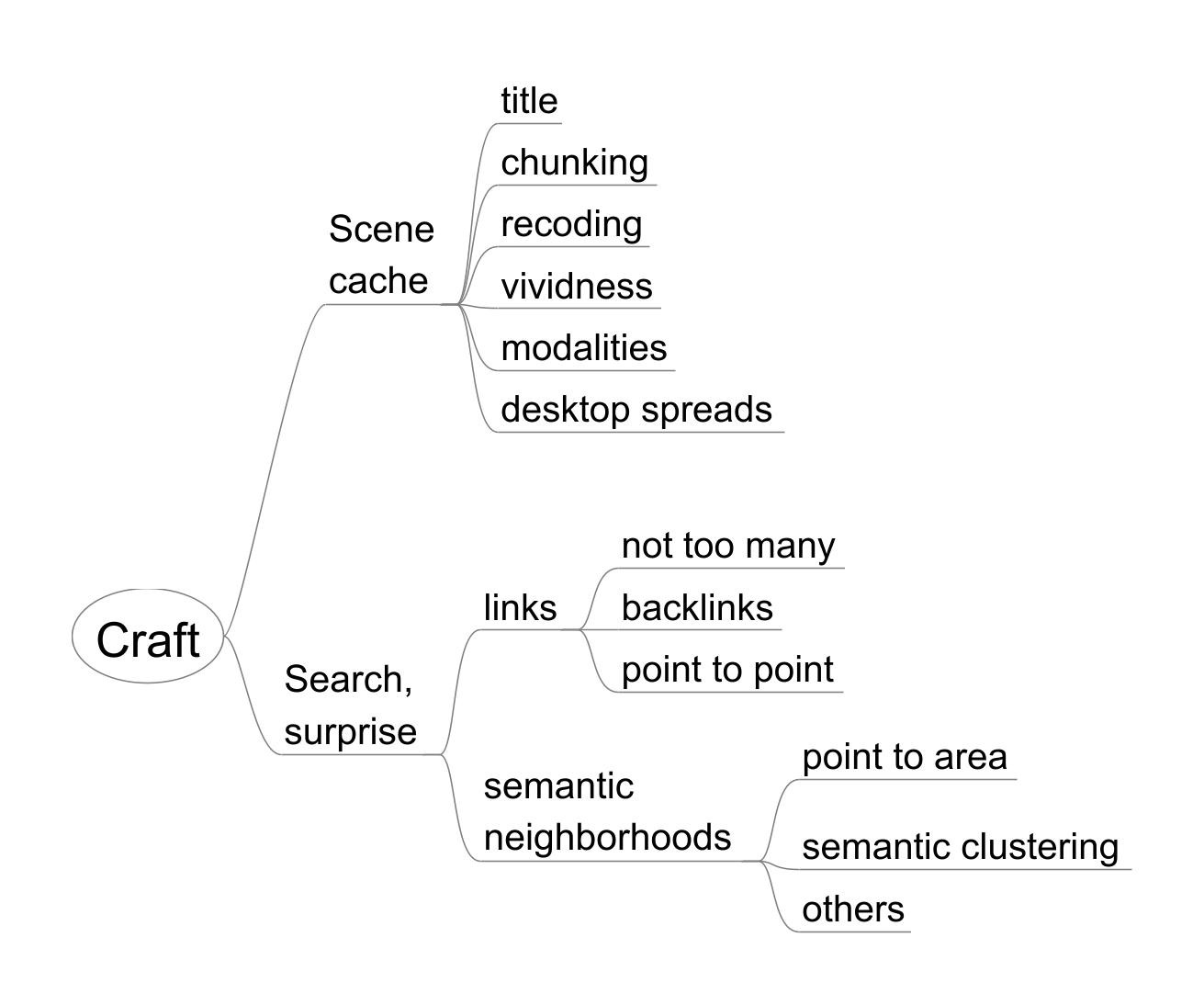
Scene caching - For a z-card that is to function to refresh a conceptual scene, the practitioner
needs to craft the z-card with care.
Search Awareness - The practitioner must use his own semantic understanding to locate the z-card in
good semantic neighborhoods that can be surfaced during searchs.
Receptivity - The practitioner needs to be receptive to noticing interesting but unexpected ideas,
words, and directions of thought while searching or working with the z-card collection.
The mind map at the start of this section depicts some aspects of scene caching and
search awareness. Some of them are discussed here, some in earlier or later sections.
The activity of creating and tuning up effective z-cards is called cardcraft. Good cardcraft is a learned skill.
Table III
Facets of Cardcraft
Facet
Remarks
Title
Titles should be vivid and distinctive for searching
Chunking
Card content should be chunked into small, coherent units
Recoding
Content is most memorable when rewritten by the user
Vividness
Card content should be vivid and well laid out
Modalities
Cards can contain or launch non-textual views of the car content: mind maps, images,
etc.
Desktop Spreads
Emulate spreading several cards or other modalities across a desktop, as if laying
out physical index cards
Table IV
Facets of Search
Facet
Remarks
Links
Links, including backlinks, to other cards help find related material, but too many
lead to clutter.
Semantic neighborhoods
Areas or clusters of cards with semantic similarity
Kinds of similarity
Semantic, lexical, implied by location, others
Links provide point-to-point connections between individual cards. Searches are usually
more productive if they point to an area or neighborhood of semantic similarity.
Z-cards with similar IDs tend to form such a neighborhood (as with Luhmann's numbering
system). If z-card IDs are arbitrary, other ways will need to be found to replace
numbering-based grouping.This kind of collocation is valuable, but other ways of establishing
related areas can be more effective. This is covered more fully in Section 4.6.
Most searching will search titles, and results will be displayed as z-card titles.
Search results can be presented clustered by neighborhood or context, when they can
be deduced. Clustering search results is a proven way to improve the productivity
of searching. So good z-card titles are essential: another aspect of cardcraft.
The importance of cardcraft is a manifestation of a more general truth. A Zettelkasten
is a tool. The practitioner is the tool user. The practitioner has to practice.
Figure 3: Cardcraft
4.3 Scene Caching - A Missing Link
Scene caching (see also Sections 3.3 and 3.5) does not seem to be discussed in online
posts about how to make effective use of a Zettelkasten. Yet as has been seen, for
many creative endeavors reigniting a mental state is most important. It is a way to
carry over the work from one time to another. Its purpose is to counteract the normal
fading of memories. Even within a single z-card, the refreshment provided by mental
saccades (section 3.6) is valuable.
Crafting a z-card so that it brings back a scene (Section 4.3) is part of the caching
story. Scenes may include a wider view than a single card can provide. Temporary semantic
clusters can be set up in various ways. Non-textual views of the subject can be displayed,
possibly including embedded images. Multiple views of the same card can be opened.
A card can be rendered, for example, by a ReStructured Text or Markdown processor
for better legibility.
Views of several cards can be opened and displayed at the same time, much as physical
index cards can be arrayed on a desk. This kind of display is called a "spread" in
this paper.
It may be that a particular implementation cannot do all of these things, or can do
them but with too much effort on the part of the practitioner. The more such techniques
can be easily used, the more support for these creative activities the system can
give. Lack of them does not mean a given system has no value; only that its support
is less capable than it might have been.
A good slogan could be "Keep it in mind".
4.4 Modalities
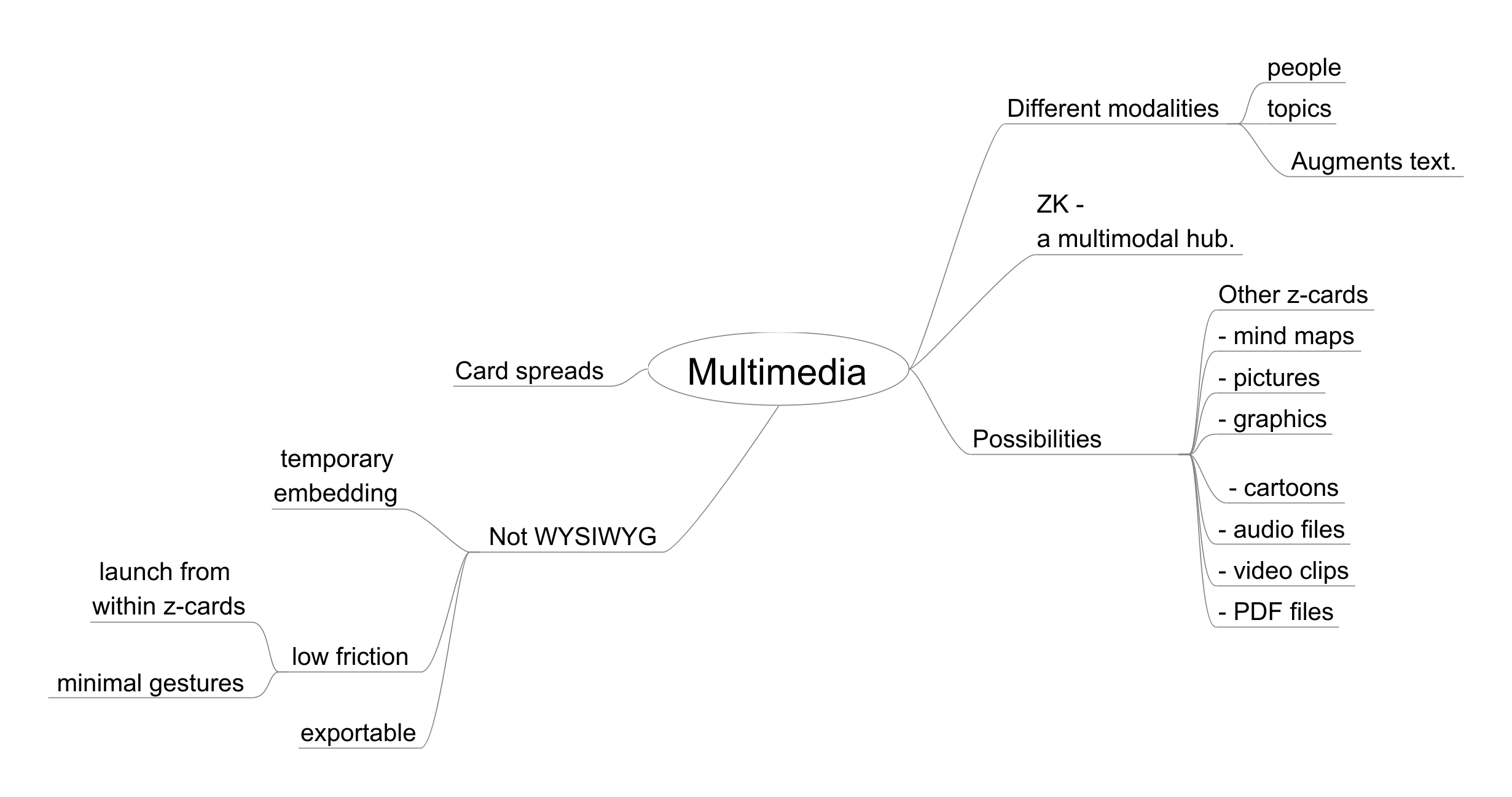
Figure 4: Multimedia Modalities
In Section 4.2, using different multimedia modalities was mentioned as a way to increase
a z-card's ability to bring a conceptual scene back to mind. They can also be a help
during other activities one might perform in connection with a Zettelkasten. For example,
the author enjoys sketching out the structure of papers and their sections using mind
maps. Keeping the mind map visible during composition is a great help. When this
can be accomplished from within a card itself, there is hardly any cognitive barrier
to doing so.
In fact, the author had three mind maps open plus a live rendered view of the section
itself in a second monitor during the drafting of this very section. One mindmap had
the plan for this subsection, one had the design of the larger Section 4, and a third
had the plan for the subsection on searching. A rendered live view is especially
helpful when tables are to be included, since it can be hard to know whether they
will look right otherwise. In addition, the mindmap could be opened in the mind map
editor from within the very passage being worked on. The few lines of simple markup
that allow for all this were removed before the paper was finalized for publication.
The mind map at the top of this section shows a range of possible multimedia files
that someone might find useful. Different people find different modalities work better
for them. The ability to launch a variety of file type from within the cards themselves
turns the Zettelkasten system into a kind of multimodal semantic hub.
The mind map asserts that WYSIWYG-style embedding is not desired, although temporary
embeddings are fine. This is because as will be seen later, one of the proposed design
requirements is that all the information in the ZK should be "on the surface", meaning
not hidden in special encoding techniques or a database but shown on the surface of
the cards. This is to allow all the contents of the ZK to be exported in text format
in a way that is easy to parse. Without this requirement years' worth of data and
cardcraft could not easily be exported and re-purposed for another system.
Pictures, diagrams, mind maps, and other modalities add greatly to the experience
of working with a good system. Don't hold back, use them
4.5 Where Hast Thou Been Forever?
The Joys Of Outlining
The term "Semantic Neighborhood" was used earlier (Sections 3.8, 4.0, and 4.2). It
represents the concept that cards about similar things should be clustered "nearby"
in some sense. Clustering can be surfaced in the display of search results. Luhmann's
card numbering system caused some related cards to be filed physically near each other.
Various ways of relating cards by their concepts - here called "semantics" - can be
thought of as semantic "channels". The more kinds of semantic channels, the richer
the card collection and the more productive searching will be.
Some computerized Zettelkasten systems link cards by their title. This design abandons
the channel of propinquity - there is no numbering system that groups related cards.
Keywords provide only a weak channel, as will be seen later. Filters are similar to
keywords in this regard. So these systems have only a few, impoverished semantic channels.
Luhmann's numbering system, although sometimes written about as if it were esoteric,
is actually a minor variant of the method used in almost all technical reports. It
is a hierarchical system that can be subdivided indefinitely. In a word, it is an
outline, though an implied and awkward one. Outlines are a tried and true way to relate
and differentiate material that has some similarity in the mind of the author.
Luhmann himself cautioned against imposing an outline on the Zettelkasten. But he
meant an rigid, predefined outline structure that has little to do with how the practitioner
thinks, and cannot grow and adapt over time. This is clear from his remarks, as quoted
in Section 2.1. The restrictions imposed by the paper-based nature of his ZK system
prevented him from using a full-fledged flexible outline. In a computerized ZK these
limitations can be removed.
An outline as used here is a first class object that is structured quasi-hierarchically
(though its contents do not need to form a strict hierarchy), looking like a tree
view. The names, locations, and nesting depth of the nodes are independent of the
z-card content. They reflect the practitioner's view of the semantics. Nodes contain
a label and a text block, which for a ZK is the text of a z-card. The ability to clone
a node and put it into a different part of the outline is a highly desirable feature.
By contrast, the treeview in a typical programmer's editor is created automatically
based on the code structures in the program text itself. The two kinds of outlines
may look similar but are profoundly different.
The children of a node may have a variety of relationships to their parent. For example,
they may form a sequence or a set. They may be related by some intangible sense. They
may discuss different facets of a larger subject. The outline will be composed of
many nodes that contain no text but serve as organizing points in the outline. These
nodes, with their titles, are not zettels but are crucial to the semantic content
expressed by the structure. The outline must be easy to change and restructure over
time to reflect the changing concepts of the practitioner.
Library science has the concepts of navigation and collocation. These are described in [Svenonius 2000] this way:
Table V
Navigation
To navigate a bibliographic database (that is, to find works related to a given work
by generalization, association, or aggregation; to find attributes related by equivalence,
association, and hierarchy).
Collocation
To locate sets of entities representing ... All documents defined by "other" criteria
Luhmann's paper-based system mixed navigation and collocation together. The numbering
system was needed to find a card by its location in the card drawers, and collocation
was provided by having cards that were numbered together located near each other.
With a good outline, these to capabilities can be separated, just as they are in a
physical library. In the latter, one searches a card catalog to find a likely shelf
location, then goes to that shelf and scans for the actual work. The scanning often
leads to serendipitous discoveries. The same can happen in an electronic Zettelkasten
system when parts of the outline are scanned.
Here is a list of types of semantic channels that a ZK with an outline can provide.
Only a few are directly related to the individual z-cards themselves.
                - Card-based
                    - links
                    - titles
                    - keywords (if used)
                - Outline structure
                    - sequences
                    - neighborhoods
                    - implied relationships
                       - Creating a temporary tree of clones of selected z-cards.
                       - Promoting or demoting certain cards in the tree
                - Propinquity (creates new semantic neighborhoods)
                    - Spreading several z-cards around as if spread out on a desk
                    - Multi-modal embedding; spreading as if on a desk
                - Search Results Clustering
                    - by contextual neighborhoods
                    - by organizer nodes
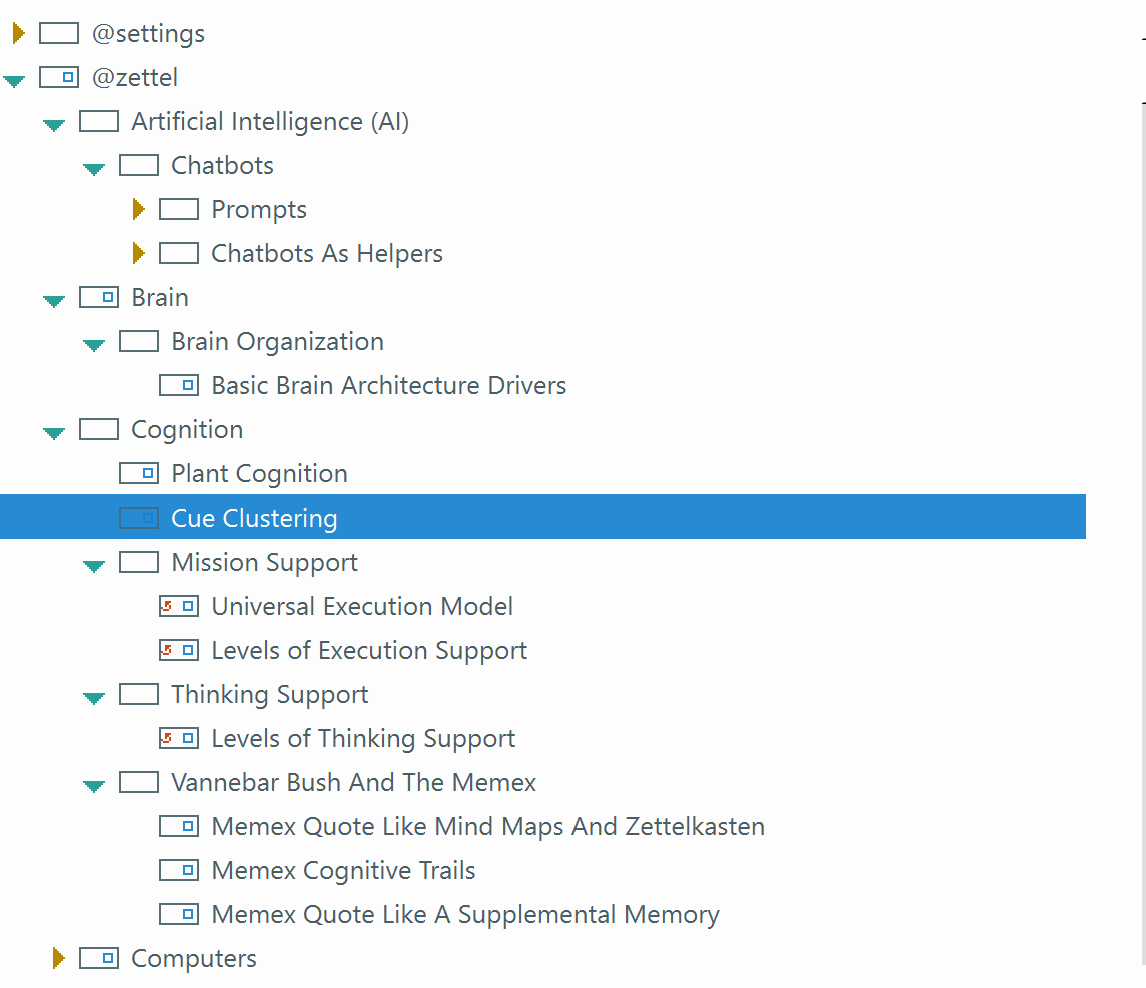
Here is a portion of the author's ZK outline:
Figure 5: Example of an outline
A search for "cue" intended to find more about cue retrieval would end up in a semantic
neighborhood containing other topics somewhat related to "Cognition". If the practitioner
is receptive he might notice the cards on Vannebar Bush's Memex and wonder if Bush
mentioned retrieval cues (he did).He might notice that the icon next to "Levels of
Execution Support" indicates that this is a cloned node and wonder where else the
card has been cloned. He might wonder in what sense plants could be said to have
"cognition" and pursue that as an interesting line of inquiry.
These examples illustrate some of the ways an outline can contribute to the value
of a Zettelkasten system and how it can promote Level 4 and 5 activity.
The placement of a z-card in the outline is often a reflection of a largely unconscious
process that takes into account many factors, many of which may never be fully articulated.
The outline' structure is therefore partly a trace of the practitioner's unconscious
knowledge. Because the outline structure is only partly planned and evolves over time,
a kind of semantics of its own emerges.
In this way the Zettelkasten can surprise the practitioner, as Luhmann wrote, and
surprise is a key to new and creative thoughts.
Let there be an outline!
4.6 Hide and Seek
Searching is of course a key activity for any practitioner. A search may seek an individual
z-card; a topic that might encompass more than one z-card; a semantic region; or a
remembered word that seems important. The search may be to find a particular branch
of the outline. Most important, in most cases the practitioner will not remember many
details if any.
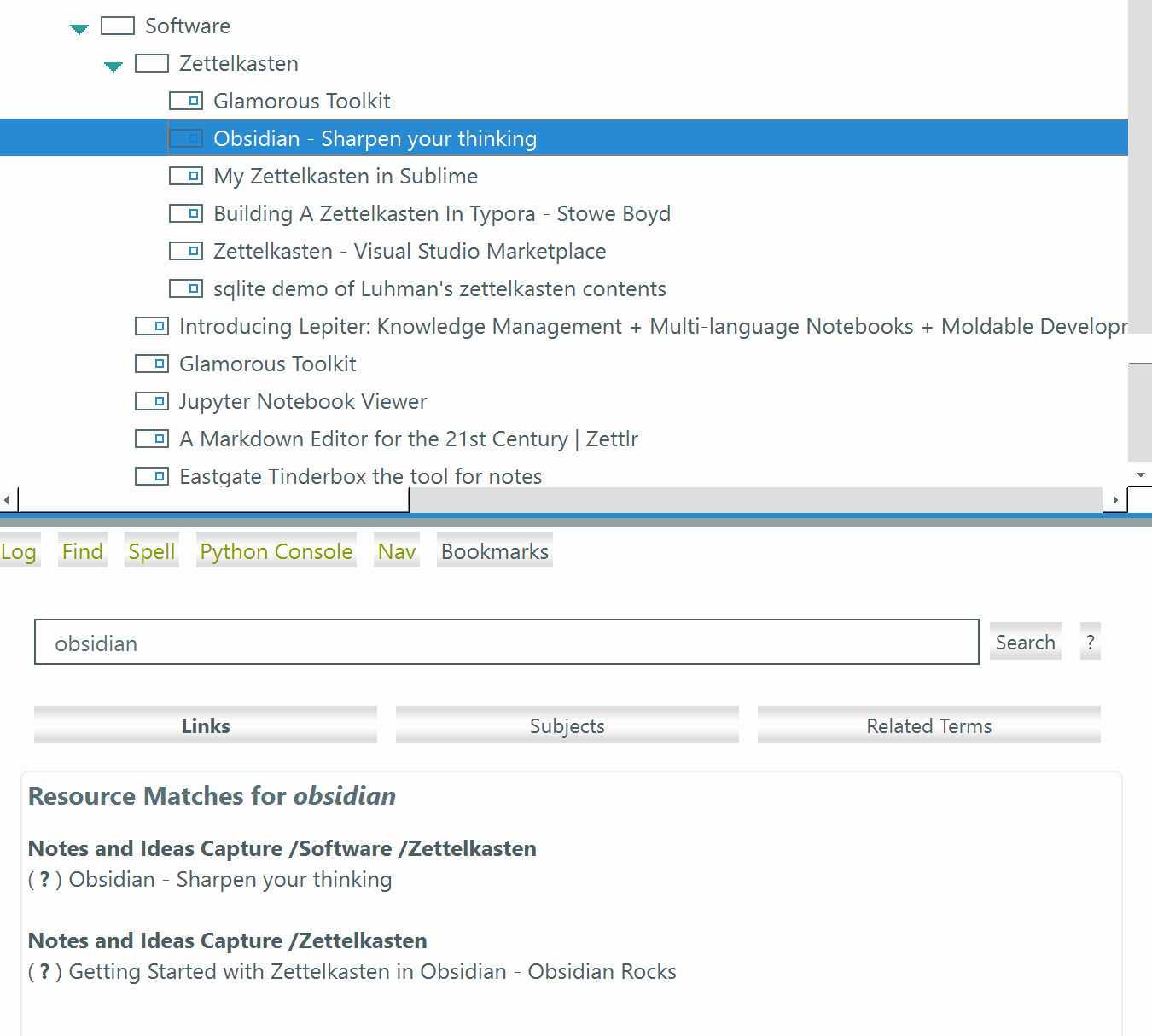
As a case in point, the author wanted to examine how well a particular platform might
work for hosting a Zettelkasten. He couldn't remember its name. The only thing he
remembered was a post on a discussion group that a particular member had used Obsidian
for some time but now had moved over to this other platform. So he searched for "Obsidian"
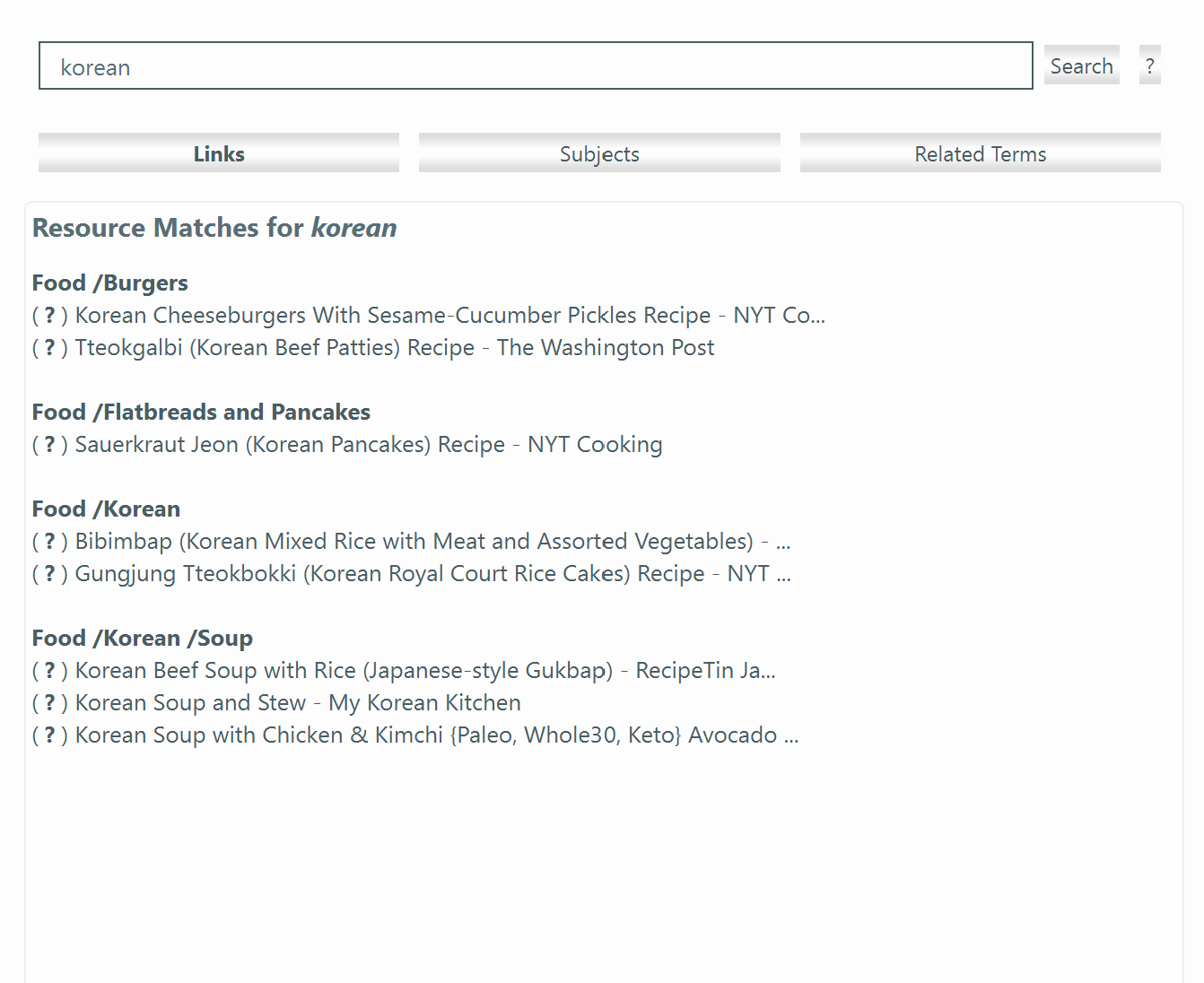
and got a hit. Navigating to that part of the outline (a single mouse click), the
card just before was for a web page titled "Glamorous Toolkit". That was it ... now
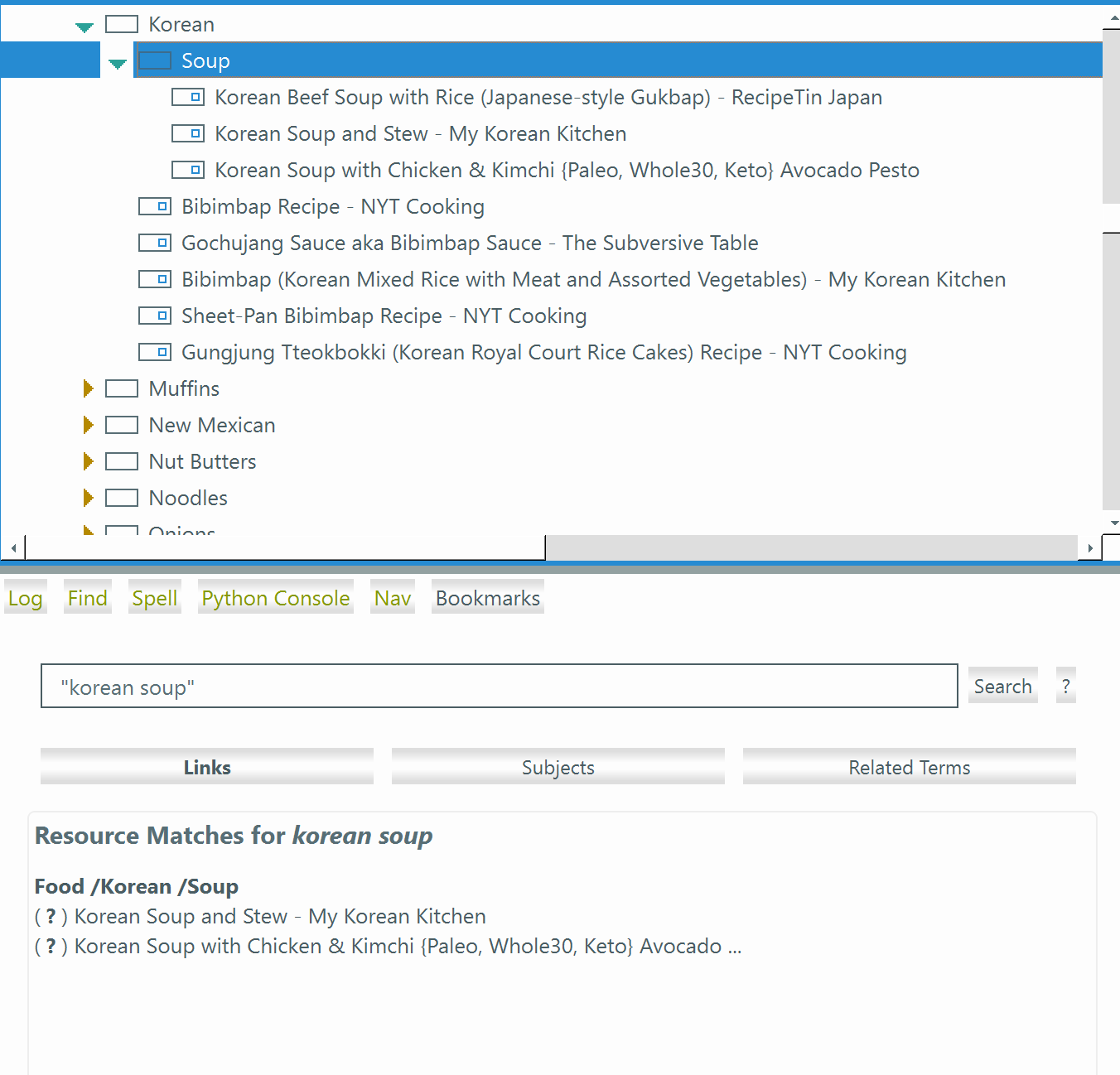
he remembered. Here is a screenshot of that search result:
Figure 6: Searching for "obsidian"
In this case the author searched for the wrong thing in the hopes it would lead him
to the right one. A system with only card-to-card links and with no means of exposing
semantic neighborhoods, could never succeed at a task like this.
[Note that this image is of the immediate ancestor of the author's Zettelkasten system;
it is specialized for managing a collection of browser bookmarks. It is essentially
the same as the ZK system except for not having links between cards.]
A second reason to make a search is to rebuild a conceptual scene. For example, one
might create a temporary area in the outline to hold case studies for a report. Each
z-card for one of the studies could be cloned into this region. A search for "case"
or "case stud" would lead right to it. Note that a stem of "studies" is used because
the practitioner might not remember if the organizing node's label used "study" or
"studies". Any time a special purpose grouping of cards is needed, they can be cloned
into one part of the outline. Later this part of the outline can be deleted if won't
be needed later.
In a system that has an outline, there are basically two kinds of searches: of the
labels of the organizing nodes, and of the titles of z-cards. Full-text searches turn
out to be used only rarely, in this author's experience. When the title of a z-card
is crafted with a mind to finding it in a later search, searching is likely to be
successful.
Search hits for z-cards should be displayed clustered under their place in the outline.
In the author's implementation, this means a flattened context path from root to the
nearest organizing node. A typical context path looks like this: "Cognition/Vannebar
Bush And The Memex". Each step of the path can be clicked to navigate to that location
in the outline. Or the z-card's title can be clicked to navigate to the card itself.
For full-text search, hits should also show the z-card titles of the cards that contain
the search phrase, clustered under their context paths. This design makes for a very
readable display that offers a useful range of navigation possibilities.
Hits for organizing nodes should be shown in a separate area such as another tab.
Note that some organizing nodes may show up in the "Subject Matches" tab but not in
the "Zettel Matches" tab. This is because an organizing node that does not contain
a z-card matching the search phrase will not appear in the tab, and an organizing
node's title (also called a "subject term") may match the search phrase even if none
of its child cards does.
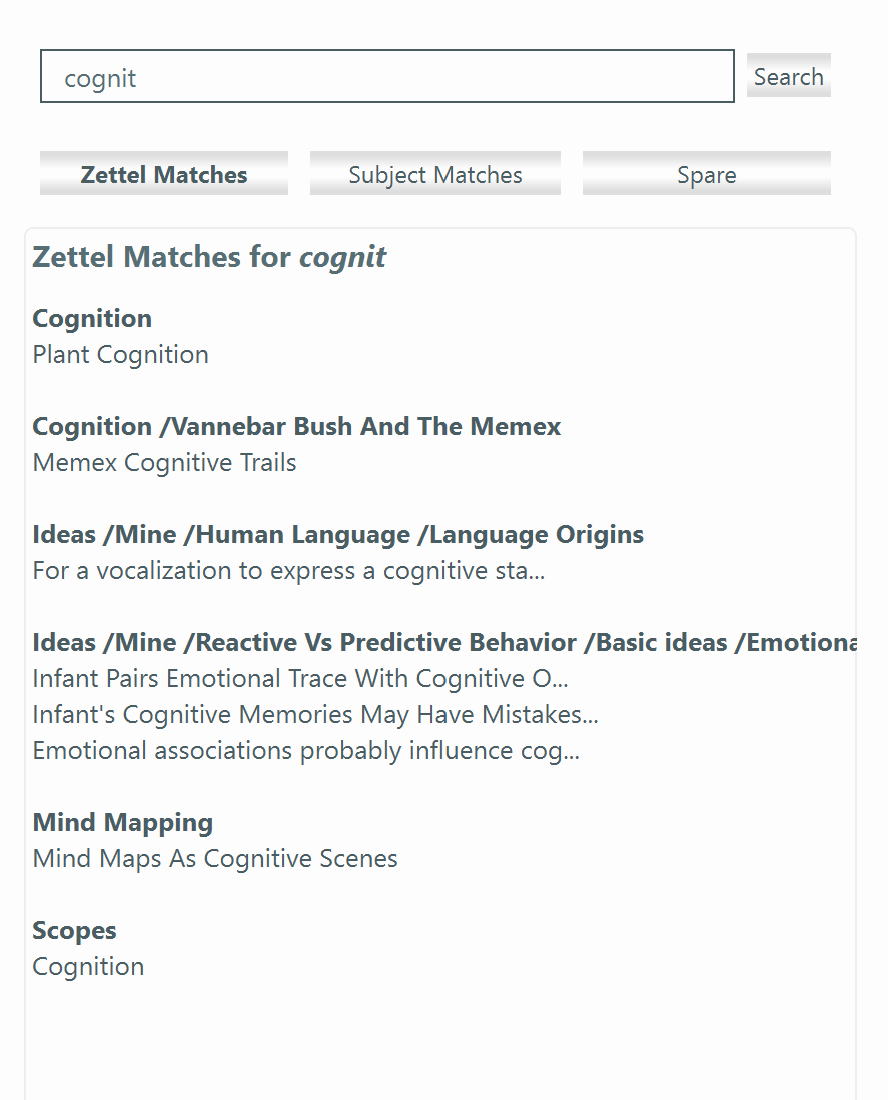
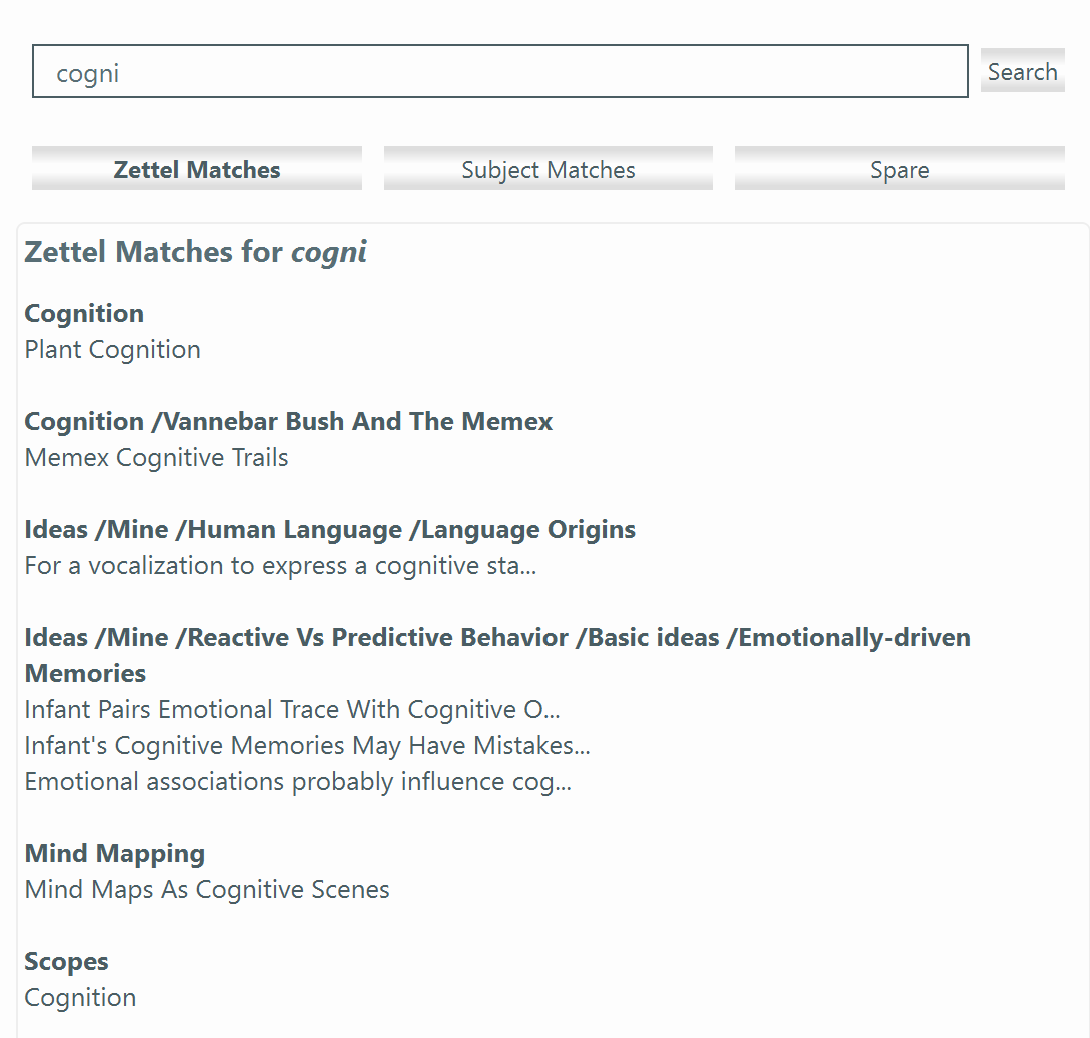
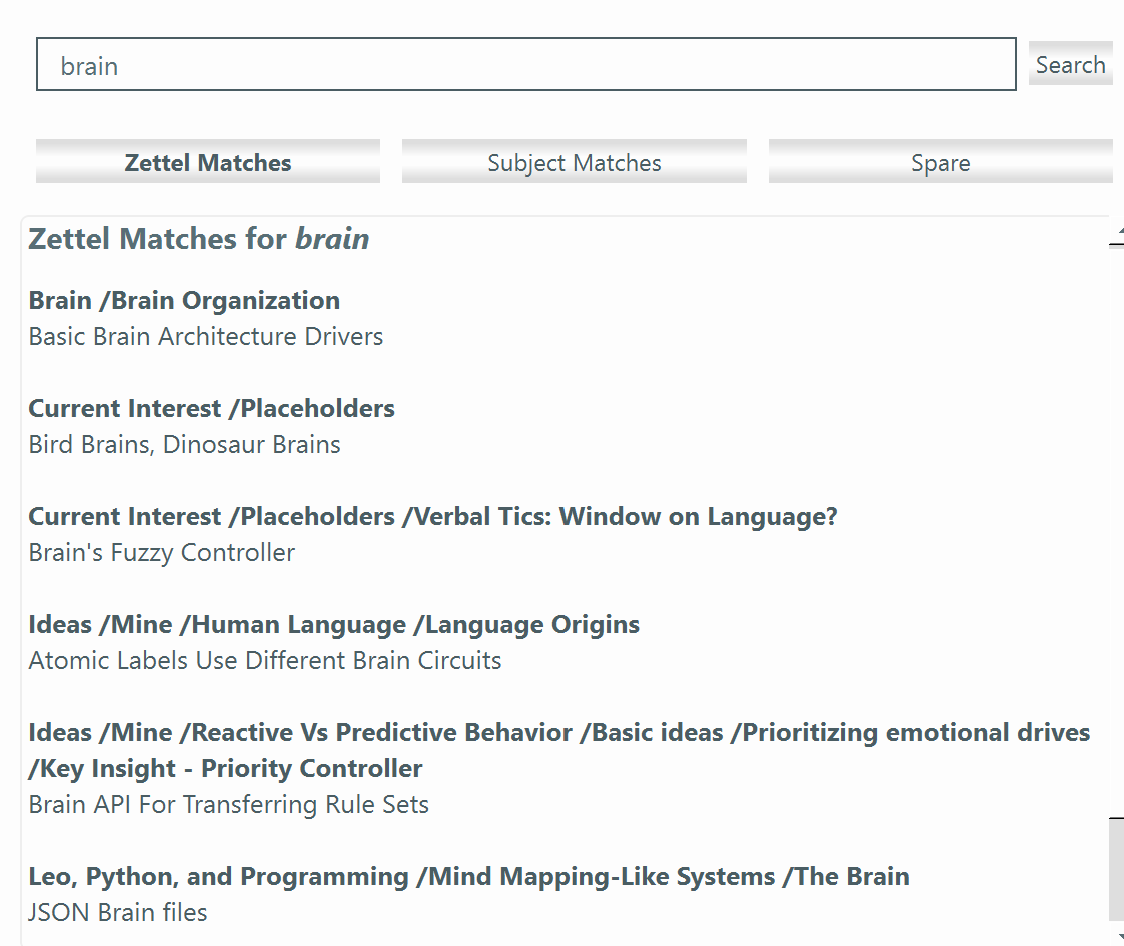
Here is an example of the z-card matches for a search in the author's implementation:
Figure 7: Z-card search results for "cogni"
The clustering of hits to surface their semantic neighborhoods is clear. Each segment
of the bold-faced context strings is separately clickable to make navigation easy.
Clicking on one of its hits navigates to the z-card itself. Long z-card title are
truncated so they do not overflow or word wrap.
Of the remaining items in the mind map heading this section, only two will be mentioned.
Keywords are shown as being undesired. A keyword is essentially a top-level organizing
node, but one that is hidden and implicit. It has no structure and cannot show conceptual
neighborhoods. Some keywords will show many hits, but too many undifferentiated hits
are hard to use. In addition, keywords contained in z-cards are hard to change if
a reorganization becomes desired later. Keywords also present maintenance and UI headaches.
It is better to create organizing nodes in the outline instead. They can be searched
like key words but with more precision.
A level 1 search is for a fact or simple idea, possibly a web page reference. The
branch in the upper left of the section mind map suggests that even a Level 1 search
can sometimes result in Level 4 or 5 experiences. This is not common but does happen,
if the practitioner happens to be receptive at the time and notices something unexpected.
It is the interaction between the Zettelkasten and the practitioner that makes possible
the unexpected and creative levels of ZK operation. A good design and good cardcraft
greatly increase the chances, though.
With good design, a search can seem more like playing and less like flailing.
4.7 Get Out Of My Way!
When a person is working in an intense state of involvement, any hindrance or interruption
becomes at the least a major irritation and may even be intolerable. The cognitive friction must be kept low, and repeated actions should be relegated to muscle memory as far
as possible. Any choices that must be made should belong in the mental realm being
thought about, not in computer-demanded ceremony.
Confronting a practitioner with popups, dialogs and the like must be avoided whenever
possible. The best ways to avoid them is to make them unnecessary. Either the data
items involved should be deducible by the system, or they should follow a simple convention
that the user can enter into a z-card itself. For example, it may once in a while
be useful to assign a type to a z-card. In the case of a z-card intended to act as
a citation reference, the user can type a very simple bit of markup, such as this
example used in the author's implementation:
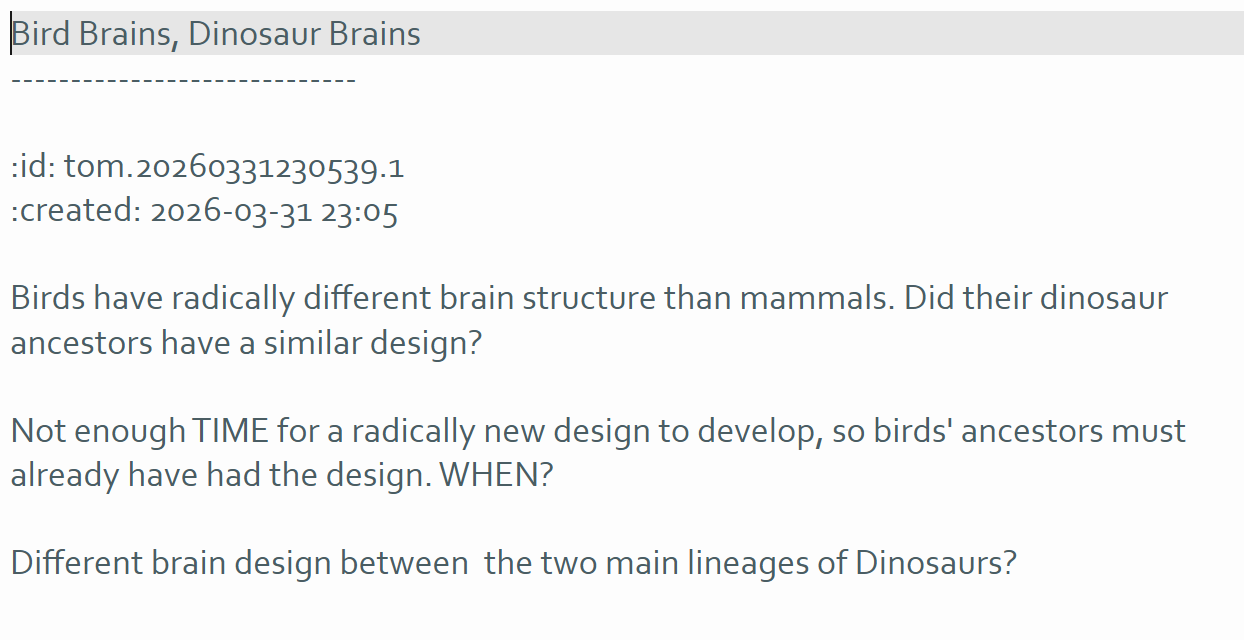
:type: citation
The markup language used here is RestructuredText (RsT). It is compact, easy to type, and easy to remember. Most important, it is a
natural form for most people to write, a key name, colon, and a value. The only difference
is the leading colon. In addition, the card can be rendered by an RsT renderer into
a nicely legible form where the metadata shows up clearly.
Using this simple markup for metadata also lets the practitioner add any kind of metadata
desired to a card. Scripts can find and parse it easily. For example, a reference
to an associated web page can be shown as:
:ref: https://www.example.com/metadata
This example shows a ZK design that relies on convention instead of ceremony and hidden
data. For example, in the Topic Maps data model underlying the author's implementation,
a block of text about the z-card's topic would be called an occurrence and be a separate data item referenced by the topic object. In the actual implementation,
the card is a topic and a text block is understood to be an occurrence.
A system of conventions like this is convenient and powerful, as long as it remains
small, simple, and as natural as possible. So it is imperative to avoid feature drift.
The user must be trusted to follow the conventions and add only minimal ones needed.
In the author's experience over many years, very few conventions and kinds of metadata
are needed for a practical ZK that supports Levels 4 and 5 creative thinking.
Since the metadata are easy to parse, scripts could be easily written to manage an
extensive set of terms. But then there would be the practical problems of managing
the metadata terms and letting the practitioner interact with them while still not
imposing extra ceremony and friction. It is far better to rely on convention and avoid
feature drift.
Low friction also entails low latency. Searches and navigation should happen without
noticeable delay. Special-purpose scripts may be allowed to take longer if they are
used only rarely and perform a valuable function, but this should be an exception.
If there is to be a system intended to provide Levels 4 and 5 of Thinking Support.
let it "Get Out Of My Way"!
4.8 Talk To Me
Some practitioners have written of experiencing a kind of communication with their
card collections, both with Zettelkasten systems and other rich note collections.
The following quotations seem to be representative:
"As a result of extensive work with this technique a kind of secondary memory will
arise, an alter ego with who we can constantly communicate" [Luhmann 1981].
"The communication with the slip box becomes fruitful only at a high level of generalization,
namely that of establishing communicative relations of relations. And it becomes productive
only at the moment of evaluation, and is thus bound to a certain time and is to a
high degree accidental" [Luhmann 1981].
"My note system has always been "useful" insofar as I can retrieve the information
that I need from it. But only recently, in the past two years, have I noticed that
the system is starting to have its own life, as if it is talking to me" [Andy 2020].
"It is as if the structure and connections communicate to us in ghostly ways" [Passin 2003].
How can this be? It is partly an outcome of how the practitioner approaches the collection.
As a personal example, if the author wanted to follow up on some idea, he would start
with a search. A Level 1 search for a fact, such as "What is the syntax for this Linux
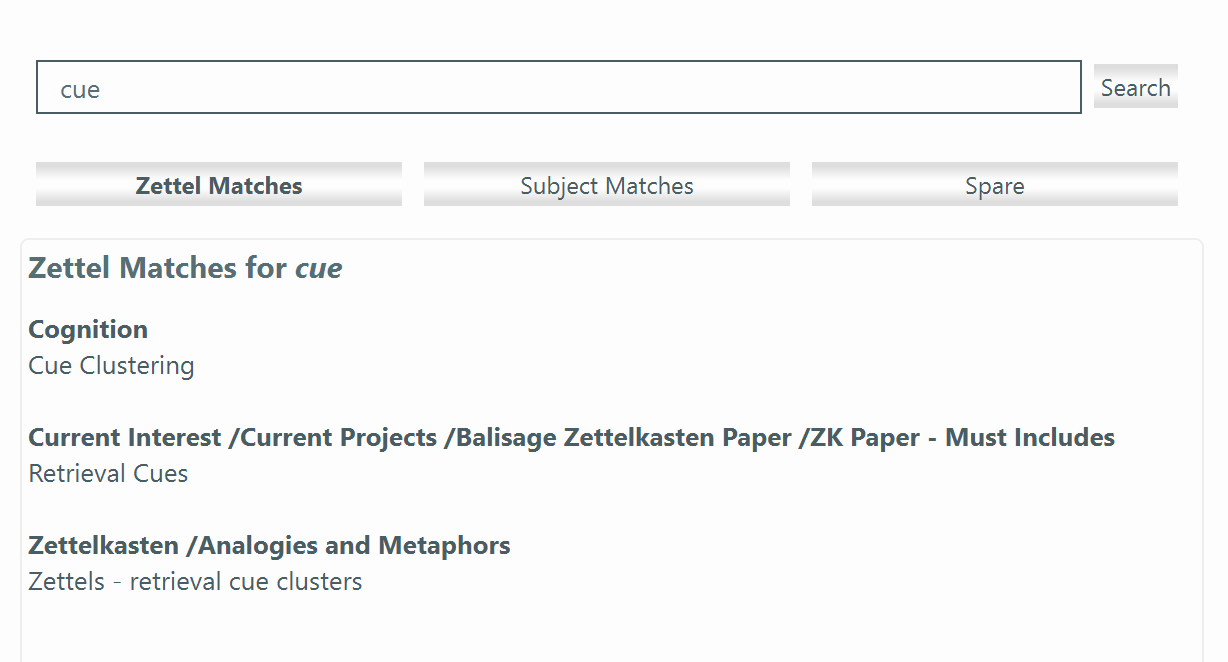
command?" feels like a demand: "Find this for me". More often, the question is more
like "I wonder what I already have on cue retrieval?"; that is, an exploration rather
than a demand. The search result shows that yes, we have some information, as this
screen shot shows:
Figure 8: What do I have on "cue retrieval"?
This particular implementation also shows the semantic areas around these z-cards.
They probably contain other interesting z-cards. Even if they are not immediately
relevant any of them might stimulate a fruitful train of thought.
The system has answered back with more than it was strictly asked. If there were no
results, or if the only results appeared in a semantic area not of interest at the
moment, this would be communicating "We don't have anything on this" Even null results
can be useful too. Because we all forget things, we might have forgotten that the
cluster "Zettelkasten /Analogies and Metaphors" even exists. It would be a surprise,
and surprises are valuable currency for creative cognition.
A conversation with one's notes can be an experience, not just a metaphor.
4.9 Luhmann - Freed At Last
Luhmann's Zettelkasten system was severely constrained by its paper-based nature.
Many of his written strictures were imposed by those constraints. For example, he
could only find a z-card by giving it an sorting identifier so that he could riffle
through cards and find it by identifier. He could no longer find a card if its written
link became illegible. He could not reorganize parts of the card collection even
if he wanted to. He had only a small space to write in.
Luhmann, though disclaiming an outline structure, did have an implied outline derived
from his numbering system (see Section 4.5). He did have some of the semantic channels
listed in Section 4.5, including intercard links, sequence, limited neighborhoods,
and propinquity to a limited extent (e.g., he could spread other cards out on a desk).
But it would have required a large cognitive effort to build up these structures in
his mind on each new encounter with the system. And there was almost no search capability.
With a good software design, and with the help of the framework (Section 3), it is
possible to remove these paper-based constraints. It is important not to inadvertently
introduce new ones. The framework also shows that support for level 4 and 5 creative
activity should be planned for as a design requirement, not as a byproduct.
The most important features that a modern system can provide that a paper-based system
cannot are:
A flexible outline that can be easily extended and reconfigured
A good and simple navigation system
A search facility that can surface semantic areas and not simply point results
An ability to conveniently open multiple surfaces of various modalities that are related
to the work of the moment
A way, such as clones, to have a z-card be located in more than one place
A way to create a temporary or provisional staging area to contain resources, draft
notes, and a grouping of resources together that will be valuable for a particular
task, such as writing a report or essay
A system with such features frees the practitioner from the constraints that Luhmann
had to deal with every day. It provides features that Luhmann would have used if he
could have made them work. That system can be said to be a "ZK++", a step beyond Luhmann's
Zettelkasten.
5.0 Ask and Receive
The system of thinking support, as it is called in Section 3.1, should be thought
of as a cognitive tool instead of a notes management system or a personal knowledge
management system. It should have purposes beyond keeping and finding notes and making
writing easier and better. It should be designed to bring conceptual scenes back to
life and to stimulate new ones. Scenes can be more complex than any note, even with
the help of good cardcraft. A z-card ought to be able to act as a hub of multimodal
contributions that restore the scene to mind. An ability to create temporary groupings
and z-card spreads would be a definite asset.
All this should be accomplished with as little ceremony and cognitive friction as
possible. A degree of learning curve could be acceptable since the system will be
in use for a long time, but this does not license a difficult interface.
The system must be able to scale to contain many z-cards. Luhmann's reached some 90,000.
Perhaps few people will reach that size, but tens of thousands are reasonable to expect.
Perceptible latency in the system's responses can seriously interfere with cognitive
flow and the design must accommodate this fact.
5.1 Principles
Figure 9:
The mind map at the top of this section collects most of the principles that have
been discussed earlier. Only a few will be highlighted here.
One of the most important is the outline. It is true that many current ZK applications do not have an outline, or the kind
of outline that is the most helpful. They miss out on one of the most powerful set
of semantic channels that could enhance the system (Section 4.5). The outline is the
place that exhibits much of the practitioner's semantic knowledge, so it should be
made a first-class element of the system. Luhmann was correct that a rigidly imposed
outline is inimical to the purposes of a ZK, and the outline needs to be flexible
and easy to modify and extend.
A key principle is that everything should be on the surface - of the z-cards and the
outline arrangement both. The system should not depend on hidden data. This requirement serves two purposes.
First, the complete data set can be exported as easy to parse text so that if need
be it can be transferred to some other system. Years worth of careful work must not
be trapped in a proprietary system, and text is the only viable format. Second, when
everything is on the surface the practitioner can see, understand, and modify it.
Another principle is that the operations and content of the system be very simple and impose a minimum of friction
and latency. This principle implies that there should not be too much for the user to remember
in ordinary operation. Formatting of metadata should be minimal, easy for a user to
type and read, and should be self-explanatory as much as possible. As many fields
or markup sections as possible should be optional, and missing data should never cause
the system to fail.
The system designer should trust the user. After all, it is the user who will supply the data and the latent semantics. It
is the user who wants to benefit. It is the user who will experience excessive friction
or latency and it is the user who will stop using such features, and later even the
entire system, because of them. Trust the user and ease his tasks.
The system should be programmable, preferably by scripts that are easy to create and
launch. The scripts must be able to change the content of z-cards , to navigate the user
from z-card to z-card, and generally inspect and act on both the tree and the z-cards.
Scripts allow an existing system to be adapted to the role of the Zettelkasten, and
allow added functionality to be added.
The need for low latency strongly suggests that the entire data set should be stored in memory, not spread out over many files.
5.2 Data Model
The data model underlying the Zettelkasten system proposed here is the ISO Topic Maps model [ISO 13250-2] (TM). This model is a natural fit because a Topic in TM is anything that can be a subject for discourse. Clearly, a z-card represents
a topic. Topics are related by Associations, which are a specialized kind of Topic. So card-to-card links, parent-child relationships
in the outline, and so forth, place the z-card into an Association with other z-cards.
Data chunks that apply to a topic are called Occurrences. Unlabeled blocks of text on a z-card represent Occurrences.
Every item on a z-card can be mapped to an equivalent TM element. There is no need
here to show an exhaustive list beyond these basic equivalences. Those familiar with
Topic Maps will recognize them at once.
Those familiar with Topic Maps will also know that applying the model in a formal
and literal way produces a rich but rigid system that is hard to modify on the fly.
It also tends to produce a large amount of ceremony and friction because so many kinds
of elements need to be populated. But a ZK needs to flexible and avoid ceremony and
friction. The way to resolve this conflict is to rely on simple conventions and the
intelligence of the user.
For example, a Topic always has an ID, a type, and a name. A z-card is known to be
a topic, so there is no need for an explicit assertion of that fact. Even though it
is a topic, the user doesn't usually need to know what type it is. The type can be
left implicit unless some script needs to know it. A z-card for a citation does not
need to be marked as a "citation" for the user's benefit; he can see that at a glance.
If the system is to provide a script that collects citations, then the script will
need to know, and the z-card's type can be so marked.
In line with the principle that everything must be on the surface, all TM-related
assertions are marked using a small subset of a simple markup language. This language
should be chosen to be easy to type and and natural to read.
By allowing most of the formality of the TM model to dissolve into a small set of
optional conventions, the rigidity can be removed while the benefits of having a definite
model remain.
5.3 Design
Starting with the outline, it must be a first-class component whose organization is
not determined by the contents of its nodes. A node should have a headline that labels the node in the outline view. It should contain a text block, which can
be displayed and edited outside the outline view. The outline structure will look
like a tree.
The design should be built on top of some existing platform so that the implementation
of a reliable outliner can be avoided. Whether it will use a pre-existing platform
or one built for the purpose, here are the basic platform features needed for an implementation:
                1. An outline component;
                2. An editable text block associated with a specific node;
                3. A scripting capability that is preferably simple to use;
                    3a. Scripts should be able to traverse and modify the outline view;
                    3b. Scripts should be able to read and modify z-card contents;
                    3c. Scripts should be able to create at least a basic user interface
                         element, such as a dedicated search panel;
                4. The ability to keep the entire data set in memory for low latency;
                5. An ability, native or scripted, for serializing the outline and card
                    content to a text file.
Additional features that are highly desirable:
                6. Clones - the ability to place a z-card in several outline locations;
                7. An ability to launch external programs appropriate for various
                    MIME types, such as an image viewer;
                8. A way to display a rendered view of the content of a z-card and
                    its markup,  including any images specified by the card's marked
                    image file names.
6.0 The Spirit Moves
An Implementation
This section presents the author's implementation. It is a third generation system,
the result of over 20 years of closely related experience; e.g., [Passin 2003].
The principles discussed throughout this paper and summarized in the mind map in Section
5.1 have many moving parts and look complex. It turns out that implementing the system,
given a suitable platform, is extremely simple. This is in large part because of the
emphasis on reducing cognitive friction and ceremonial mechanics. The user is trusted
to make intelligent decisions and to keep bloat to a minimum. The emphasis on keeping
all data on the surface and exportable as text also mandates simplicity.
The host platform is the Leo Editor, here called "Leo" [The Leo Editor]. Leo is a scriptable outliner and editor in the MORE tradition. It uses the Python
programming language, and Python scripts are able to launch commands and access internal
features. It provides clones as a native capability. Leo provides all eight of the
required and desirable features listed in Section 5.3. The implementation will be
called the "Leo/ZK++", since it provides all the capabilities of Luhmann's ZK and
more, while removing the constraints imposed on him by the paper-based nature of his
system.
Leo is used for this implementation, but any outliner that provides the required features
could be host an implementation. Platforms that do not support one or the other feature
can still make for good ZK systems, but they will be limited to some degree. In any
case, the practitioner plays a vital role: a system can support but not replace him.
6.1 A Sample Z-card
Here is a z-card about a subject discussed in this paper. It should be self-explanatory:
      Zettelkasten Movie Analogy: Scene Re-inflation
      -----------------------------------------------
      :id: tom.20260315131956.1
      :created: 2026-03-15 13:21
      :elaborates_on: tom.20260308003422.1 Eliciting and Stimulating Creativity
      :seealso: tom.20260315140706.1 Scenes and Frames
      :seealso: tom.20260317101834.1 Scenes and Working Frames
      :seealso: tom.20260406130700.1 Zettels - retrieval cue clusters
      A director needs help to maintain the shape of a scene over time:
          - continuity notes
          - script with markups
          - blocking diagrams
          - rushes
          - etc., etc.
      This gestalt, this constellation, is the "Working Frame" or "Scene".
      A Level 5 ZK card tries to capture enough of the scene that it can be brought to life again.
The id strings (like "tom.20260315131956.1") are the node IDs assigned by the Leo
when the node is created and never changed. The markup terms are few and are more
like notes to oneself than markup. The `:id:` line is the specific feature that marks
this node as a z-card. A script can check whether a node is a z-card or not quickly
and unambiguously.
Note that this z-card contains an occurrence, namely, the unlabeled block of text.
The practitioner need not be aware of this technical fact.
6.2 The Markup
The markup used with Leo/ZK++ is a very small subset of ReStructured Text (RsT). It
is used for these reasons:
1. Writing `key: value` is a very common and natural technique;
2. Adding the leading colon is easy to type and remember;
3. Using this syntax and placing the key at the start of a line results in text that
is very easy for scripts to search.
4. An RsT renderer will produce a clear, legible rendered view, which can display
images using RsT syntax. This capability substitutes for embedding binary image data,
which would conflict with the principle that everything must be on the surface and
all data must be exportable as text.
5. As an option, the practitioner can use any other RsT markup. Mathematical symbols
could be written in LaTex format and will render as the intended mathematics, as just
one example.
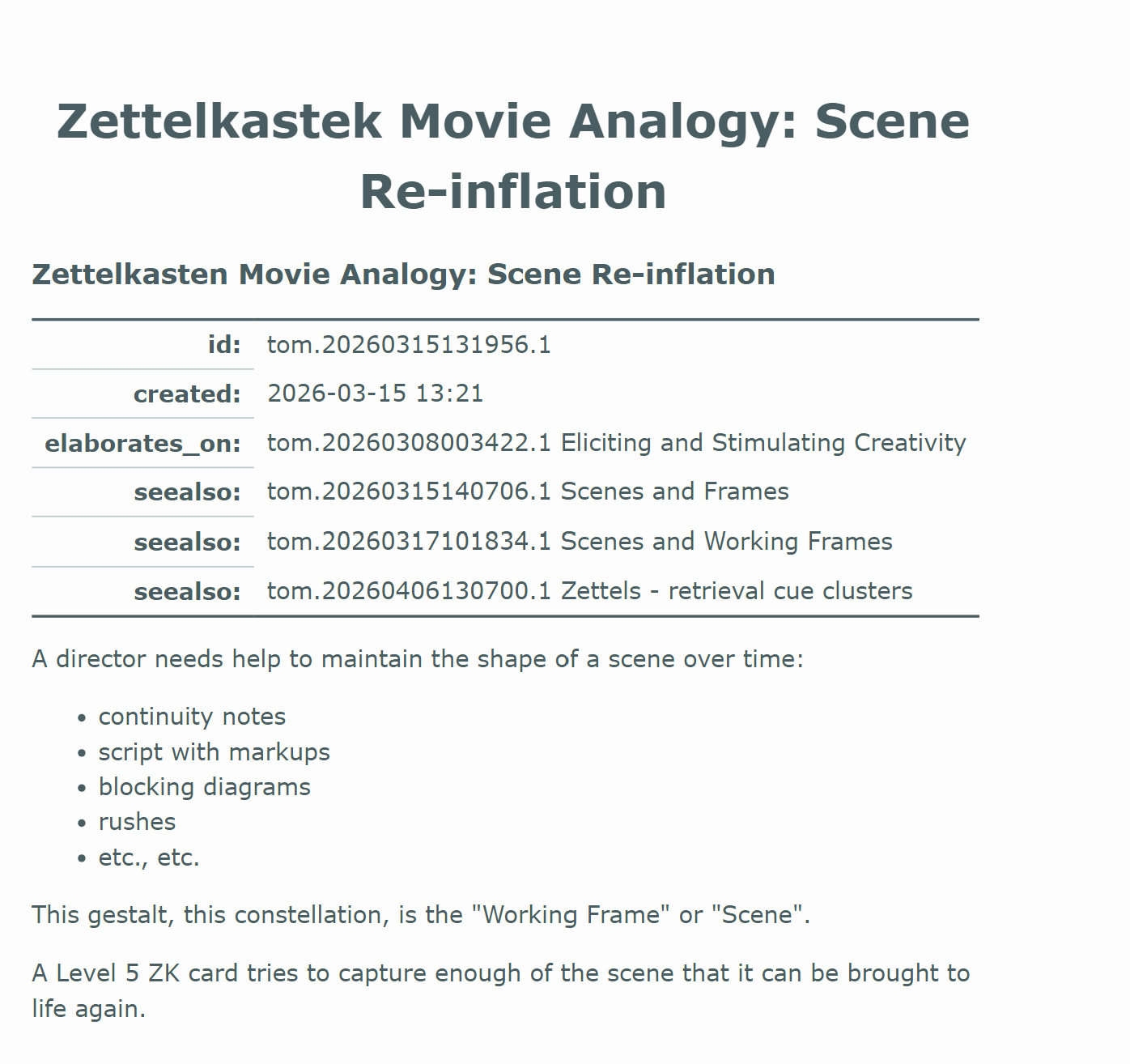
Leo provides several ways to render RsT in a node. Here is a screen shot of the above
card as presented by an RsT renderer.
Figure 10: Rendered Version Of A Z-card
6.3 Identifiers And Links
Node identifiers such as `tom.20260315131956.1` are used by the navigation scripts.
Card titles are not used, and are optionally included so the practitioner can recognize
where the link points to. So the user is free to abbreviate the title or change it
to make it more memorable; the target's title can be changed without affecting the
navigation. Links serve as navigation points whether or not they are in a markup
line.
Links in a markup line are placed before the card label so that the practitioner can
find them without having to search around the line to find them. This placement also
makes it easier for a script to extract them reliably.
The actual string can be considered to be opaque. In the Leo/ZK++ implementation,the
creation timestamp happens to be embedded in the node identifier. This is used by
the z-card creation script to build the `:created:` metadata line. This line has no
functional use and is only a convenience for the practitioner.
6.4 Gestures
Leo/Zk++ uses a small set of commands and gestures. For the most part, they will become
muscle memory after a short time. Here are the main commands:
CTRL-F6 With cursor on a line with an identifier, navigate to target and insert
backlink
CTRL-F7 Copy node's ID to clipboard
CTRL-F8 Convert current outline node into a z-card
CTRL-F9 With cursor on a line with an identifier, navigate to target (does not
insert backlink)
CTRL-F10 With cursor on a line with image markup, temporarily embed the image in
the card.
A few commands are not bound to shortcuts:
zettel-find-latest List the most recently created z-cards
zettel-count-cards Count z-card nodes
zettel-show-id display the current node's ID.
In addition, the practitioner will use standard Leo affordances and commands, such
as CTRL-I to insert a new node. These commands plus the search panel are all that
are needed to turn the host platform into a capable cognitive support tool.
6.5 Search Panel
Leo has good full text search facilities, but a dedicated search panel can be far
more valuable for a Zettelkasten. The search panel in Leo/ZK++ returns two views of
the results:
1. Cards whose titles match the search phrase, clustered by their place in the outline;
2. Outline locations that match the search phrase.
Note that a matching location may have no z-card child nodes that match the search,
and conversely, a matching card may be located under an organizing node that does
not match the search.
Both the z-card titles and their cluster parent's location path are clickable navigation
links. Here is a screenshot of the search panel in action.
Figure 11: The search panel in action
The search panel is designed as an Model-View-Controller. It is about 1000 lines of
Python code, and is by far the largest script in the Leo/ZK++ system.
7.0 The Bridge
It is time to remember the practitioner, and reprise his premier role in a Zettelkasten
system. Craftsmanship and practice make all the difference.
Table VI
It's all in the cards
Cards and their titles need to be crafted with care
On the surface
All the system's data should be on the surface. Do not try to work around this. It
will only add bloat and trap the victim in his system
Give it away
Be generous with your attention and do not hold back when spreading your semantics
around the system. A narrow focus may be needed from time to time, but a stingy attitude
will keep you from realizing the full potential of your ZK
See and be scene
Use all the means you can to refresh your mental scenes. The more ways, the better
Come back to me
Make good use of backlinks, to help you find your way back
Let's regroup
Tend your outline and shape it as you both grow
March to your own drum
Your Zettelkasten will be yours alone. It will be shaped by your interests and concepts.
It will speak your language, if you let it
Doppelgangers - live fast and burn out
Make good use of clones to create temporary clusters for special purposes. Use them
to settle the question of where to place a z-card - Use clones to place it where ever
it wants to be
8.0 The Overflow
Here some earlier points, reprised for emphasis, and also ideas for future work.
8.1 ZKs Alive
A Zettekasten has been said to communicate or talk with the practitioner. Let it do
so; be receptive. Allow for surprise.
8.2 Without you I am nothing
No Engagement, No Result
A good Zettelkasten is a well-tuned cognitive instrument. Like all instruments it
requires practice to play well. Practice mindfully and be engaged with your searches.
8.3 Today's ZK ISA
What can a modern Zettelkasten be? In a nutshell:
book index
topic map
mismatcher (hurray!)
search engine
scene cache
scene reanimator
keep-alive for ideas
engagement goad
8.4 Extend Me
The Leo/ZK++ has been extended by an overlay of specialized scripts to handle genealogy
data. This experiment has been successful so far. The scripts and data are kept in
a different ZK outline than the author's primary one. Other overlays should be feasible
as well.
Since a script can launch external programs, it is feasible to send data to a graphing
program like GraphViz and in return get a diagram like, in this case, a family tree
for the entire collection. A ZK can in essence be a cognitive hub, coordinating a
range of other programs.
8.5 Tomorrow and Tomorrow.
Speculating on future possibilities, the following ideas are intriguing.
Imagine an e-book, and it has a live Zettelkasten for its index. The user can modify
this index, add annotations or thoughts for future research and generally use all
the affordances of the ZK. Preferably this book index can be merged with the user's
main Zettelkasten too. This idea does not seem too far-fetched.
A specialized chatbot could ingest the contents of a ZK. The user could interact with
it in rewarding ways that would be wholly new. The main technical obstacle to be overcome
is how to prevent the chatbot from adapting too closely to the practitioner. He does
not need a mirror, he needs surprises.
9.0 The Fade
The arc is complete.
The dogfood has been filling.
Go now and do likewise.
Appendix A.
Background of This Work
The work reported here is the outgrowth of four main threads dating back to the early
2000s. First was a series of browser bookmarks managers that were in essence lightweight
zettelkastens that worked with bookmarks instead of notes [Passin 2003]. Second was an intiative to allow writing XML source text, including RDF, in a highly
simplified and intuitive way that relies on a few simple conventions [Passin 2007]. Third was the development of a Topic Maps engine and various applications built
on it. The fourth was experience with systems modeling and enterprise architecture.
Together these threads led to an understanding that modeling systems need to be highly
adaptable to changes and reorganization, that more semantics is captured by the structure
than by individual information items, and that a flexible and adaptive system needs
to present the user with extreme simplicity and intuitive operation as far as possible.
Appendix B.
Searches Unveil Semantic Clusters
Korean Soup
It usually happens that a search uncovers other related z-cards, sometimes clustered
under forgotten contexts. These can induce the practitioner to follow their leads
to other areas of interest. This appendix gives some examples. They are written in
the first person, to avoid overusing the awkward phrase "the author".
Here is an example using the bookmarks manager mentioned in Appendix A. Note that
the outline and search functions are nearly identical to the Leo/ZK++. If I search
for a recipe for a Korean soup, I will probably be happy to find that I have other
Korean and non-Korean soup recipes too, plus maybe general discussion of how tradition
Korean soups different from Western ones. Here's how the search can play out.
I will start with a search that is narrow: "korean soup". The figure below shows the
bookmarks whose title matches the search phrase. The bottom panel shows the search
result, with the context path in bold and two bookmark titles below. Clicking on
their titles will load the link into the browser. Clicking the question mark will
navigate to the bookmark's location in the outline. Clicking on any step in the context
path will navigate to that node in the outline.
Figure 12: "Korean Soup" Search
The upper panel shows part of the outline after clicking on the "/Soup" part of the
context path. Notice that there are three bookmarks, not just the two shown in the
search results. That is because the third's title did not include the search phrase.
Right away we see that even though our search phrase was too literal, we did find
related bookmarks.
Notice too that we have more Korean recipes nearby, and the search has found them
even though they are not for soups. We have found three nested levels of semantic
clusters: "Food", "Food/Korean", and "Food/Korean/Soups". If we had bookmarks for
Korean subjects that were not food, a search for "korea" would have uncovered them
and their related clusters. In fact, there are other "Korea"-related clusters, although
they also are for recipes. This is illustrated in the next image:
Figure 13: "Korea" Search
Notice how the search has uncovered clusters (outline sections) that share only the
word "Food" in their titles, which we did not search for. A full text search for "korea"
would have turned up far too many hits of no interest. By contrast the clustered search
is interesting and useful.
Brains
"The Brain" is a note-keeping program that seems as if it might be a potential zettelkasten
platform. I was interested in its file format and was fairly sure I had at least one
z-card about the program. As usual, I remembered neither its name nor its place in
the outline. So I searched for "brain". Here is what the search panel showed:
Figure 14: Search Panel Results for "Brain"
There several clusters that look interesting but are not my target. The card I was
thinking of is right at the bottom. Clicking on that line navigates to the card, which
turns out to have a little program from four years ago for reading The Brain's JSON
files and printing out some basic information.
This was a very basic search, hardly more than Level 1 (i.e., a search for some fact),
not interesting it itself. But look at the world it has stumbled into: brain archtecture,
dinosaur brains, fuzzy controllers, even something about a "brain API". It turns out
tht most of those z-cards are very basic notes to myself, areas I want to return to
when I have the time. We can tell this without even opening a z-card, just by looking
at the context paths: "Current Interest", "Placeholders", "Ideas/Mine", all obviously
provisional. I didn't take the time, when I created these z-cards, to work out or
create a place in the outline for them. Probably they will go somewhere under "Cognition".
In the meantime, they are still here to be found. They are not lost.
Let's look at one:
Figure 15: Z-card Image for "Bird Brains, Dinosaur Brains"
This card is preliminary, isn't linked to any other cards, and has received little
cardcraft; but it's worth keeping for later, and without being explicitly linked
the clustered search has found it anyway.
This search shows the Zettelkasten promoting Levels 4 - 5 support (Expansion, Emergence)
, the kind of experience that Luhmann wrote about. In fact, Luhmann's system could
never have unveiled these preliminary notes nor their clustered neighborhoods. The
closest he could have come would have been to keep a separate card drawer for work-in-progress
cards, with some loose organization, and shuffle through them anytime he wanted to
work on one (if he could even remember it).