As users begin to explore using XProc 3.x pipelines, and migrate existing 1.0 pipelines to 3.x, they naturally have questions about how to tell if a pipeline will work and will produce the correct result.
This breaks down, broadly, into four categories:
-
Is the pipeline written correctly: is it syntactically valid?
-
Is the pipeline written correctly: is logically valid?
-
Does it do what the author intended: does it produce the correct results?
-
If it doesn’t, how can the author figure out why?
This paper explores these ideas in the context of XML Calabash.
Syntactic validity
At the most basic level, we determine the validity of pipelines by making sure they’re well-formed XML and by visual inspection. Does it look like an XProc pipeline?
It’s also possible to validate XProc pipelines with the RELAX NG grammar for XProc. One complication for validating XProc arises if other grammars (like XSLT) are inline in the pipeline. In that case, consider using NVDL for validating different namespaces with appropriate schemas.
XProc 3.0 is substantially different from XProc 1.0 in the number and variety of syntactic simplifications it supports. This makes pipelines easier to write, at least in the sense that fewer elements and attributes are required. But you might find that pipelines are easier to understand if you apply the short cuts consistently: always use pipe attributes (or never use them), rather than mixing-and-matching throughout your pipeline document. Write Schematron schemas (or your own RELAX NG grammars) to enforce local conventions.
Attempting to run the pipeline will also reveal many kinds of errors. The XProc specification mandates that the processor check for dozens of static errors, constructions that are invalid. These range from misspelled names to loops in the pipeline. Some processors may also produce warnings for technically valid constructions that are unlikely to do anything useful. (If your processor has switches to enable warnings, turn them on!)
If the --nogo option is used on XML Calabash, the
processor will check that the pipeline is syntactically correct but
won’t attempt to run it.
Syntax errors in XProc are a lot like syntax errors in other programming languages; they’re easy to find and often more-or-less easy to fix. They certainly become easier to fix with time as familiarity with the vocabulary increases.
To explore several kinds of syntax errors, we’ll look at an example pipeline to show the railroad diagram for part of an Invisible XML grammar. That is, the pipeline should take this input:
<doc xmlns:xi="http://www.w3.org/2001/XInclude">
<title>An example grammar</title>

<p>Consider this grammar:</p>

<listing><xi:include href="grammar.ixml" parse="text"/></listing>

<p>Railroad diagrams offer a visual way to understand grammars. To interpret a
railroad diagram, begin at the “arrow tail” on the left and follow any line to
the “arrow head” on the right. Every possible path you can take is valid
according to the grammar.</p>

<p>For example, the railroad diagram for the “date” nonterminal is:</p>

<img src="rr-date.svg"/>

<p>The leading <nt>s</nt> is optional, because we can either choose a line that
goes through it or not; <nt>day</nt>, <nt>month</nt>, and the <nt>s</nt> between
them are required, then an optional <nt>s</nt> followed by a <nt>year</nt> is
allowed.</p>

</doc>
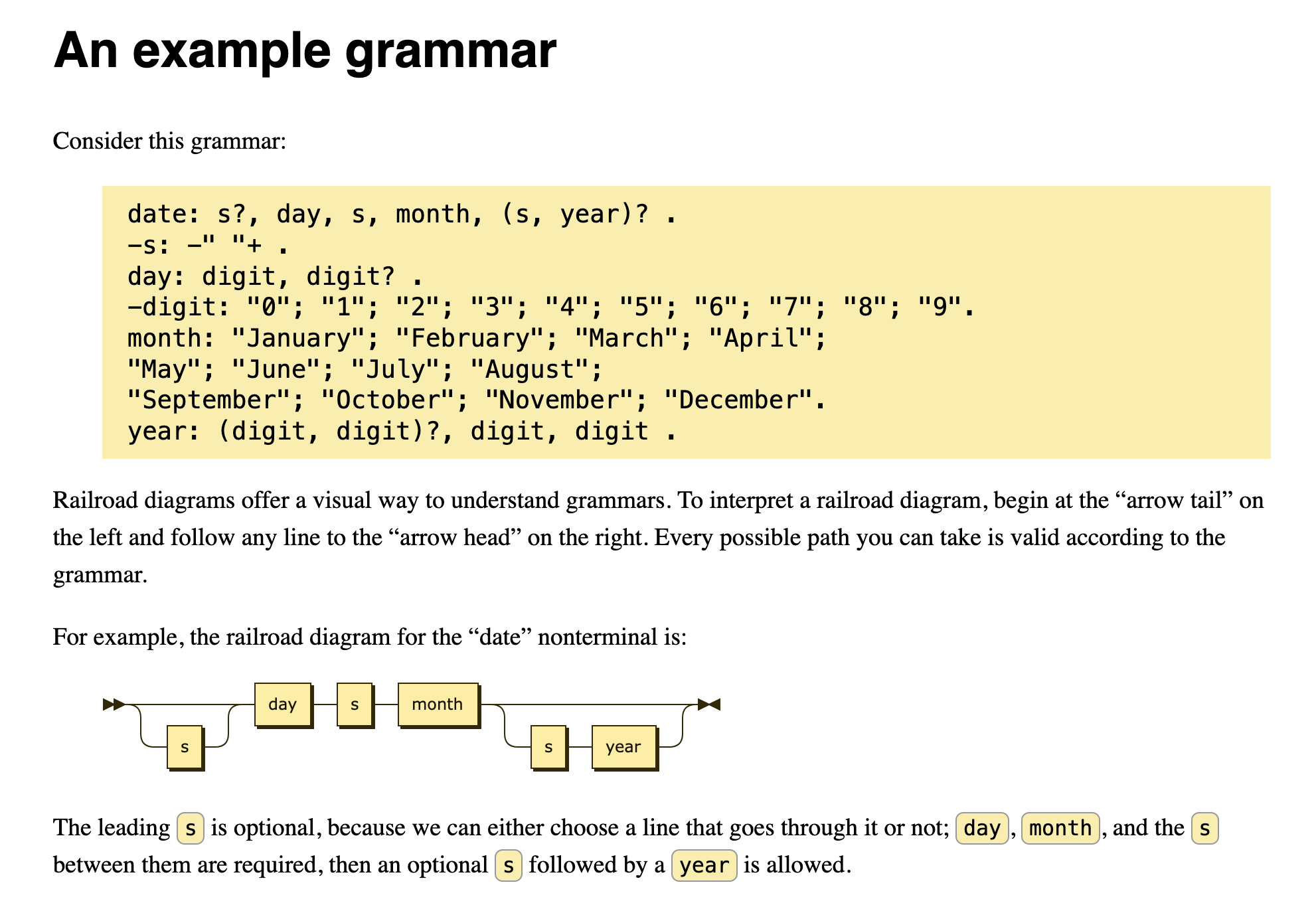
And produce HTML document that will render something like the one shown in Figure 1.
Figure 1: Example output
We’ll assume that the document input is passed in on the
source port; here’s a first attempt at a pipeline to
format the document. It has several several syntax errors. We’ll
correct them one at a time. In each case, you may wish to pause a
moment and see if you can spot the errors before reading on.
<p:declare-step xmlns:p="http://www.w3.org/ns/xproc"
                xmlns:xs="http://www.w3.org/2001/XMLSchema"
                name="main" version="3.1">
<p:input port="source"/>
<p:output port="result"/>

<cx:railroad notation="ixml">
  <p:with-input>
    <p:document href="grammar.ixml"/>
  </p:with-input>
</cx:railroad>

<p:store href="rr-date.svg"/>

<p:xinclude>
  <p:with-input pipe="main"/>
</p:xinclude>

<p:xslt>
  <p:with-input port="stylesheet" href="style.xsl"/>
</p:xslt>

</p:declare-step>
Well-formed XML is a prerequisite, but we’ve left out the namespace declaration for
cx. With that addition, we have at least a well-formed document:
<p:declare-step xmlns:p="http://www.w3.org/ns/xproc"
                xmlns:cx="http://xmlcalabash.com/ns/extensions"
                xmlns:xs="http://www.w3.org/2001/XMLSchema"
                name="main" version="3.1">
<p:input port="source"/>
<p:output port="result"/>

<cx:railroad notation="ixml">
  <p:with-input>
    <p:document href="grammar.ixml"/>
  </p:with-input>
</cx:railroad>

<p:store href="rr-date.svg"/>

<p:xinclude>
  <p:with-input pipe="main"/>
</p:xinclude>

<p:xslt>
  <p:with-input port="stylesheet" href="style.xsl"/>
</p:xslt>

</p:declare-step>
This second attempt is valid according to the RELAX NG schema for
XProc, but still contains an error: there’s no in-scope declaration
for the cx:railroad step. We can fix that by adding the declaration
or importing it. Importing it is easier and it’s worth remembering that the
https://xmlcalabash.com/ext/library/… URIs are recognized by the processor,
no actual web access occurs.
<p:declare-step xmlns:p="http://www.w3.org/ns/xproc"
                xmlns:cx="http://xmlcalabash.com/ns/extensions"
                xmlns:xs="http://www.w3.org/2001/XMLSchema"
                name="main" version="3.1">
<p:input port="source"/>
<p:output port="result"/>
<p:import href="https://xmlcalabash.com/ext/library/railroad.xpl"/>

<cx:railroad notation="ixml">
  <p:with-input>
    <p:document href="grammar.ixml"/>
  </p:with-input>
</cx:railroad>

<p:store href="rr-date.svg"/>

<p:xinclude>
  <p:with-input pipe="main"/>
</p:xinclude>

<p:xslt>
  <p:with-input port="stylesheet" href="style.xsl"/>
</p:xslt>

</p:declare-step>
At last, we have a syntax error that can be detected by grammar validation;
the p:import is in the wrong place. One more syntax error to go:
<p:declare-step xmlns:p="http://www.w3.org/ns/xproc"
                xmlns:cx="http://xmlcalabash.com/ns/extensions"
                xmlns:xs="http://www.w3.org/2001/XMLSchema"
                name="main" version="3.1">
<p:import href="https://xmlcalabash.com/ext/library/railroad.xpl"/>
<p:input port="source"/>
<p:output port="result"/>

<cx:railroad notation="ixml">
  <p:with-input>
    <p:document href="grammar.ixml"/>
  </p:with-input>
</cx:railroad>

<p:store href="rr-date.svg"/>

<p:xinclude>
  <p:with-input pipe="main"/>
</p:xinclude>

<p:xslt>
  <p:with-input port="stylesheet" href="style.xsl"/>
</p:xslt>

</p:declare-step>
This one is schema valid, but a quick run with --nogo finds the error:
Error: err:XS0022 at file:/.../invalid-4.xpl:18:30: Cannot read from “main” on “!store”.
XML Calabash names all of the steps even if the author doesn’t
provide a name. It uses names of the form
“!step-type” (with sequential numbering to make
them unique, if necessary) when it has to invent a name. In this case
!store is the p:store step. (The leading “!”
assures that it isn’t a name the author could use because
author-supplied step names must be valid XML names.)
The syntax error is that the p:xinclude step is
attempting to read from the main port of the preceding
p:store step. The p:store step has no such port; the XInclude step should
be reading from the primary input port of the step named
main, the pipeline as a whole.
This is a good example of a case where there are tradeoffs in
the syntax of XProc. The pipe attribute is concise, but
has its own microsyntax that must be remembered. In this case, the
correct value is @main or, to be completely explicit,
source@main. The XML binding is more verbose,
<p:xinclude>
  <p:with-input>
    <p:pipe step="main"/>
  </p:with-input>
</p:xinclude>
But the author is probably less likely to write
port="main" where step="main" was intended
than they are to write "main" in the shortcut where
"@main" was intended.
The final, corrected pipeline is syntactically valid.
<p:declare-step xmlns:p="http://www.w3.org/ns/xproc"
                xmlns:cx="http://xmlcalabash.com/ns/extensions"
                xmlns:xs="http://www.w3.org/2001/XMLSchema"
                name="main" version="3.1">
<p:import href="https://xmlcalabash.com/ext/library/railroad.xpl"/>
<p:input port="source"/>
<p:output port="result"/>

<cx:railroad notation="ixml">
  <p:with-input>
    <p:document href="grammar.ixml"/>
  </p:with-input>
</cx:railroad>

<p:store href="rr-date.svg"/>

<p:xinclude>
  <p:with-input pipe="@main"/>
</p:xinclude>

<p:xslt>
  <p:with-input port="stylesheet" href="style.xsl"/>
</p:xslt>

</p:declare-step>
But is it correct? Sadly, no.
../bin/xmlcalabash.sh example1.xpl -i:source=doc.xml -o:result=output.html
Error: err:XD0006 at file:/.../example1.xpl:15:30:
   A sequence of inputs is not allowed on the “source” port.
Logical validity
A syntactically valid pipeline may still be wrong. Broadly, it can be wrong in two ways: it may violate the runtime constraints on a step and fail with a dynamic error, or it may simply produce incorrect results. The former is easier to debug and that’s what is happening now in the example pipeline above.
By reading the reference
page for the cx:railroad step and considering
the pipeline carefully, it’s possible to work out what the error is.
But it’s often easier to get a sense of the problem by looking at a graph of the
pipeline.
If you have Graphviz configured, the --graphs option will construct
SVG diagrams of the pipeline structure. For this pipeline, the graph shown in
Figure 2.

Figure 2: Pipeline graph
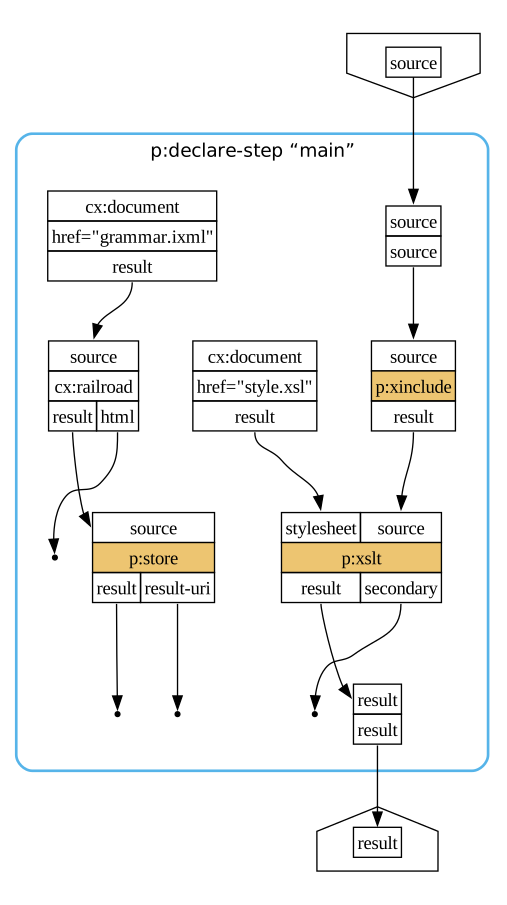
The vertical ellipsis on the connection from the cx:railroad output
port to the p:store input port is a visual indicator that the output port
may produce a sequence where the input port will not accept one. That isn’t always
an error,
of course, because a single document is a sequence of length one.
The error message indicates that more than one document appeared on the result
port. We can investigate further with the --trace option. The resulting trace
will include this output:
…
<step id="railroad"
      name="!railroad"
      type="cx:railroad"
      start-time="2025-07-13T09:45:57.194Z"
      duration-ms="636">
   <document id="12" content-type="text/html">
      <from id="railroad" port="html"/>
      <to id="sink" port="source"/>
   </document>
   <document id="13" content-type="image/svg+xml">
      <from id="railroad" port="result"/>
      <to id="store" port="source"/>
   </document>
   <document id="14" content-type="image/svg+xml">
      <from id="railroad" port="result"/>
      <to id="store" port="source"/>
   </document>
   <document id="15" content-type="image/svg+xml">
      <from id="railroad" port="result"/>
      <to id="store" port="source"/>
   </document>
   <document id="16" content-type="image/svg+xml">
      <from id="railroad" port="result"/>
      <to id="store" port="source"/>
   </document>
   <document id="17" content-type="image/svg+xml">
      <from id="railroad" port="result"/>
      <to id="store" port="source"/>
   </document>
   <document id="18" content-type="image/svg+xml">
      <from id="railroad" port="result"/>
      <to id="store" port="source"/>
   </document>
</step>
…
That reveals six documents are sent. If we look at the input grammar and the
description of cx:railroad we can now work out the problem. The cx:railroad
step outputs a different diagram for each non terminal. We want only a single diagram,
so we need to add the nonterminal option:
…
<cx:railroad notation="ixml" nonterminal="date">
  <p:with-input>
    <p:document href="grammar.ixml"/>
  </p:with-input>
</cx:railroad>
…
And now our pipeline works!
Maybe.
There’s another, deeper flaw here that’s harder to spot. Look back at the graph. The sequence of steps that produces the SVG diagram and the sequence of steps that produce the HTML output are unconnected. They could run in either order, or even be interleaved if multiple threads are used.
Whether or not this is a problem depends on the specific details of the pipeline. If the SVG diagram is XIncluded into the document, or if the stylesheet wants to open it in order to query the diagram for its dimensions, then it’s critical that the diagram be created first. If the only connection between the diagram and the rest of the document is that an HTML image reference is created to the SVG file, then it doesn’t matter.
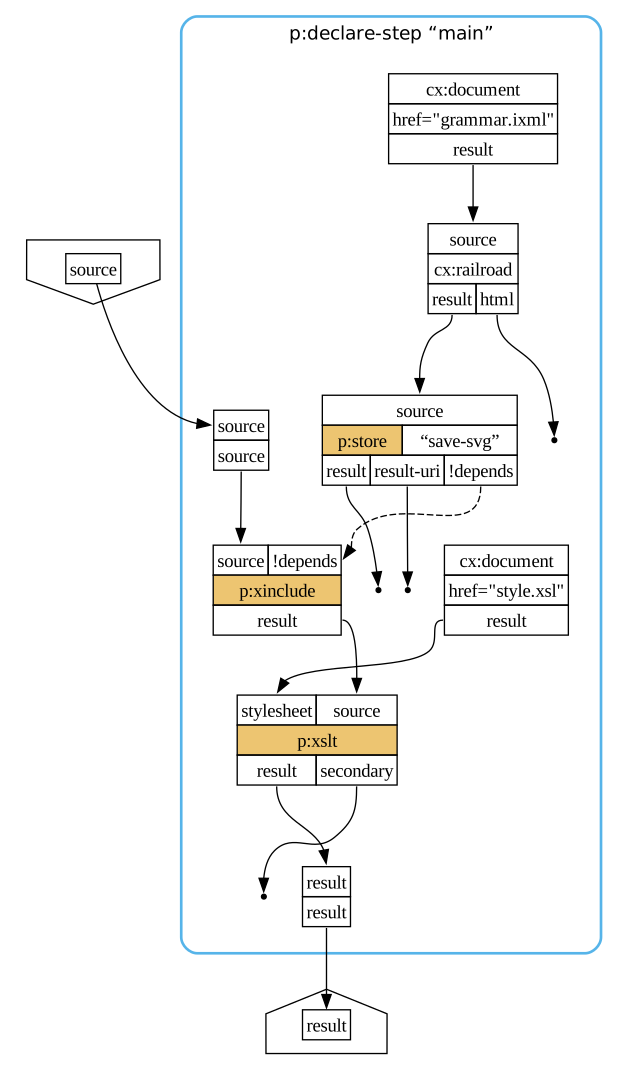
If it does matter, or if it might, the simplest fix is just to be explicit about the dependency:
<p:declare-step xmlns:p="http://www.w3.org/ns/xproc"
                xmlns:cx="http://xmlcalabash.com/ns/extensions"
                xmlns:xs="http://www.w3.org/2001/XMLSchema"
                name="main" version="3.1">
<p:import href="https://xmlcalabash.com/ext/library/railroad.xpl"/>
<p:input port="source"/>
<p:output port="result"/>

<cx:railroad notation="ixml" nonterminal="date">
  <p:with-input>
    <p:document href="grammar.ixml"/>
  </p:with-input>
</cx:railroad>

<p:store name="save-svg" href="rr-date.svg"/>

<p:xinclude depends="save-svg">
  <p:with-input pipe="@main"/>
</p:xinclude>

<p:xslt>
  <p:with-input port="stylesheet" href="style.xsl"/>
</p:xslt>

</p:declare-step>
The resulting graph, shown in Figure 3, demonstrates that the store step will always save the SVG output before XInclude runs.

Figure 3: Pipeline graph with extra dependency edge
Testing assumptions
Writing tests is an important component of any software development task. The more complex the task, the more important it is to have established tests and test results so that any changes can be tested for unanticipated consequences.
The XProc test suite, for example, has more than 3,000 tests and XML Calabash has several hundred more for testing extensions steps and features.
XML Calabash also allows you to add assertions directly to your pipelines. When they’re not enabled, they are ignored, so there’s no performance impact in production work.
Suppose, for example, that we want to ensure that the SVG output
from the cx:railroad step is producing the correct result.
We want something that’s wide enough, and it’s supposed to contain
“day”, “month”, and “year” nonterminals.
We can add those assertions to the p:store step:
<p:store name="save-svg" href="rr-date.svg">
  <p:with-input port="source">
    <p:pipeinfo>
      <s:schema xmlns:s="http://purl.oclc.org/dsdl/schematron"
                queryBinding="xslt2">
        <s:ns prefix="svg" uri="http://www.w3.org/2000/svg"/>
        <s:ns prefix="xs" uri="http://www.w3.org/2001/XMLSchema"/>
        <s:pattern>
          <s:rule context="/svg:svg">
            <s:assert test="xs:integer(@width) gt 400"
                      >Diagram is too narrow.</s:assert>
            <s:assert test="//svg:text[@class='nonterminal'] = 'day'"
                      >There is no ‘day’ nonterminal in the diagram.</s:assert>
            <s:assert test="//svg:text[@class='nonterminal'] = 'month'"
                      >There is no ‘month’ nonterminal in the diagram.</s:assert>
            <s:assert test="//svg:text[@class='nonterminal'] = 'year'"
                      >There is no ‘year’ nonterminal in the diagram.</s:assert>
          </s:rule>
        </s:pattern>
      </s:schema>
    </p:pipeinfo>
  </p:with-input>
</p:store>
Now the XML Calabash --assertions flag can be used to make assertion
failures either a warning or an error.
It might seem strange that the assertion is on the p:store step instead of the
cx:railroad step. The problem is that there’s no “output” element on an atomic step
where the assertions could be added. The output from the p:store step is the input to
the p:store step so the approach above works. In a more complex pipeline where the
store step might have different inputs, that wouldn’t work.
A slightly different, but more complex approach, can be used to associate the assertions with the actual output port. The asssertions can be placed “out of line” and referenced. Like so:
<p:declare-step xmlns:p="http://www.w3.org/ns/xproc"
                xmlns:cx="http://xmlcalabash.com/ns/extensions"
                xmlns:xs="http://www.w3.org/2001/XMLSchema"
                name="main" version="3.1">
<p:import href="https://xmlcalabash.com/ext/library/railroad.xpl"/>
<p:input port="source"/>
<p:output port="result"/>

<cx:railroad notation="ixml" nonterminal="date"
             cx:assertions="map{'result': 'assert-correct-svg'}">
  <p:with-input>
    <p:document href="grammar.ixml"/>
  </p:with-input>
</cx:railroad>

<p:store name="save-svg" href="rr-date.svg"/>

<p:xinclude depends="save-svg">
  <p:with-input pipe="@main"/>
</p:xinclude>

<p:xslt>
  <p:with-input port="stylesheet" href="style.xsl"/>
</p:xslt>

<p:pipeinfo>
  <s:schema xmlns:s="http://purl.oclc.org/dsdl/schematron"
            xml:id="assert-correct-svg"
            queryBinding="xslt2">
    <s:ns prefix="svg" uri="http://www.w3.org/2000/svg"/>
    <s:ns prefix="xs" uri="http://www.w3.org/2001/XMLSchema"/>
    <s:pattern>
      <s:rule context="/svg:svg">
        <s:assert test="xs:integer(@width) gt 400"
                  >Diagram is too narrow.</s:assert>
        <s:assert test="//svg:text[@class='nonterminal'] = 'day'"
                  >There is no ‘day’ nonterminal in the diagram.</s:assert>
        <s:assert test="//svg:text[@class='nonterminal'] = 'month'"
                  >There is no ‘month’ nonterminal in the diagram.</s:assert>
        <s:assert test="//svg:text[@class='nonterminal'] = 'year'"
                  >There is no ‘year’ nonterminal in the diagram.</s:assert>
      </s:rule>
    </s:pattern>
  </s:schema>
</p:pipeinfo>

</p:declare-step>
Debugging
You can learn a lot from validation, from compilation, from the
graphs, from traces, and from assertions. But ultimately, you may find
that you need to debug a pipeline. There are three immediate avenues
to explore: the message attribute, the p:message step,
and, in the case of XML Calabash, the interactive debugger.
The message attribute and the p:message step
are ways of introducing “print statements” into your pipeline. For example:
<p:xslt message="Processing {node-name(/*)} with style.xsl">
  <p:with-input port="stylesheet" href="style.xsl"/>
</p:xslt>
When this XSLT step runs, it will print a message identifying the name of the document element on the source input port. (Well, technically, on the default readable port, but in this case that’s the same as the document on the source port.)
The p:message step is an “identity” step with the
additional feature that it conditionally prints a message. In this
way, you can more easily control when messages appear. For example, you might enable
them
during development but leave them off in production runs.
This pipeline will only print the processing message if the static option
$DEBUG is true():
<p:declare-step xmlns:p="http://www.w3.org/ns/xproc"
                xmlns:cx="http://xmlcalabash.com/ns/extensions"
                xmlns:xs="http://www.w3.org/2001/XMLSchema"
                name="main" version="3.1">
<p:import href="https://xmlcalabash.com/ext/library/railroad.xpl"/>
<p:input port="source"/>
<p:output port="result"/>

<p:option name="DEBUG" static="true" as="xs:boolean" select="false()"/>

<cx:railroad notation="ixml" nonterminal="date">
  <p:with-input>
    <p:document href="grammar.ixml"/>
  </p:with-input>
</cx:railroad>

<p:store name="save-svg" href="rr-date.svg"/>

<p:xinclude depends="save-svg">
  <p:with-input pipe="@main"/>
</p:xinclude>

<p:message select="Processing {node-name(/*)} with style.xsl"
           test="{$DEBUG}"/>

<p:xslt>
  <p:with-input port="stylesheet" href="style.xsl"/>
</p:xslt>

</p:declare-step>
The final option, interactive debugging, lets you set step through the pipeline, set breakpoints, evaluate and change options and documents.
Suppose that instead of examining the graph and the traces to find the “sequence of inputs” bug, we had decided to just dive into the debugger.
$ xmlcalabash.sh --graphs:/tmp/pipe example1.xpl -i:source=doc.xml -o:result=/dev/null --debugger
Debugger at main
>
That gives us a debugger prompt. The sub command will show us the
steps in the subpipeline:
> sub
document   ... cx:document
xinclude   ... p:xinclude
document_2 ... cx:document
railroad   ... cx:railroad
xslt       ... p:xslt
store      ... p:store
sink       ... cx:sink
sink_4     ... cx:sink
sink_2     ... cx:sink
sink_3     ... cx:sink>
In this case, we’re interested in why the p:store receives multiple inputs. The
inputs themselves come from the cx:railroad step, so a good place to begin is
by examining its outputs. We can tell the debugger to stop for each output:
> break on railroad at output result
> run
Output from cx:railroad/!railroad (railroad) on result
Debugger at railroad
The break command sets a breakpoint and run continues
execution until it reaches one. On an output breakpoint, the variable
cx:document will hold the docume that has been output. We can inspect that:
> show node-name($cx:document/*)
svg
It’s an SVG document, so let’s setup a namespace binding and look at parts of the document instead of the whole tangle of SVG.
> namespace svg = "http://www.w3.org/2000/svg"
> show $cx:document//svg:text
<text xmlns="http://www.w3.org/2000/svg"
      xmlns:xlink="http://www.w3.org/1999/xlink"
      class="nonterminal"
      x="59"
      y="53">s</text>

<text xmlns="http://www.w3.org/2000/svg"
      xmlns:xlink="http://www.w3.org/1999/xlink"
      class="nonterminal"
      x="125"
      y="21">day</text>

<text xmlns="http://www.w3.org/2000/svg"
      xmlns:xlink="http://www.w3.org/1999/xlink"
      class="nonterminal"
      x="187"
      y="21">s</text>

<text xmlns="http://www.w3.org/2000/svg"
      xmlns:xlink="http://www.w3.org/1999/xlink"
      class="nonterminal"
      x="233"
      y="21">month</text>

<text xmlns="http://www.w3.org/2000/svg"
      xmlns:xlink="http://www.w3.org/1999/xlink"
      class="nonterminal"
      x="333"
      y="53">s</text>

<text xmlns="http://www.w3.org/2000/svg"
      xmlns:xlink="http://www.w3.org/1999/xlink"
      class="nonterminal"
      x="379"
      y="53">year</text>
We know that the cx:railroad step is outputing graphs for an iXML grammar
and that looks like the one we want. Very odd. Let’s see what comes next.
> r
Output from cx:railroad/!railroad (railroad) on result
Debugger at railroad
> show $cx:document//svg:text
<text xmlns="http://www.w3.org/2000/svg" class="terminal" x="59" y="37"/>
That’s a little harder to interpret. We could, at this point, save the SVG and look at it in a browser or SVG editor. (I did. It isn’t actually that illuminating.) Let’s press on.
> r
Output from cx:railroad/!railroad (railroad) on result
Debugger at railroad
> show $cx:document//svg:text
> show $cx:document//svg:text
<text xmlns="http://www.w3.org/2000/svg"
      xmlns:xlink="http://www.w3.org/1999/xlink"
      class="nonterminal"
      x="39"
      y="21">digit</text>

<text xmlns="http://www.w3.org/2000/svg"
      xmlns:xlink="http://www.w3.org/1999/xlink"
      class="nonterminal"
      x="127"
      y="53">digit</text>
At this point, we might recognize this as the rule for day in the grammar.
That’s the third rule and this is the third document. Further, the second rule is
for just a terminal
so that previously confusing result also makes more sense.
Once again, we’ve come to the conclusion that the problem is that the cx:railroad
step is sending one document for every rule but we only expected a document for the
single
rule we were interested in.
For more background on the debugger, see Chapter 8. The interactive debugger in the XML Calabash user guide for more details.