Introduction
This paper describes a current project within Taylor & Francis, a publisher of scholarly journals, to create a new process for transforming journal article content from an obsolete, proprietary, XML DTD to the current version of the Journal Article Tag Suite (JATS). This paper will begin with background information to describe the context in which this project is being done, then describe the overall design principles that were created to guide this project, then describe some technical challenges that were encountered and how the design principles shaped the solutions that were chosen.
To understand the context and necessity of this project, it is useful to first examine the historical development of XML formats at Taylor & Francis and the challenges that prompted this initiative.
Background
Taylor & Francis, like other organizations that publish large amounts of highly structured content, makes use of XML-based tools and processes. In the early 2000s, Taylor & Francis, like other organizations at the time, created an XML DTD to replace earlier SGML and XML DTDs that were in use. Taylor & Francis’ XML DTD, called the Taylor & Francis Journal Article (TFJA) DTD, supported production and archival processes for journal articles from about 2004 until about 2013. During these years, the TFJA format was used in the production processes for all journal articles published by Taylor & Francis. TFJA format was also used in retrodigitization projects to create PDF and XML online archives for journal content that had previously only been published in print format. As a result, Taylor & Francis’ journal archive contains more than 2.3 million journal articles, including more than 208,000 journal issues, in TFJA format.
Taylor & Francis discontinued TFJA and adopted the Journal Article Tag Suite (JATS), an industry standard (ANSI/NISO Z39.96-2024) XML format that is used for production, archive, and interchange of journal articles. Although Taylor & Francis’ archive systems still hold content in TFJA format and can export from TFJA using transformations to JATS and other formats, various changes have diminished the ability to use files that are in TFJA format. Current processes and systems rely on the JATS format and are not able to use the TFJA format, and very few people have expertise in the TFJA format.
When content that is archived in TFJA format needs to be reprocessed or made available, the files must first be converted into JATS. Taylor & Francis’ Digital Production team has processes for converting files from TFJA to JATS. However, there are problems with the existing processes: only a few people can use the software for these conversion processes, the conversion processes result in loss of some information in the TFJA files, and the converted files often cannot be used directly without further (manual) intervention.
The project described in this paper seeks to create an entirely new process for converting TFJA to JATS. In creating an entirely new process, instead of revising an existing process, there are several advantages available to this project. The current work is informed by both the positive aspects and shortcomings of the existing conversion processes, making use of the benefit of hindsight. The current project uses XSLT 3.0, XQuery 3.1, and the latest versions of Saxon and BaseX. These technologies provide capabilities that were not available when the earlier processes were created. Another advantage is that the archive of TFJA content is now static – no new content is being added in TFJA format – so it is possible to see in the archive all variations of how TFJA data structures (e.g. XML elements and attributes) have been used and create higher quality transformations to JATS. This advantage is not always available, so transformations (including the prior TFJA conversion processes) are usually created relying on the defined intended use of data structures and only a few known examples of various content and data.
Design Principles
Experience with the earlier processes for converting TFJA helped to establish a set of design principles to guide the creation of the new process for converting TFJA to JATS.
The previous processes for converting TFJA were built using XSLT and were successfully used to convert large numbers of TFJA files to JATS for delivery to Taylor & Francis' online platform and other destinations. They were also capable of handling several variations present in TFJA files, such as different ways in which XML elements were used and different file naming conventions.
These earlier processes were also created to meet certain goals using the best tools and methods available at the time, but since their creation several problems have been identified. The previous conversion processes for TFJA to JATS were focused on content distribution to Taylor & Francis' online platform, so the JATS tagging style followed the display requirements of the online platform which differ from the JATS tagging style required by our production systems. Metadata and content items not necessary for online display were omitted. MathML was also omitted due to technical challenges. The previous processes for converting TFJA to JATS were intended to be available to everyone in the Digital Production team, however various technical problems (such as differences in software versions, security restrictions, and installation difficulties) have meant that only a few people are able to convert TFJA files. The files converted from TFJA to JATS by the previous processes are also not directly usable in our current production systems without further (manual) intervention, restricting the ability to efficiently scale the process.
To address these issues, a set of principles was established to guide the creation of the new process for converting TFJA to JATS:
-
Fidelity guarantees preservation of all content from the original files, ensuring nothing is unknowingly lost. Problems are identified and resolved by failing intentionally and comparing input to output.
-
Usability ensures the transformation is easy to use in a variety of scenarios—from staff processing individual files to automated batch transformations of numerous files.
The principle of fidelity to the original TFJA files allows for items to be knowingly
lost in the conversion process. For example, certain XML elements that the TFJA DTD
required to be present often contained nonsensical placeholder text, and each figure
had
more than one image file saved at different resolutions (including thumbnail sizes).
The
analysis process includes documenting all items that are knowingly lost in the
conversion process. To ensure that nothing is unknowingly lost, the conversion process
includes steps that compare input XML to output XML and compare input files to output
files. This principle is also supported by using XSLT instructions on-multiple-match="fail" and on-no-match="fail" which cause the transformation process to stop and report an error when something
unexpected happens.
The principle of usability is supported by allowing options for how the conversion process can be deployed and used. The transformation process can run on a server or can run locally, and can be accessed in several ways:
-
Web Browser UI – for Digital Production staff
-
HTTP API – for large batches and automation
-
Command Line – for running locally and use in an oXygen add-on
There are also options for how journal issues in TFJA format can be provided as input to the conversion process which support the various scenarios that may be required by Digital Production team members:
-
TFJA issue file zipped
-
TFJA issue files zipped in a folder
-
TFJA issue folder unzipped
-
Unique Identifier for a TFJA issue file in the archive
With these guiding principles established, we developed a technical architecture that would support the fidelity and usability requirements and provide capabilities for addressing the complexities inherent in converting XML document formats.
Technical Architecture
The design principles of fidelity and usability are supported by the choice of technology and software used to create the new transformation process. XSLT 3.0 and XQuery 3.1, and the latest versions of Saxon and BaseX are being used to create the new conversion process.
The diagram in Figure 1 provides an overview of the technical architecture. User interactions via web browser user interface, HTTP API, and command line are represented on the left side of the diagram. The central part of the diagram represents BaseX running on Java on a Windows or Linux operating system, which can be deployed in a Docker Container. BaseX contains the XQuery code and XSLT code (via Saxon) and is underpinned by the Jetty webserver and a file system. The XQuery code can access TFJA files in the content management system (DARTS Archive). A GitHub repository is used to manage the source code and automate testing and deployment. The development environment, represented on the right side of the diagram, consists of oXygen XML Editor, BaseX, Visual Studio Code, XSpec, Gradle, Git, Java JDK, and Docker Desktop.
Figure 1: Diagram of the technical architecture
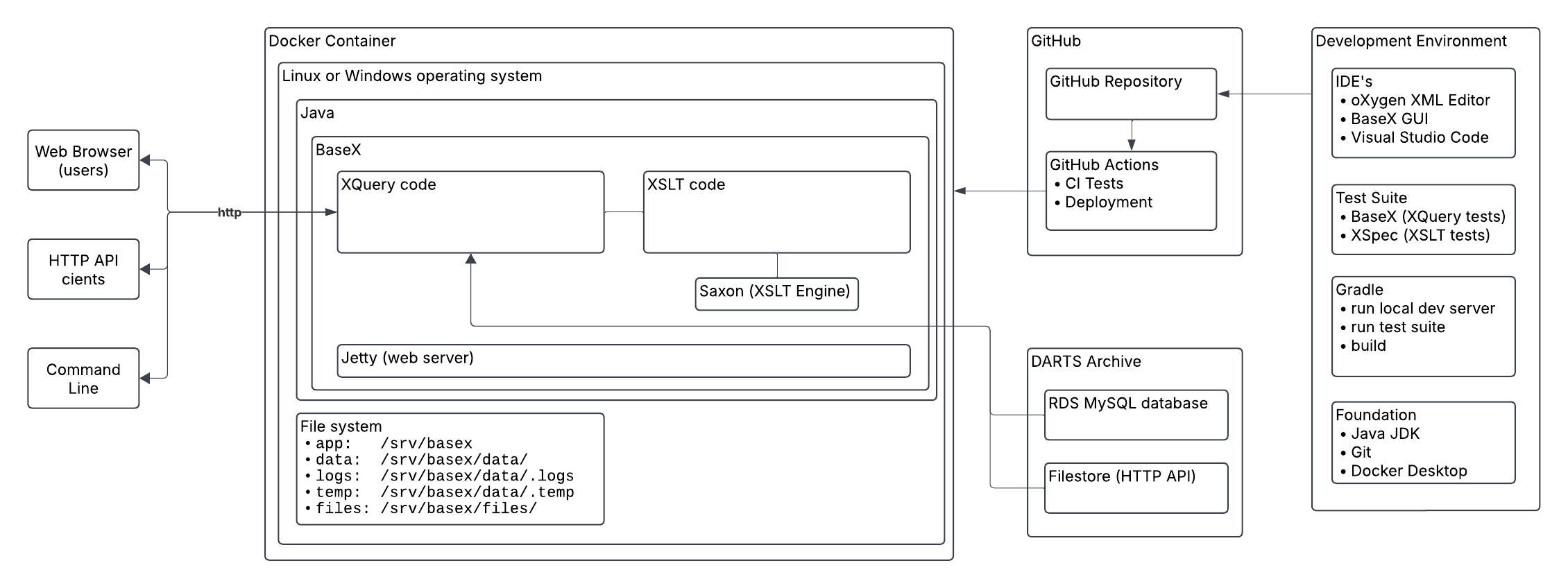
Image description
A block diagram showing how the parts of the technical architecture are related
BaseX contains several extensions of XQuery that were utilized including RESTXQ and modules Job, Store, File, Validate, Archive, XSLT, SQL, HTTP, HTML, and Unit.
RESTXQ was used to create an HTTP API and a web-based user interface. The conversion process is started by using one of several HTTP API endpoints that are bound to XQuery functions that handle different types of input, e.g. TFJA issue file(s) zipped, TFJA issue folder unzipped, or a unique identifier for a TFJA issue file in the archive. Each of these functions uses the Jobs module to queue a TFJA file for processing so that an HTTP response is immediately returned. The Store module is used to record information about each job, including the Job ID, the status of the job (e.g. queued, processing, error, finished), the file name of the TFJA file, and any error or warning messages. This information is made available through HTTP API endpoints. The JATS file that is produced by the conversion process is then downloaded using another HTTP API endpoint. The web interface makes use of these HTTP API endpoints to provide functionality including input forms, a live status display, and download links.
The core parts of the conversion process are written in XQuery and XSLT. XQuery code performs actions such as looping through files, unzipping/zipping, moving and renaming files, invoking XSLT, and validating. XSLT code performs the transformation of TFJA XML to JATS XML.
Certain coding conventions were adopted to help ensure quality. A Schematron schema for XSLT was created to help ensure that all XSLT templates adhere to the coding conventions for this project. This Schematron schema for XSLT was configured in oXygen XML Editor to supplement the coding suggestions that the oXygen XML Editor normally provides for XSLT. The coding conventions for this project include the following rules:
-
Every element and every attribute that is defined in the TFJA DTD should have a
<xsl:template>. -
Every
<xsl:apply-templates>must have aselectattribute. -
Every
<xsl:template>(with some exceptions) must contain<xsl:apply-templates>with aselectattribute for@*andnode()or contain<xsl:next-match/>to ensure that all XML nodes are processed, including all elements, attributes, text, comments, and processing instructions.
Two unit testing frameworks were used in combination with other testing methods which will be described in a following section: XSpec was used to test XSLT code, and XQUnit was used to test XQuery code.[1]
The technical infrastructure provides the foundation for our work, but equally important is the methodical analysis process we developed to ensure comprehensive and accurate format conversion guided by our design principles.
Analysis approach
Using an analysis-based approach involving comparison of two DTDs can improve the quality of XML transformations (Quin 2021), so one of the first tasks in this project was the creation of an analysis-driven development process. TFJA and JATS are both document models for journal articles that use XML DTDs and thus bear many similarities. However, the two DTDs are significantly different in many respects and cannot be directly compared by any automated process. The process of comparing the two DTDs would need to be done manually relying (in part) on the documentation for each DTD.
To support the analysis process, DTDAnalyzer was used to create an XML representation of the TFJA DTD, and this XML representation was then transformed into a table that lists every element, attribute, content model, and context where elements and attributes can be used. This table was then loaded into Microsoft Excel to create a checklist. This checklist shows every possibility allowed by TFJA DTD, even options that are unlikely to have ever been used in actual content. During the analysis process, information is entered in this checklist to:
-
Identify how each TFJA element and attribute, in every possible context, maps to JATS elements and attributes
-
Track status for each element and attribute in every possible context
-
Document elements and attributes that are intentionally excluded
-
Categorize elements and attributes that are related
-
Record notes
-
Report on progress
Figure 2 shows an excerpt of the checklist. Each row in the checklist represents an element or a child of an element. The columns of the checklist are:
-
element – name of the element
-
child – the element’s content model, attributes, and child elements
-
contexts – elements in which the element is allowed to appear
-
JATS tag – mapped JATS elements or attributes
-
Notes – any notes that need to be recorded
-
Status – used to track progress and identify what still needs to be completed
-
Exclude – rationale if any element or attribute is excluded
-
Category – used to identify and filter rows that are related to a topic
Figure 2: A portion of the checklist
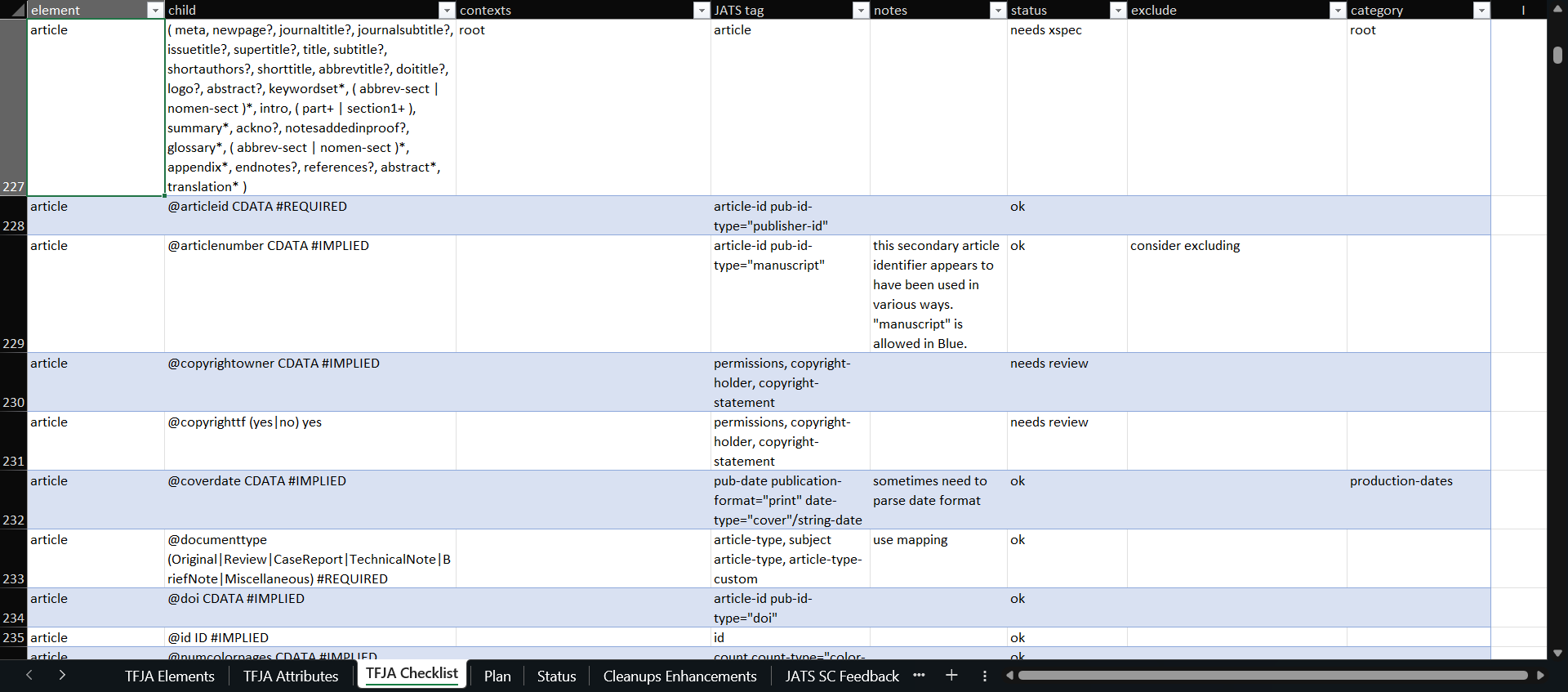
Image description
Screenshot of the checklist in Microsoft Excel
The checklist is used in the development workflow, which is a repetitive process that proceeds as described here:
-
Assign a category to all rows in the checklist related to a particular topic (e.g. authors, affiliations, figures, tables, etc.)
-
Examine TFJA documentation and JATS documentation to identify the appropriate JATS tags for mapping each structure in TFJA. Also examine the relevant examples in the archive by inspecting XML tagging, PDF files, and prior renderings in HTML.
-
Write XSpec scenarios to test the XSLT templates using sample TFJA input and expected JATS output.
-
Write XSLT templates to transform the TFJA elements and attributes to equivalent JATS elements and attributes.
-
If a TFJA element or attribute is intentionally excluded, record the reason in the “exclude” column of the checklist.
-
Run the XSpec test suite.
-
Run all validations (described in the next section).
-
Make any necessary additions to the compare normalization XSLTs.
-
If new tagging is encountered, copy example files from the archive into the set of test files used when running the validations.
-
Update the status column in the checklist.
In some instances, for expediency, XSpec scenarios were written immediately after (instead of before) writing XSLT templates. In other instances, also for expediency, XSpec scenarios were not written at the same time as the XSLT templates; in these instances, a status was recorded in the checklist to show that XSpec scenarios are needed – and then at a later time the XSpec scenarios are written.
This analysis approach was a primary component of our development process, but ensuring the quality and completeness of the transformation also required robust validation mechanisms.
Validating and Comparing Input to Output
The design principle of fidelity to the original TFJA files established a very high threshold for quality, so a multi-faceted approach was created to validate the conversion process and ensure that the files output by the conversion process in JATS format match the original TFJA files. Using a combination of different methods to validate the conversion process leverages the capabilities of each method while counterbalancing for the blind spots of each method.
During development, workflows use both manual and automated processes to run each method of validating the conversion of TFJA to JATS. Several of the validation methods are also applied in production every time the conversion process is run to convert a file from TFJA format to JATS format. Any failures that occur are reported for inspection, which results in the conversion process being improved (or in rare cases some files may need to be manually corrected).
Table 1
Methods used in the development workflow and in production to validate the conversion of files from TFJA format to JATS format
| Validation Method | Development | Production |
|---|---|---|
| XQUnit functions are used to test XQuery code. | Yes | No |
| XSpec scenarios are used to test XSLT code. | Yes | No |
| Output JATS XML documents are compared with output JATS XML documents from a previous iteration using a corpus of sample TFJA XML documents. | Yes | No |
| Output JATS XML documents are validated using the JATS DTD. | Yes | Yes |
| Files contained in the output JATS zip files are compared with the files contained in the input TFJA zip files. | Yes | Yes |
| The text content of output JATS XML documents are compared with the text content of input TFJA XML using a normalization process. | Yes | Yes |
To ensure that nothing would be unknowingly omitted in the JATS XML converted from TFJA XML, as required by the design principle of fidelity to the original TFJA file, a tool was created address the challenge of comparing two XML documents that are expected to contain the same content in two different formats. Other projects have addressed this kind of challenge in a variety of ways (for example, Latterner, et al. 2021). The solution created for this project uses a normalized XML format to compare the contents of two documents that have different formats.
The basic operation of the compare tool is as follows, although this process is entirely automated except for the visual inspection step.
-
An input XML document in TFJA format is transformed to the normalized format using
compare-tfja.xsland saved ascompare-input.xml -
The input XML document in TFJA format is transformed to JATS format using
tfja-to-jats.xsl -
The output XML document in JATS format is transformed to the normalized format using
compare-jats.xsland saved ascompare-output.xml -
The two normalized documents
compare-input.xmlandcompare-output.xmlare compared using the XPath functiondeep-equals(), which returns true if the two documents are equal or false if there are differences. -
If
deep-equals()returns false, the normalized XML documentscompare-input.xmlandcompare-output.xmlcan be opened in Diff Files (part of oXygen XML Editor) to visually see what is different between the two files.
Figure 3 shows an example of viewing differences between compare-input.xml and
compare-output.xml in Diff Files. A configuration option “ignore nodes by XPath” in Diff
Files set to ignore /compare/t/processing-instruction() so that processing
instructions that are part of the normalized XML format are not highlighted as
differences.
Figure 3: Screenshot of Diff Files highlighting a difference between two files compare-input.xml and compare-output.xml

Image description
Screenshot in which two normalized XML files are compared and a difference is highlighted
The normalized XML format contains all the text values from a given XML document sorted for comparison along with XPath pointers to the location in the XML document where the text value is from. Figure 4 shows an example of the normalized XML format. The structure of the normalized XML format is as follows:
-
<compare>element – root element of the normalized format. Contains one<info>element and many<t>elements. -
<info>element – contains key identifying metadata such as DOI and article title. -
<t>elements – list of all text nodes, attribute values, comments, and processing instructions presented as plain text and sorted for comparison. -
<?p path ?>processing instruction – shows XPath location of the text node, attribute value, comment, or processing instruction. -
<?o text ?>processing instruction – shows original text for mapped values (e.g. date value as originally formatted, original value from a controlled list converted using a lookup table)
Figure 4: Example showing the start of a normalized XML file.

Image description
Screenshot of normalized XML
The normalized XML is created using an XSLT that provides general processing logic to transform any XML document into the normalized format for comparison, which is imported by two XSLTs that provide format-specific processing logic for the input format (TFJA) and the output format (JATS).
In places where the conversion process must alter text values, instead of simply copying text from the input format to the output format, similar logic needs to be part of the normalization process. For example, the TFJA format requires dates to represented using a specific data format while the JATS format uses a different data format. Also, attributes that use a controlled list of values in the TFJA format use lookup tables for mapping to a different controlled list of values in the JATS format. Code reuse is intentionally avoided in the normalization XSLTs to avoid the risks of testing code against itself and thereby failing to identify problems, although reusing lookup tables is permitted.
These validation methods collectively ensure that the transformation process meets our strict fidelity requirements while remaining practical for everyday use. The combination of automated checks and visual comparison tools provides confidence in the accuracy of the process for each file that is converted.
Conclusion
This project demonstrates how carefully selected design principles—fidelity and usability—can successfully guide the transformation of a large archive of journal articles from an obsolete format to the current industry standard JATS format. By implementing multiple validation methods, including normalized XML comparison techniques and comprehensive testing, the conversion process ensures content integrity while documenting intentional omissions. The technical architecture's flexibility, offering web, API, and command-line interfaces, makes the system accessible for both individual file processing and automated batch operations.
The successful implementation using modern XML technologies (including BaseX, Saxon, XSpec) and an analysis-driven methodology provides a valuable template for similar digital preservation challenges. As scholarly publishing evolves, this approach shows that with proper design principles and appropriate technology choices, organizations can maintain the integrity and accessibility of their content archives while transitioning between document formats—ensuring both precision in content preservation and practical usability for staff.
References
[BaseX] BaseX. https://basex.org/
[DTDAnalyzer] DTDAnalyzer. https://dtd.nlm.nih.gov/ncbi/dtdanalyzer/
[ANSI/NISO Z39.96-2024] ANSI/NISO Z39.96-2024, JATS: Journal Article Tag Suite, version 1.4. https://jats.nlm.nih.gov/. doi:https://doi.org/10.3789/ansi.niso.z39.96-2024
[Latterner, et al. 2021] Latterner, Martin, Dax Bamberger, Kelly Peters and Jeffrey D. Beck. “Attempts to modernize XML conversion at PubMed Central.” Presented at Balisage: The Markup Conference 2021, Washington, DC, August 2 - 6, 2021. In Proceedings of Balisage: The Markup Conference 2021. Balisage Series on Markup Technologies, vol. 26 (2021). doi:https://doi.org/10.4242/BalisageVol26.Latterner01
[Quin 2021] Quin, Liam. “JATS to JATS with Eddie 2.” Presented at Journal Article Tag Suite Conference (JATS-Con) 2020/2021. In Journal Article Tag Suite Conference (JATS-Con) Proceedings 2020/2021. Bethesda (MD): National Center for Biotechnology Information (US); 2021. Available from: https://www.ncbi.nlm.nih.gov/books/NBK569514/
[XQuery 3.1] XQuery 3.1: An XML Query Language. W3C Recommendation, 21 March 2017. https://www.w3.org/TR/xquery-31/
[Saxon] Saxon. https://saxonica.com/
[XSLT 3.0] XSL Transformations (XSLT) Version 3.0. W3C Recommendation, 8 June 2017. https://www.w3.org/TR/xslt-30/