Quin, Liam. “Writing Maintainable XSLT Conversions: From EEBO TEI to Web HTML Seven Ways.” Presented at Balisage: The Markup Conference 2025, Washington, DC, August 4 - 8, 2025. In Proceedings of Balisage: The Markup Conference 2025. Balisage Series on Markup Technologies, vol. 30 (2025). https://doi.org/10.4242/BalisageVol30.Quin01.
Balisage: The Markup Conference 2025 August 4 - 8, 2025
The paper compares several ways to structure a transformation
consisting of a sequence of steps, each building on earlier
steps. Most of the steps are written in XSLT.
The steps are connected in various ways, including with XSLT
modes and variables, with the XPath 3
fn:transform() function, with XProc
steps, with the Unix command-line make
program, and with a batch shell script.
The methods are compared in terms of maintainability: skills
and knowledge needed; managing interdependencies; difficulty of
revision; ease of reuse.
Recommendations for structuring multi-step XSLT
transformations are made that depend on context, on people, on
data, with guidelines included to help project designers make
the choice.
This project started for pedagogical purposes. The author was
going to teach a course on XSLT 3, and the students were all users
of Text Encoding Initiative (TEI) texts. By happenstance the author
came across a transcription in TEI markup of a book that it had
wanted on a Web site it runs. It worked on a transformation and then
used the resulting stylesheet as an example in the course.
Having written the transformation from TEI into HTML, the author
then came upon fifty-three thousand more texts from the Early
English Books Online Text Creation
Partnership project. They were all marked up in a
deceptively similar manner, but each transcription needed work to
make the markup regular. Although the author planned to use only a
few of the books from the Early English Books Online project for its
Web site, some planning was needed.
This meant reusing parts of the transformation, but with
modifications.
And this in turn led to the work described in this paper.
The criteria given here for choosing how to divide the
transformation and which tools to use are not absolute: they are in
large part subjective. However, the underlying principles are more
general.
The files associated with this paper are available for download
from the Balisage Web site, and also directly from the
author.
About the Book
Before discussing how to make a Web version of this book we should
examine the printed book itself. The author does not have access to
a physical copy (although it once enjoyed the excitement of holding
one in its hands, in the sadly gone bookshop Galloway & Porter
in Cambridge), but there are online editions.
The book was written by Thomas à Wood (1632‒1695).
The book title is given as follows in bibliographies (for the
first of two volumes; both volumes were used in this
project):
Athenæ Oxonienses. Vol. 1. an exact history of all the
writers and bishops who have had their education in the most
ancient and famous University of Oxford, from the fifteenth year
of King Henry the Seventh, Dom. 1500, to the end of the year
1690, representing the birth, fortune, preferment, and death of
all those authors and prelates, the great accidents of their
lives, and the fate and character of their writings : to which
are added, the Fasti, or, Annals, of the said university, for
the same time. [Wood 1691]
In the interests of brevity in this paper it is referred to as the
Athenæ Oxonienses, or simply Ath. Ox. for short, and, except where
indicated, all references are to the entire work, not a specific
volume, and to the 1691 edition (1692 for the second volume).
So, after all this, what is it? The Oxford
Athens, or Ath. Ox., is, as its length title suggests, a book of
short biographies of people associated with Oxford University. It is
referenced over 1,700 times from Chalmers’ Biographical Dictionary
[Chalmers 1812] and has been described as
the first serious attempt at
an English biographical dictionary [Encycl. Brit.]. People are listed in
alphabetical order grouped by date.
About the Transcription
To give credit to a significant project, and to give necessary
context, this section describes the origin of the XML texts that
were used.
The Text Creation Partnership started in 1999 with a goal of
making the texts of historical books in the English Language
available for study, rather than the digital page images in use at
the time [TCP 1999]. The Early English Books Online project involved a commercial
vendor of page images and over 150 libraries. The texts were keyed
in by hand, since optical character recognition was inadequate for
the orthographies in use.
The texts, including Ath. Ox., were encoded in SGML according to
the guidelines of the Text Encoding Initiative P3 [TEI P3] and later translated to XML; the XML
TEI-encoded texts were used for the transformation described in this
paper.
Because the texts were hand-keyed by many people working in
different institutions, and because the books themselves vary
considerably in structure, and because the digital images themselves
may have been relatively poor quality compared to the best available
today, there are considerable variations in the quality and
consistency of transcriptions, both between books and within books.
Lacunæ are generally marked; Greek phrases are sometimes labeled as
foreign but not transcribed and sometimes simply omitted. However,
overall, the quality is certainly high enough to make the texts
useful as an adjunct to the Web site run by the author of this
Paper, words.fromoldbooks.org and, when combined with links to
page images, perhaps for more general use.
The texts are explicitly marked as being in the public domain, a
refreshing change from earlier texts often marked as being for
academic use only, and hence not clearly available for commercial
Web sites, teaching, or other purposes.
Making a Web Edition
The goal of making a Web edition of Ath. Ox. was to be able to
refer to it via hyperlink from the Web edition of the Chalmers
Biographical Dictionary. This goal suggested a strategy of making a
separate Web page for each biographical entry in Ath. Ox. using
XSLT.
Separate Web pages for individual biographical entries are more
convenient for many users than downloading an entire book. More
importantly for the author of this paper, individual Web pages are
more focused: Web crawlers can detect a single topic covered with a
high degree of relevancy, so the pages can be found more easily with
a Web search than an entire book. Bandwidth costs on the server are
also reduced, since most visitors do not need the entire
book.
The initial transformation was part-written when the idea of using
it as a course example arose. This was because it happened that all
of the individual participants on the course, each working for a
different organisation, were working with TEI-encoded texts.
Software conforming to Version 3 of the XSL Transformations
specification [XSLT 3] can generally create
HyperText Markup Language (HTML) Version 5 files suitable for modern
browser use. It is practical to write a short XSLT transformation
stylesheet that an XSLT engine such as Saxon (Saxonica; commercial and open
source) can compile and run, and thereby produce multiple HTML
files.
The strategy chosen initially was to run a sequence of
transformations in a single stylesheet as follows:
Remove the TEI XML namespace (since the result is to be
HTML and not TEI XML);
Regularize some orthographic variations;
Identify the individual biographical entries;
Give each entry an XML id attribute that can
be used for cross-references and filenames;
Make those id attributes be unique within the
generated document;
Add cross-reference links, both from explicit references
in the text and also, less reliably, from mentions, hoping
no-one had a name such as the or
and.
Write an XML document giving entry titles and ID values
for the use of XSLT transformations building the Chalmers
Web pages.
The following program listing (an excerpt from
prepare.xsl) shows the complete
construction of the output. Each step involves applying XSLT
templates to the result of the previous step (or to the input),
changing one aspect. Each step takes place in a distinct XSLT
mode.
  <xsl:template match="/">
    <!--* input is A71276.xml *-->
    <xsl:variable name="combined-inputs" as="document-node()">
      <xsl:apply-templates mode="combineDocs" select="/" />
    </xsl:variable>

    <!--* remove the TEI namespace to make life simpler,
        *-->
    <xsl:variable name="no-namespace" as="document-node()">
      <xsl:apply-templates mode="removeNS" select="$combined-inputs" />
    </xsl:variable>

    <!--* turn ſ into s and ▪ into . *-->
    <xsl:variable name="text-cleaned" as="document-node()">
      <xsl:apply-templates mode="cleanText" select="$no-namespace" />
    </xsl:variable>

    <!--* mark entries for people *-->
    <xsl:variable name="with-people" as="document-node()">
      <xsl:apply-templates mode="withPeople" select="$text-cleaned" />
    </xsl:variable>

    <!--* surround entries for people with wrappers *-->
    <xsl:variable name="wrapped-people" as="document-node()">
      <xsl:apply-templates mode="wrapPeople" select="$with-people" />
    </xsl:variable>

    <!--* Move the person name to its own element *-->
    <xsl:variable name="person-in-title" as="document-node()">
      <xsl:apply-templates mode="personTitle" select="$wrapped-people" />
    </xsl:variable>

    <!--* add id attributes to the Person elements, based on names *-->
    <xsl:variable name="with-ids" as="document-node()">
      <xsl:apply-templates mode="addIDs" select="$person-in-title" />
    </xsl:variable>

    <!--* make id attributes unique *-->
    <xsl:variable name="unique-ids" as="document-node()">
      <xsl:apply-templates mode="uniqueIDs" select="$with-ids" />
    </xsl:variable>

    <!--* make links back to Chalmers *-->
    <!--* NOTE this does not yet take into account multiple
        * people with the same name, allen-thomas-1 etc.
        * It could usefully check for dates in common, but
        * this is likely unreliable for parent/son entries.
        *-->
    <xsl:variable name="with-links" as="document-node()">
      <xsl:apply-templates mode="addLinks" select="$unique-ids" />
    </xsl:variable>

    <!--* generate the final output *-->
    <xsl:sequence select="$with-links" />

    <!--* write a file of id/name mappings for use by Chalmers *-->
    <xsl:apply-templates select="$with-links" mode="writeEntries" />
  </xsl:template>
At this point a reminder about XSLT modes is appropriate, or an
introduction for those readers unfamiliar with them. When an XSLT
processor reaches an xsl:apply-templates element, it
constructs a list of nodes in the tree representation of the input
document, and for each node in the list, it chooses the most
applicable template, and adds the result of evaluating that template
to the output. Thus, if the templates chosen themselves contain
xsl:apply-templates elements, a recursive tree-walk
is performed. When selecting templates, if the processor is
operating in a named mode, only those templates explicitly marked as
being applicable to that named mode are selected.
XSLT Modes are used here to keep the processing of each step
independent from other steps in the same stylesheet. Later we shall
see an approach that uses separate XSLT stylesheets instead of
modes, but this requires a little more infrastructure. Modes were
used here as part of writing the stylesheet, because they can all be
contained in a single file for rapid development. In the experience
of the author, this sort of use of modes is common in XSLT
work.
The names of the modes here are camelCase words,
rather than hyphenated-words; this is because it is
not an error in XSLT to try to apply templates with a mode whose
name is never defined. Using a single word allows the author to use
automatic completion in a specific editor, to avoid possibly typing
errors in mode names. A different editor might be able to complete
hyphenated names; it is often worth accommodating one’s own tools in
one’s style.
There is a draft Version 4 of the XSLT language in which the
xsl:mode element can contain all templates for a given mode,
improving error checking. At the time of writing, XSLT 4 is still a
draft, and therefore should not (in the opinion of this author) be
used in production. Element and attribute names added by the
stylesheet all have an upper case first letter and are then lower
case; this avoids conflict with any TEI names. A namespace could
have been used, but this was simpler and sufficient.
In this paper we will not examine the entire stylesheet. However,
the alert reader will notice there was no step to generate HTML. The
author did this in a separate stylesheet that took the output of
prepare.xsl, shown partly in the program listing
above, and produced HTML files. This separation greatly facilitates
reuse of stylesheets, but it is arbitrary. We will return to this
when we consider criteria for designing multi-step
transformations.
The following listing shows the definition of one of the modes,
the one to add an Entry element wrapper round the biography entry
for a single person. The input to this mode has the first paragraph
of each entry marked with a Starts attribute having the
value person.
  <xsl:mode name="wrapPeople" on-no-match="shallow-copy" />

  <!--* No automatic copying of elements at the entry level: *-->
  <xsl:template mode="wrapPeople"
    match="body//node()[
      preceding-sibling::p[@Starts = 'person']
      and not(@Starts = 'person')
    ]" />

  <xsl:template mode="wrapPeople" match="p[@Starts = 'person']"
                                                as="element(Entry)">
    <Entry>
      <!--* copy the p element except for the Starts attribute *-->
      <p>
        <xsl:apply-templates select="@* except @Starts" />
        <xsl:apply-templates select="node()" />
      </p>

      <xsl:variable name="next" as="element(p)?"
        select="(following-sibling::p[@Starts = 'person'])[1]" />

      <xsl:apply-templates
        select="following-sibling::node()[
          if ($next) then (. << $next) else true()
        ]" />
    </Entry>
  </xsl:template>
Note
The expression A << B in XPath 2 and later
is true if and only if A occurs earlier than B in document
order. The << characters must be escaped as
<< in the actual XSLT file.
The declaration of a mode is optional; the
on-no-match attribute instructs the XSLT processor
on what to do with nodes not matched explicitly by any template in
that mode; shallow-copy means to copy the node to the
output and then process any child nodes it may have, in the same
fashion. This replaces the older identity
template.
Most of the other modes are similarly short. The entire
prepare.xsl stylesheet contains fewer than six hundred
lines.
Input and Output
This section will give the reader a taste of the transformation;
we can then proceed to discuss how it might be done differently, and
when, and why.
A snippet of the input:
<p>
 <pb n="47" facs="tcp:56137:17"/>
 <milestone type="tcpmilestone" unit="unspecified" n="61"/> THOMAS ABEL or <hi>Able</hi>
 took the Degrees in Arts, that of Maſter being compleated 1516,
 but what De<g ref="char:EOLhyphen"/>grees
 in Divinity I cannot find. He was afterwards a Servant to
 Qu. <hi>Catherine</hi> the Conſort of K. <hi>Hen.</hi> 8. and is ſaid by
 a certain<note n="t" place="bottom">T<gap reason="illegible" resp="#TECH" extent="1 letter">
       <desc>•</desc>
  </gap>o, Bouchier <hi>in</hi>
  Hiſt. Eccieſ. de Martyrio
The output of prepare.xsl for this
snippet:
<Entry Volume="1" id="abel-thomas" Page="46" Year="1540">
 <p Page="46" Milestone="61">
  <Name><span class="csc">Thomas</span> <span class="csc">Abel</span></Name>
  or <hi>Able</hi> took the Degrees in Arts, that of Master being compleated 1516,
  but what Degrees
  in Divinity I cannot find. He was afterwards a Servant to
  Qu. <hi>Catherine</hi> the Consort of K. <hi>Hen.</hi> 8. and is said by
  a certain<note n="t" place="bottom">T<gap reason="illegible" resp="#TECH" extent="1 letter">
        <desc>•</desc>
   </gap>o, Bouchier <hi>in</hi>
  Hist. Eccies. de Martyrio
Each entry has been surrounded with an Entry element, given Page
and Year attributes (the page break marker in the input is after the
start of the paragraph here, so the stylesheet gets the wrong page;
that would be worth handling in the XSLT. The
tcpmilestone elements identified many, but not all,
of the starts of entries; in the end the most expedient solution was
to add more milestone markers, one for each entry, and to print a
message if the numbers were not consecutive. In perhaps a dozen
cases they were not consecutive in the printed book.
The tall s (ſ) has been replaced with the more modern version (s),
for example in ‘ſaid’ near the end of the seventh line. Explicit
hyphenation elements have been replaced by (invisible) soft hyphen
Unicode characters.
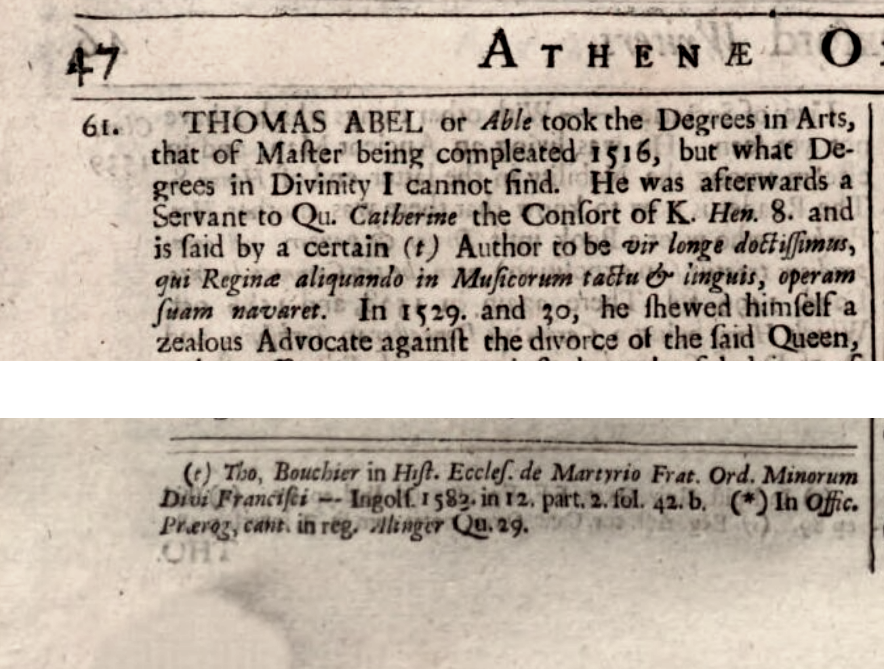
Figure 1 shows a snippet from the printed book,
and also the note (t) at the bottom
of the page. The image has been reduced in resolution for this
paper, and is somewhat clearer in the full sized version.
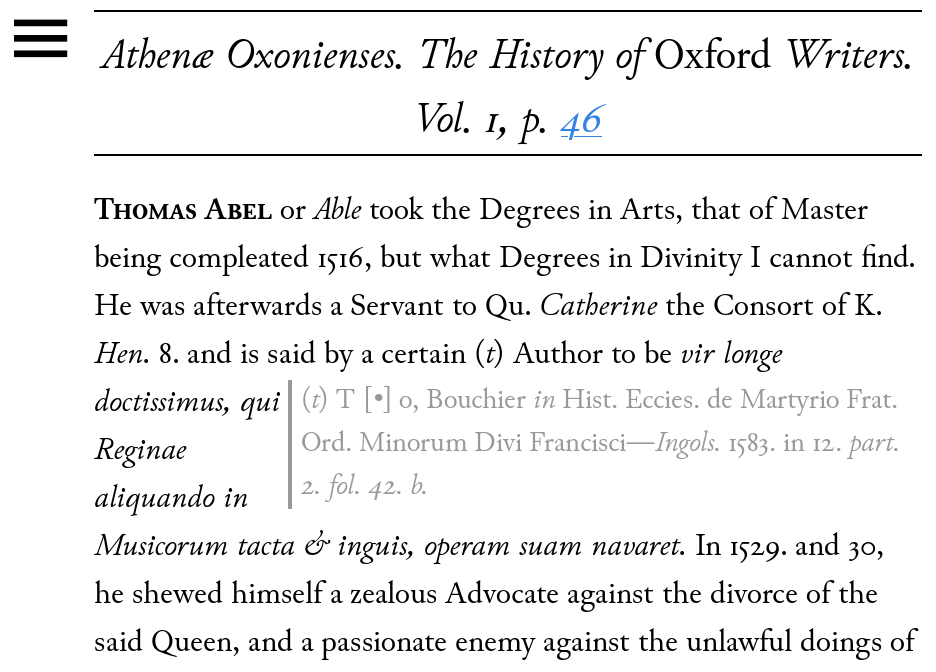
Note that the font used, Junicode by Peter Baker, has been
instructed using Cascading Style Sheets to display ligatures and
some variant glyphs automatically; unlike the tall s mentioned
above, ligatures do not affect searchability because the full text,
not a combined ligature character, appears in the generated HTML
files.
Strategies for Transformation
In the preceding sections we saw that a sequence of largely
independent steps was used to represent the transformation. The
order in which the steps are performed is important, but the steps
do not otherwise interact. Each takes an XML document (or tree
representation) as input and uses XSLT to produce an XML document
(or tree representation) as output.
There are many different ways to process a sequence of such steps.
Some of these are:
A single XSLT stylesheet, as shown earlier, using
variables and modes;
A single stylesheet that uses the transform function to
call a separate stylesheet for each step;
An XProc pipeline that calls either a single combined
stylesheet or one for each step, or a combination;
A batch script (MS-DOS) or shell script that includes
commands to run Saxon or another XSLT processor and uses
temporary files or a Unix-style pipeline with multiple
instances of Saxon;
A Unix Makefile for use with the make command (which is
available on most platforms);
An XML input to the ant program, which is essentially a
replacement for the make command using XML and written in
Java;
A program written in an imperative language such as Python
or Rust that uses language-native XSLT versions (or tree
manipulation in the language directly).
In following sections we will explore each of these strategies,
some in more depth than others, and along the way take note of
strengths and weaknesses of each. We will then be in a position to
consider more general guidelines for writing future
transformations.
Not discussed here are some additional steps such as copying CSS
stylesheets, font files, and other items into the output folder and
then copying the folder and its contents onto a Web server. In the
case of Ath. Ox. these can all be accomplished with a
publish.sh batch shell script as part of a
larger Website framework.
A Single Stylesheet
This is the simplest to understand: put each step into an XSLT
mode, as illustrated in earlier sections.
Disadvantages include:
reuse in other projects is at the text snippet (copy and
paste) level, so that fixing a bug in one copy of the entire
stylesheet does not help other copies.
A mistake in the name of a mode can result in the default
mode being used, rather than an error, which can be
difficult to debug.
Keeping all templates for a given mode together, so they
can be found, understood, copied, modified, requires some
discipline. The draft XSLT 4 proposal of letting stylesheet
authors place all templates for a given mode inside the mode
element will mitigate this to some extent, but using the new
feature will remain optional, and XSLT 4 is still under
development.
Advantages include:
Writing, deploying, supporting this approach requires
knowledge of only one language.
XSLT can do most of what is needed with little effort. It
can do more, such as copying image and font files for the
Web deployment, with some work (and the EXpath file
extension, which Saxon supports in at least some
versions).
Since only one JVM is created (to run Saxon), and only one
XSLT stylesheet is compiled, performance is good.
using transform()
This approach puts the templates for each step into a separate
XSLT stylesheet. A single controlling stylesheet calls the
transform() function for each step, perhaps still using the same
basic structure with temporary variables.
The XPath and XQuery transform() function,
formally fn:transform, takes as input an XSLT
stylesheet and a node or URL to transform, along with other
parameters as needed, and returns the result of evaluating (running)
the given stylesheet on the given node or resource.
An advantage of using fn:transform over modes
are that there is no interference: a step using one mode cannot
accidentally involve apply-templates with no
mode, for example, and use default templates the author did not
intend.
An advantage of fn:transform over using
separate XSLT invocations for each step is that there’s no need to
start a new Java Virtual Machine for each transformation, and any
memory used by the invoked transformation is likely to be reclaimed
when fn:transform returns. There is also no
need for a separate orchestration mechanism to run the
transformations outside XSLT.
The Ath. Ox. transformation using
fn:transform looks like this:
    <xsl:template match="/">

    <!--* input is A71276.xml *-->
    <xsl:variable as="document-node()" name="combined-inputs"
      select="lq:transform(/, 'modules/join-docs.xsl', 'combineDocs')" />

    <!--* remove the TEI namespace to make life simpler,
        *-->
    <xsl:variable name="no-namespace" as="document-node()"
      select="lq:transform($combined-inputs, 'modules/remove-ns.xsl', 'removeNS')" />

    <!--* turn ſ into s and ▪ into . *-->
    <xsl:variable name="text-cleaned" as="document-node()"
	select="lq:transform($no-namespace, 'modules/clean-text.xsl', 'cleanText')" />

    <!--* mark entries for people *-->
    <xsl:variable name="with-people" as="document-node()"
	select="lq:transform($text-cleaned, 'modules/with-people.xsl', 'withPeople')" />

    <!--* surround entries for people with wrappers *-->
    <xsl:variable name="wrapped-people" as="document-node()"
	select="lq:transform($with-people, 'modules/wrap-people.xsl', 'wrapPeople')" />

    <!--* Move the person name to its own element *-->
    <xsl:variable name="person-in-title" as="document-node()"
	select="lq:transform($wrapped-people, 'modules/person-title.xsl', 'personTitle')" />

    <!--* add id attributes to the Person elements, based on names *-->
    <xsl:variable name="with-ids" as="document-node()"
	select="lq:transform($person-in-title, 'modules/add-ids.xsl', 'addIDs')" />

    <!--* make id attributes unique *-->
    <xsl:variable name="unique-ids" as="document-node()"
      select="lq:transform($with-ids, 'modules/unique-ids.xsl', 'uniqueIDs')" />

    <!--* make links back to Chalmers *-->
    <!--* NOTE this does not yet take into account multiple
        * people with the same name, allen-thomas-1 etc.
	* It could usefully check for dates in common, but
	* this is likely unreliable for parent/son entries.
	*-->
    <xsl:variable name="with-links" as="document-node()"
      select="lq:transform($unique-ids, 'modules/add-links.xsl', 'addLinks')" />

    <xsl:sequence select="$with-links" />

    <!--* write a file of id/name mappings for use by Chalmers *-->
    <xsl:sequence
      select="lq:transform($with-ids, 'modules/write-entries.xsl', 'writeEntries')" />

    </xsl:template>
The lq:transform function is defined for
convenience as follows:
Wrapping fn:transform up in this way reduces
repetition in the main template, making it easier to read. The
stylesheet parameters are passed to every module, even if not
needed, for simplicity; they are a list of ID strings for creating
cross references, and the published URL of the Chalmers
dictionary.
This approach still uses temporary variables for each intermediate
result. In XPath 3 there is a “simple map operator” [W3C XPath 3.1], using the character !, such
that for each item in the (possibly singleton or empty) sequence on
its left, evaluates the expression to its right with the context
item (“.”) set to that value. We can use that operator to make a
“streaming” version of the template that uses fn:transform, without
the need for explicit temporary storage:
  <xsl:template match="/">

    <!--* input is A71276.xml *-->
    <xsl:variable as="document-node()" name="combined-inputs"
      select="lq:transform(/, 'modules/join-docs.xsl', 'combineDocs')" />

    <xsl:variable name="with-links" as="document-node()" select="
      (: remove the TEI namespace to make life simpler :)
      lq:transform($combined-inputs, 'modules/remove-ns.xsl', 'removeNS')
      !
      (: turn ſ into s and ▪ into . :)
      lq:transform(., 'modules/clean-text.xsl', 'cleanText')
      !  (: mark entries for people :)
      lq:transform(., 'modules/with-people.xsl', 'withPeople')
      ! (: surround entries for people with wrappers :)
      lq:transform(., 'modules/wrap-people.xsl', 'wrapPeople')
      ! (: Move the person name to its own element :)
      lq:transform(., 'modules/person-title.xsl', 'personTitle')
      ! (: add id attributes to the Person elements, based on names :)
      lq:transform(., 'modules/add-ids.xsl', 'addIDs')
      !  (: make id attributes unique :)
      lq:transform(., 'modules/unique-ids.xsl', 'uniqueIDs')
      !  (: make links back to Chalmers :)

	 (: NOTE this does not yet take into account multiple
	  : people with the same name, allen-thomas-1 etc.
	  : It could usefully check for dates in common, but
	  : this is likely unreliable for parent/son entries.
	  :)
      lq:transform(., 'modules/add-links.xsl', 'addLinks')
    " />

    <xsl:sequence select="$with-links" />

    <!--* write a file of id/name mappings for use by Chalmers *-->
    <xsl:sequence
      select="lq:transform($with-links, 'modules/write-entries.xsl', 'writeEntries')" />

  </xsl:template>
The version using a single XPath expression and the “!” operator
runs (on the computer the author uses) in approximately 37 seconds,
using 51 seconds of CPU time. It is very slightly faster, or about
the same speed as, the version using transform and temporary
variables, and used approximately 2% less memory, so between these
two versions the best is that one that’s easiest to maintain and
reuse.
Disadvantages include:
There are now many more files to keep track of, one per
mode. Using a lib sub-folder can mitigate
this.
It is also possible to construct stylesheets in memory and
pass them to transform, either as tree nodes or as strings,
but this loses the separation that may be a primary
advantage.
The transform() function was introduced in XSLT 3; if a
move to an XSLT 1 or 2 engine was needed, it would be
necessary to revert to the approach using modes, or using a
non-XSLT orchestration as described in subsequent sections.
However, converting an XSLT 2 or 3 stylesheet to XSLT 1 is
generally difficult for other reasons.
The multiple stylesheets need to be loaded and compiled.
In practice this is fast, and it is unlikely a
transformation would have hundreds of steps, but it is worth
remembering before embarking on large projects.
Advantages include:
A single Java Virtual Machine instance and a single XSLT
engine can be used, retaining good performance,despite
having to compile the individual step stylesheets;
Any memory used by a stylesheet invoked by fn:transform is
likely to be reclaimed when the transform is done and the
function returns, just as if a separate XSLT process had
been run. This can be significant because any file read by
XSLT using the doc function is kept in memory to guarantee
the same result of calling doc again with the same URL in
the same XSLT run.
Only one language is used, reducing skills needed and also
using only a single tool;
There is strong separation between the XSLT for the steps
and the orchestration. This will greatly facilitate
reuse.
The transformation runs somewhat faster than the version
using modes (36 seconds compared to 47 for the version with
modes), uses less memory (29.7 megabytes compared to 31),
and is easier to maintain and reuse.
An XProc Pipeline
XProc is a language with an XML syntax designed for exactly
scenarios such as this: performing multiple steps in sequence.
Unfortunately, XProc implementations have had problems, not least of
which has been a reputation for cryptic error messages. XProc
Version 3 was introduced to try to make XProc easier to use,
however. The following listing shows part of an XProc 3 pipeline
that can be used to run this transformation: here it runs the entire
XSLT transformation, using the XSLT version with modes, then
generates HTML and writes out the generated files:
<p:declare-step xmlns:p="http://www.w3.org/ns/xproc" version="3.0">

  <!--* XProc 3 pipeline to convert TEI Ath. Ox. to HTML.
      *
      * We have two input files to process.
      * ideally we would first remove the "out" folder.
      *-->

  <p:input port="source"/>
  <p:output port="result" pipe="result@create-secondary-documents" />

  <p:xslt>
    <p:with-input port="stylesheet" href="prepare.xsl" />
  </p:xslt>

  <p:xslt name="create-secondary-documents">
    <p:with-input port="stylesheet" href="teiplus2html.xsl" />
  </p:xslt>

  <p:for-each>
    <p:with-input pipe="secondary" />
    <p:store href="{base-uri(/)}" />
  </p:for-each>

</p:declare-step>
The individual steps here are still modes in prepare.xsl, but can
clearly be taken out into individual files.
Disadvantages include:
There are now two languages in use, XSLT and XProc, and
one of them, XProc, is not (in the experience of the author
of this paper) widely used. A mitigation is that XProc 3 is
much easier than XProc 1, and there is also an excellent
book about it [Siegel 2020]. However, it
still seems wise to keep XProc use as simple as possible, as
there seem to be more resources available for understanding
and debugging XSLT than for XProc.
There are also two tools to use: an XProc implementation
such as Morgana or Calabash and an XSLT implementation such
as Saxon, and these must be configured to run together. This
may mean a batch script or makefile wrapper, but if you do
that you have to consider instead just using the batch
script or makefile without XProc.
The following program listing shows one possible shell
script to run the XProc pipeline using Morgana; it is not
complex:
Because the XProc steps are entirely independent, it might
not be so easy to pass multiple items in to each step. For
example, the step linking entries back to the Chalmers
Biographical Dictionary takes an XML document listing
Chalmers titles and entry filenames as well as the document
input. This external document is also used for testing for
shared entries, in a separate step, so would either need to
be passed from XProc to XSLT as a parameter, or read as
needed by each step XSLT stylesheet.
Advantages include:
A single JVM is still likely here, avoiding multiple JVM
startup time and possibly saving system memory.
Strong separation between transformation steps and
orchestration is enforced at the language/file boundary, so
that reuse is very likely to be possible.
A batch script
Consider the following Unix shell script (for use on Linux, MacOS,
or Windows with the Linux subsystem installed):
#! /bin/sh
saxon-ee A71276.xml prepare.xsl > tmp1.xml
saxon-ee tmp1.xml teiplus2html.xsl
# copy auxiliary files:
test -d out/. &&
    cp -a athox.css awesomplete.css out/ &&
    cp -a junicode out/
This is reasonably simple to understand. It does make a temporary
file, tmp1.xml, although at least on Unix or Linux
systems the data in the temporary file will generally be read from
memory by the second Saxon run, not from long-term storage
media.
There are only two XSLT runs here; if there were twenty, temporary
file management would become harder. On the other hand, having the
temporary files around and perhaps given more useful names can
facilitate debugging.
This approach has some disadvantages:
The shell script is a second language, but, unlike XProc,
is not in XML, so there is both a second language and a
second syntax. This is mitigated by the fact that anyone
setting up batch transformations likely needs at least a
passing familiarity with shell scripts, or with
Windows/MS-DOS match scripts. The script should also be
compared with the XProc shell script given in the previous
section for complexity.
In fairness it should be noted that Morgana could be
encapsulated in a shell script just as saxon-ee has been for
this example.
With a shell script, each run of Saxon will make a new
Java Virtual Machine. For twenty steps that could be twenty
additional seconds of processing time.
This approach also has advantages:
If you are given a bunch of files and asked to make
something work, and you see runme.sh, you know
where to start looking.
There are two languages, not three as with the XProc
approach (shell, XProc, XSLT).
Copying fonts, images, and other assets is easy in a batch
script.
Someone who knows system administration can edit and run
the shell script without needing to know XSLT. This can be a
useful division of work.
A Unix Makefile
The make command came from Unix in the late 1970s. It
has its own syntax, with the arcane property that indented lines
must use tab characters and not spaces. The reason people still use
this tool is that it computes a dependency graph based on file
timestamps, and only runs the minimum set of commands needed to
produce the result. It can also run programs in parallel, although
that does not apply to a sequence of steps.
The following program listing shows a Makefile for Ath.
ox.:
# Makefile to show a way to run processes
# if you edit this remember indented lines must start with
# a single TAB character and NOT spaces.

SAXON="saxon-ee"

install: all
	cp -a athox.css awesomplete.css out/
	cp -a junicode out/

all: tmp1.xml teiplus2html.xsl
	$(SAXON) tmp1.xml teiplus2html.xsl

tmp1.xml: A71276.xml prepare.xsl
	$(SAXON) A71276.xml prepare.xsl > tmp1.xml
This Makefile says that the target
install depends on
all; the target all n turn
depends on the files tmp1.xml and
teiplus2html.xsl;
tmp1.xml in turn depends on
A71276.xml and
prepare.xsl. So if
teiplus2html.xsl is changed and you run the
make command, Saxon will be run on
tmp1.xml using
teiplus2html.xsl, but the last rule,
building tmp1.xml, will not be needed as it
will be unchanged from the previous run of
make.
A similar dependency graph based on intermediate files can be
created by other tools, including Calabash (an XProc
implementation), ant, and for the more
development-inclined, meson and
ninja.
The approach using make has
disadvantages:
Makefiles are finicky to edit;
Like a batch script, multiple runs of XSLT will each need
a JVM, if the XSLT engine is written in Java.
Projects controlled with makefiles tend to have a lot of
temporary files.
There are also advantages:
The make utility is widely used in a
docs-as-code environment, as well as in software
development; meson and
ninja are replacing make in some
projects, but make is very widely used
and documented. Most system administration people will know
about make.
Although separate instances of Saxon are run for each
transformation, only the minimum necessary number of
transformations are performed if anything changes.
Automating this optimization is very effective in reducing
manual errors, as humans are always tempted to second-guess
the computer and run what they incorrectly believe to be the
minimum necessary number of steps.
As with runme.sh, if you are given a
bunch of files and there is one called
Makefile, you have a good idea
where to start.
Using ant
Ant is an XML-based replacement for make.
Like XProc, it is much less widely used than bash, batch scripts, or
make. Also like XProc, it is in XML, and
implemented in Java.
The following build.xml file for
ant is complete (using a single XSLT file
prepare.xsl rather than individual steps
for brevity of exposition) except for the part that pushes the
result to the live Web site, which is the same for all the solutions
here, and uses ssh.
<!--* build file for use with ant *-->
<project name="Ath. Ox." default="publish" basedir=".">
  <description>
    Make Ath. Ox. Web site and push it
  </description>

  <xslt in="A71276.xml"
        style="prepare.xsl"
	out="ant-tmp.xml"
	classpath="saxon-ee/saxon9ee.jar:saxon-ee/"
	>

    <factory name="com.saxonica.config.EnterpriseTransformerFactory" />
   </xslt>

  <xslt in="ant-tmp.xml"
        style="teiplus2html.xsl"
	classpath="saxon-ee/saxon9ee.jar:saxon-ee/"
	out="ant-out"
        >
    <factory name="com.saxonica.config.EnterpriseTransformerFactory" />
   </xslt>

  <copy file="athox.css" todir="out" />
  <copy file="awesomplete.css" todir="out" />
  <copy todir="out/junicode" >
    <!--* have to use a resource collection to copy a directory *-->
    <fileset dir="junicode" />
  </copy>
</project>
Ant disadvantages include:
It introduces a second language, and you may also need a
batch script to run it;
Unlike make and
bash, ant is not generally
pre-installed on severs. On the other hand neither is Saxon,
but it does mean one more tool to install and
maintain.
Some configuration to get ant to use
Saxon will be needed.
Ant shares some advantages with XProc and some with
make:
Being Java-based, there is only an initial JVM delay,
assuming ant can be configured to run Saxon using the Java
class directly, as shown here.
Ant, like make, can compute a dependency diagram and only
run steps that are needed because of changes to XSLT or data
earlier in the pipeline.
Which to choose
In this section we try to derive some more general observations
and guidelines.
Categorizing the Guidelines
The importance of following guidelines can be assessed mostly
by comparing what happens when they are not followed. A
successful guideline (the author claims) is one that is easy to
understand and will help people avoid specific problems or
classes of problem.
Guidelines for an XSLT project could relate to the people and
infrastructure around the project, such as securing funding or
allocating staff, but that would be true of any project. The
focus of this paper is a project involving transforming XML
documents into Web pages using XSLT.
There can also be also technical guidelines, and
recommendations for organising XSLT stylesheets. Such things are
within the remit of this paper, but extensive advice would
constitute a book on writing XSLT stylesheets.
The guidelines in this section are about
organising a project that uses a
sequence of primarily XSLT-based steps.
Overall Architecture
It is tempting to think of an XSLT transformation as a single
unit, working an element at a time. However, splitting it into a
sequence of steps brings several advantages:
If each step performs one
identifiable task, the steps are likely
to be independent. It is then often clear which step has
a problem or needs to be enhanced, and the amount of
code to be examined is reduced.
For debugging, comparing the input to a step and its
output should show only the differences relating to the
task accomplished by that step. So small steps facilitate debugging.
If documents generated by a particular step are
retained, they can be reused later, reducing computation
and speeding development. This is especially true of
solutions using make or
ant. Thus, small steps can facilitate rapid
development.
A general guideline, then, is, separate
transformations into small steps rather than making them
monolithic.
One Tool Or Many?
Usually there are at least two tools for any transformation:
one or more XSLT stylesheets and a script of some sort (or a
README file) to run the transformation (or say how to run it).
The script to run the transformation interacts with the system,
and may have to conform to other conventions or rules such as
project-wide or department-wide policies. However, a
proliferation of complex tools can mean no-one can update the
project unless they know all the tools, and unless the tools are
widely known with many examples readily available, this is
generally to be avoided.
When introducing a new tool to a project, consider the skills
that will be needed to work on the project. A strength of XML
and XSLT in many environments is that people who do not consider
themselves programmers can use XSLT to do advanced and
sophisticated text processing. This does not, of course, make
them lesser people, but means that mixing, for example, XSLT
with custom Java or C code, might not always be appropriate when
there are alternatives.
Additional tools, then, that use XML, or that are already used
in the environment in which the transformation is to run, may be
a better fit with people working on the project, both now and in
the future, than other languages. Avoid
adding tools that need a background knowledge from a
different technical culture.
Even where additional tools are open source and freely
available, they carry a maintenance burden in keeping them up to
date and making any necessary changes in the project if the
tools have changed in incompatible ways. For transformations in
embedded systems, each new tool also adds memory and long-term
storage requirements.
Homogeneous or Mixed Tooling?
A single tool, such as a single XSLT engine, might be able to
do all that is needed. It might be that some aspects, such as
copying files, are harder or require extensions, but using a
single tool clearly means needing a narrower set of skills for
development and maintenance. Eventually, it may be necessary to
introduce other tools
Consider a multi-stage pipeline that uses twelve XSLT
transformations, but, somewhere in the middle of the pipeline,
it also uses a Python script to connect to a database and
populate some elements.
A question to ask, architecturally, is what would be involved
in migrating that step to an XML technology. For example, there
are SQL extensions to some XSLT engines, or an XQuery step could
be used. Since XQuery extends the same XPath language used in
XSLT, it is closer to XSLT than Python is likely to be, and
anyone working on XSLT is likely to be able to work also on the
XQuery portion or the project.
There is no hard and fast rule on when to switch to another
tool mid-transformation. The adage, use XML tools to process XML data seems appropriate,
but does not necessarily translate to using XML tools to
orchestrate other XML-based tools.
Different tools vernally have different command-line options
or invocation sequences, and those may change as the tools are
updated. In the case that a mixture of tools is used in a
transformation, the importance of a wrapper script of some kind,
such as a shell script, build script, or Makefile, is therefore
increased.
Shell scripts, like XSLT functions and named templates, can
give names to abstractions, and can through encapsulation
provide an insulating layer between the main transformation and
the various sub-components. For example, a shell script wrapper
for Saxon means that if the Saxon Java class name or jar-file
location changes, only the shell script needs to be updated;
this is limited to those approaches that run steps as commands,
such as a batch script or makefile, but even in an all-Java
environment the location of a jar file can often be put into a
reusable variable. Use indirection and
layering to manage dependencies.
If XSLT steps have extra dependencies, such as a common but
large XML reference, or more complex
dependencies than a linear pipeline, XProc may be
the most suitable way to orchestrate them. However, loading a
large file into an XML database such as eXist-db or BaseX means
that XPath expressions can be evaluated against it efficiently
without having to re-parse it, so a mix of XQuery and XSLT can
be beneficial. Although not discussed earlier in this paper,
using XQuery to orchestrate transformation steps can be a viable
alternative.
Performance
The author of this paper was mildly surprised to find the
version of the pipeline for Ath. Ox. was slightly faster with
make than with ant. It
might be that ant was actually running a separate JVM for each
command, and it might be that spending more time configuring ant
would change that, but the makefile worked first time and was
sufficiently fast. A version using fn:transform() in XPath to
run each XSLT step and then combine them all in one stylesheet
might have been faster still. But you have to measure performance: it is never wise
to guess, and rarely makes sense to make architectural decisions
based on unmeasured conjectures about performance.
Performance is perhaps most commonly considered to be a
question of total elapsed time, but it could also be peak memory
consumption or peak CPU consumption or temporary file size,
depending on the constraints of the containing system. A
transformation that runs very quickly but uses all available
memory and CPU on a computer might be perfect if that is all the
computer is running, but not so good on a system also running a
busy database server.
It should be noted that Make uses temporary files to track
dependencies. The output of each step is stored as a file before
being fed to the next step. This means that if you change a
later step, the earlier steps do not need to be run again: the
temporary files can be used instead. It also means you can check
the temporary files, which can help with debugging. Sometimes a
more robust pipeline, with checks between the stages, saves more
human time than those few milliseconds
would ever do. Ant can also be configured to work this way, as
can (with extensions) XProc.
For a batch conversion script, the Java Virtual Machine startup
time can dominate. If you are running the same transformation
multiple times, compiling the stylesheet is also
significant.
In both of these cases, where performance is an issue, keeping
the transformation in a single Java process makes sense. Thus,
avoid unnecessary JVM start-up
time. This would favour either the single
stylesheet with modes approach or the
fn:transform() approach, since the compiled
stylesheets are by default kept in memory with
fn:transform().
As always, its best to measure performance rather than guess.
The author wrote an XSLT stylesheet that reads XSLT and produces
new XSLT that emits a message at the start and end of each
template; an external time-stamp program can then be used
determine the total time in each template; this works with any
XSLT engine that can produce messages on its standard error
stream. However, an understanding of architectural principles,
and of the idea that not doing something is usually faster than
doing it, can lead to a design that can be made faster.
First make it work, then make it work
better.
Reuse
If you plan to use the same transformation but with slight
modifications, perhaps on different input or perhaps for a
different result, it is tempting to write a new stylesheet that
overrides some templates in the original. Doing this creates an
implicit dependency, however, and someone changing the original
stylesheet might not notice. In the case where you have many
small stylesheets each doing a small change, you have the same
problem, but a change to one of the small stylesheets is likely
to be easier to spot and handle.
Another similar scenario is that you might not need all of the
steps. For example, the author noticed that some of the EEBO
transcriptions, such as Ath. Ox., used the tall letter s where
it occurred in the printed book, and transcriptions of some
other books used a regular modern-style letter s. So, the XSLT
module to modernize the letter s would not be needed for those
books.
Because the small steps each do only one thing, it is much
easier to decide which ones to use in a new project than if the
transformation were monolithic. If the steps are each in a
separate file, removing them from a copy of the master
stylesheet, or from the XProc pipeline or the makefile, is
relatively easy. Comment them out! Keep
the orchestration separate from the work, for maximum
reuse.
Documentation
Comments are all well and good, but will they mean anything ten
years later? The author once had to maintain a body of code whose
primary comments were /* XXX */. Splitting a
transformation into steps lets you give a name to each step, and
lets you put an explanatory comment about purpose at the start of
each step.
Comments before each template take discipline to keep up to date.
A comment inside a template, but at the start,
is easier, because you’re forced to look at it every time you look
at the template. And a comment, as in the examples in this paper,
before calling a transformation step, can go a long way to making
clear what is happening.
Code that cannot easily be read cannot be fixed. Code that can be
read but that is wrong can be fixed. Therefore, it is more important to write clear code than it is
to write correct code.
Conclusions
A full decision tree for designing a transformation would depend
on the people and the context, on the input and the intended output.
This paper has shown some things to consider, some of which, in the
experience of the author, are often not considered.
If you are writing a new transformation in XSLT, consider writing
it as a series of steps, even if those steps are initially all
contained in the same XSLT file; it is much easier then to separate
them out later for reuse.
Tools such as make, XProc, ant, and even shell or batch scripts if
they are kept simple and readable, can help separate out the
orchestration and interface to the surrounding environment from the
actual transformation; this separation can facilitate debugging,
resource management, and reuse.
References
[TEI P3] Burnard, Lou,
Sperberg-McQueen, C. M., Guidelines for Electronic Text
Encoding and Interchange (TEI P3), ACH-ACL-ALLC Text
Initiative, Chicago and Oxford, 1994.
[TEI P4] Burnard, Lou, Sperberg-McQueen, C. M.,
TEI P4: Guidelines for Electronic Text Encoding and
Interchange, Oxford, Providence, Charlottesville,
Bergen: Text Encoding Initiative.
[Chalmers 1812] Chalmers, Alexander, The
General biographical dictionary: containing an historical and
critical account of the lives and writings of the most eminent
persons in every nation; particularly the British and Irish;
from the earliest accounts to the present time, 1812,
London, by subscription.
[XSLT 3] World Wide Web
Consortium, The, XSL Transformations (XSLT) Version
3.0, Michael Kay, Ed., 2017.
[W3C XPath 3.1] World Wide Web
Consortium, The, XML Path Language (XPath) 3.1,
Jonathan Robie, Michael Dyck, Josh Spiegel, Ed., 2017.
[Wood 1691] Wood, Thomas à,
Athenæ Oxonienses. Vol. 1. an exact history of all the
writers and bishops who have had their education in the most
ancient and famous University of Oxford, from the fifteenth year
of King Henry the Seventh, Dom. 1500, to the end of the year
1690, representing the birth, fortune, preferment, and death of
all those authors and prelates, the great accidents of their
lives, and the fate and character of their writings : to which
are added, the Fasti, or, Annals, of the said university, for
the same time. London, 1691. Tho. Bennet at the
Half-Moon in S. Paul’s Churchyard.
Burnard, Lou,
Sperberg-McQueen, C. M., Guidelines for Electronic Text
Encoding and Interchange (TEI P3), ACH-ACL-ALLC Text
Initiative, Chicago and Oxford, 1994.
Burnard, Lou, Sperberg-McQueen, C. M.,
TEI P4: Guidelines for Electronic Text Encoding and
Interchange, Oxford, Providence, Charlottesville,
Bergen: Text Encoding Initiative.
Chalmers, Alexander, The
General biographical dictionary: containing an historical and
critical account of the lives and writings of the most eminent
persons in every nation; particularly the British and Irish;
from the earliest accounts to the present time, 1812,
London, by subscription.
Wood, Thomas à,
Athenæ Oxonienses. Vol. 1. an exact history of all the
writers and bishops who have had their education in the most
ancient and famous University of Oxford, from the fifteenth year
of King Henry the Seventh, Dom. 1500, to the end of the year
1690, representing the birth, fortune, preferment, and death of
all those authors and prelates, the great accidents of their
lives, and the fate and character of their writings : to which
are added, the Fasti, or, Annals, of the said university, for
the same time. London, 1691. Tho. Bennet at the
Half-Moon in S. Paul’s Churchyard.